UI sidebar
Source: src/components/layout/Sidebar.tsx (675 lines) — Sidebar, SidebarAction
Reach: / — always present at md and wider when sidebarOpen; the mobile drawer at narrower widths
States: 5 — default, hover-revealed, empty, Trash dialog, Settings dialog
A 260 px <aside> on the --color-sidebar surface, five stacked regions, only the
middle one scrolling:
- Workspace button — initial-letter square + workspace name + a sync icon. The whole row opens Settings. Beside it (desktop only) a collapse button.
-
Desktop badge —
Monitoricon +Desktop · <platform>, only under Tauri. Absent in the browser, which is why a web capture is not missing it. - Five actions — Search, New page, Import / export, Link markdown, Agent harness.
- Scrolling tree — Favorites (only when non-empty), Private, Linked markdown.
-
Footer — sign-in link or
UserButton, then Trash and Settings.
Recursive, one row per page, indented 8 + depth × 12 px. Each row has three parts:
- a chevron (
aria-label="Collapse"/"Expand") — an empty 14 px spacer when the page has no children, so rows stay aligned - a title button — emoji icon (default
📄) + title (defaultUntitled) - a hover group (
data-hover-reveal,opacity-0 group-hover:opacity-100) holding the⋯Page menu and a New sub-page+
Default expansion is depth-based, not stored: expanded[id] ?? depth < 1. Roots
open, everything deeper closed, and the state resets on reload. A capture of a deep
tree must click each level open.
The ⋯ menu has four items: Favorite/Unfavorite, Add sub-page, Duplicate, then a
separator and a destructive Delete. Delete archives — it does not destroy; Trash is
where permanent deletion lives.
Mounts load their children lazily — loadMountKids fires on first expand, so the
list is empty until then, and a failure resolves to an empty array rather than an
error state. Children show 📁 or 📝. The unlink button is data-hover-reveal with
title="Unlink" and no confirmation.
A static line, "Link folder (no import)", always sits below the mount list. It is explanatory text, not a button — a rubric that reads it as an affordance is wrong.
storageMode |
syncStatus |
Icon | Colour |
|---|---|---|---|
local |
any | CloudOff |
muted |
database |
saving | pending
|
Cloud pulsing
|
muted |
database |
error |
CloudOff |
destructive |
database |
saved |
Cloud |
emerald-600 |
The header's SyncChip (app-shell.md) is a labelled pill; this is a
bare icon, and the two disagree on iconography — saving is a pulsing Cloud here and
a spinning Loader2 there. Both are current behaviour. emerald-600 is the one colour
in the app that is not a theme token.
Trash (max-w-md) — archived pages, each with Restore and a destructive Delete.
Empty state: "Trash is empty".
Settings (max-w-md) — desktop badge if applicable, workspace-name input, a
Light/Dark segmented pair, an AI card (backend · provider · model, a CLI availability
line, and the Configure AI button that opens the wizard on its provider step), a
storage line, and a destructive Reset workspace.
Trap: Reset workspace calls native
confirm()(line 653). A browser modal blocks every subsequent automation event — the MCP bridge stops responding and looks broken rather than blocked. Do not click it while driving the app. If you do, dismiss it by hand in the window.
The chevron on a mount row has no aria-label (page rows have one). Target it
structurally, and do not read its absence from an accessibility snapshot as the row
being missing.
| What | Selector |
|---|---|
| Root | aside |
| Workspace / Settings | first aside button — its name is the workspace name |
| Collapse | role=button[name="Collapse sidebar"] |
| Actions | role=button[name="Search"|"New page"|"Import / export"|"Link markdown"|"Agent harness"] |
| Section heads | text Favorites, Private, Linked markdown
|
| Page row | the .group div; title button is its second child |
| Expander | role=button[name="Expand"|"Collapse"] |
| Page menu | role=button[name="Page menu"] |
| New sub-page | role=button[name="New sub-page"] |
| Hover group | [data-hover-reveal] |
| Unlink | button[title="Unlink"] |
| Trash / Settings | role=button[name="Trash"|"Settings"] |
| Settings dialog | role=dialog[name="Settings"] |
| Trash dialog | role=dialog[name="Trash"] |
| Configure AI | role=button[name="Configure AI"] |
Expand/Collapse and Page menu repeat once per row — always scope to a row first.
1. seed localStorage["forgenotes-ui-freeze"] = "1"
   (+ ["forgenotes-ui-reveal"] = "1"  for the -reveal variant)
   (+ ["workspace-v1"] = {"state":{"theme":"dark"},"version":0} for dark)
2. load /, viewport 1280x800
3. wait for `aside`
4. webview_screenshot --selector aside
| State | Extra |
|---|---|
| Default | none |
| Reveal | seed forgenotes-ui-reveal — a real :hover reveals one row; the flag reveals all |
| Empty | clear workspace-v1 and skip seeding, or delete every page |
| Trash | click Trash, wait for role=dialog[name="Trash"]
|
| Settings | click Settings, wait for role=dialog[name="Settings"]
|
Scope the snapshot to aside. An unscoped webview_dom_snapshot times out on this
app's DOM.
| State | Wireframe |
|---|---|
| 1 · Default (rest) | 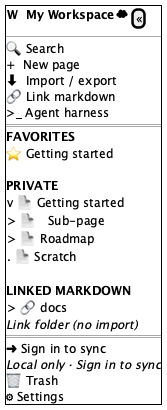 |
| 2 · Hover affordances revealed | 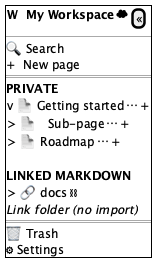 |
| 3 · Trash dialog | 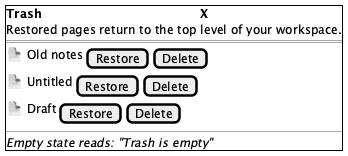 |
| 4 · Settings dialog | 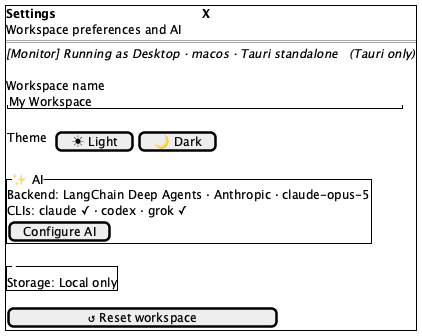 |
Tokens and always-acceptable items: tokens.md.
- Workspace row on top: letter square, name, sync icon — collapse button at the right
- Five actions in order: Search, New page, Import / export, Link markdown, Agent harness
- Section headings uppercase, 11 px, letter-spaced, muted
- Private always present; Favorites only when a page is favourited
- Child rows indented 12 px per level, chevrons aligned in one column
- Active row filled with
--color-sidebar-active - "Link folder (no import)" below the mount list
- Footer separated by a top border, holding Trash then Settings
- Only the middle region scrolls
- Workspace name, page titles, emoji icons, tree depth and ordering
- Sync icon variant and colour
- Desktop badge present under Tauri, absent in the browser
- CLI availability line in Settings — depends on what is installed
- Mount children absent until first expand (lazy load)
-
⋯,+, or Unlink in a rest capture — they areopacity-0; visible here means someone changed how they hide, and only a screenshot can catch it - A chevron glyph on a page with no children (a spacer, not an icon)
- Favorites when nothing is favourited
- A native
confirm()dialog
- Titles overflow instead of truncating
- Indentation collapses so hierarchy is unreadable
- Footer scrolls with the tree instead of pinning
- Hover affordances
display: nonerather thanopacity-0— clickable but unscreenshottable, the exact asymmetry.ui-revealexists to expose - Sidebar surface identical to the canvas — the two must differ
AiSetupWizard (ai-setup-wizard.md), LinkFolderDialog and
MarkdownIODialog (dialogs.md), HarnessPanel
(harness.md), CommandPalette
(command-palette.md). Trash and Settings are specified here
because Sidebar owns and renders them.