UI command palette
Source: src/components/search/CommandPalette.tsx (232 lines)
Reach: ⌘K / Ctrl+K anywhere, or sidebar → Search
States: 4 — browse, results, searching, empty
A cmdk palette in a hand-rolled overlay: a bg-black/40 scrim plus a
min(560px, 100%-2rem) panel pinned at top-18%, z-[100] — above everything
including Radix dialogs.
Three stacked regions: a search row (magnifier, input, ESC kbd or spinner), an
optional one-line mode banner, and a scrolling list capped at max-h-80.
The list always has an Actions group holding a single New page item, above a second group whose heading flips between Pages (browse, first 30 non-archived) and Results (a query is present).
That "always" has a consequence worth stating, because it was a real bug: cmdk renders
<Command.Empty> only when the whole list has zero items, and the Actions group
always contributes one. So Command.Empty could never fire here, and a search matching
nothing showed a bare Results heading with no rows and no message. The empty message
is now rendered explicitly on showHits && hits.length === 0, and deliberately sits
outside both groups — a cmdk Group with no Item children hides itself, message
included.
The mode banner appears only while a query is present:
storageMode |
Banner |
|---|---|
local |
Local search (sign in to sync for Postgres search) |
database, trgm true |
Postgres full-text + pg_trgm similarity |
database, trgm false |
Postgres full-text + ILIKE fallback |
A failed server search falls back to local results and relabels the banner — so
the banner reflects what actually ran, not what was attempted. Each result row also
carries a per-hit mode tag (keyword / similarity) in 10 px uppercase.
Debounce is 180 ms, and searching is set before the timer. Between keystroke
and request the spinner replaces the ESC badge; they are mutually exclusive and
never both visible.
shouldFilter={false} — cmdk's built-in filtering is off, because filtering
already happened upstream (server or localSearchPages). Typing does not narrow the
rendered list client-side; it triggers a new search.
-
The
⌘Khandler toggles, so pressing it with the palette open closes it. -
Opening does not reset; closing does. The
!openeffect clears query and hits, so a reopened palette is always empty — a capture never inherits a previous query. -
autoFocuson the input, and the palette returnsnullwhen closed. There is no mount-but-hidden state, so an accessibility snapshot either finds it fully or not at all. - Selecting a page also dispatches
workspace:clear-mount, whichAppShelllistens for — that is how opening a page from search leaves mount view.
cmdk brings its own dialog handling, so this is deliberately not Radix. That means
role="dialog", aria-modal, and aria-label had to be written out by hand — before
that it was an anonymous div: invisible to accessibility tooling and unaddressable
by an agent reading the accessibility tree. Removing them does not break a single test
that clicks by text, which is exactly why it is called out here.
No Escape handler and no focus trap. ESC is displayed as a badge; the key is
handled by cmdk internally for list navigation, and dismissal is the scrim click.
Current behaviour, recorded not rubric'd.
| What | Selector |
|---|---|
| Palette |
[data-testid="command-palette"] / role=dialog[name="Command palette"]
|
| Input |
role=combobox (cmdk's input) — placeholder varies by storage mode |
| Scrim | .fixed.inset-0.z-\[100\] > [aria-hidden] |
| Group headings | text Actions, then Pages | Results
|
| Result row | role=option |
| Selected row |
role=option[aria-selected=true] — styled bg-muted
|
| New page |
role=option with text New page
|
| Empty | text No pages found | Searching…
|
| Mode banner | the 11 px line directly under the input |
| Spinner |
.animate-spin — swap for kbd text ESC when idle |
The placeholder differs by mode (Search pages… vs Search pages (Postgres keyword + similarity)…), so do not select the input by placeholder text.
1. seed localStorage["forgenotes-ui-freeze"] = "1"
   (+ localStorage["workspace-v1"] = {"state":{"theme":"dark"},"version":0} for dark)
2. load /, viewport 1280x800
3. wait for `header`
4. press Meta+k            (or click sidebar "Search")
5. wait for [data-testid="command-palette"]
6. webview_screenshot
| State | Extra |
|---|---|
| Browse | none — the palette opens here |
| Results | type a term that matches, wait for role=option count > 1 and the banner |
| Searching | inside the 180 ms debounce — throttle, or assert .animate-spin rather than screenshotting |
| Empty | type a string matching nothing, wait for No pages found
|
Wait for the banner, not just for options. Between keystroke and response the list
still holds the previous results, so a screenshot taken on role=option alone can
capture stale hits under a new query.
| State | Wireframe |
|---|---|
| 1 · Browse (no query) | 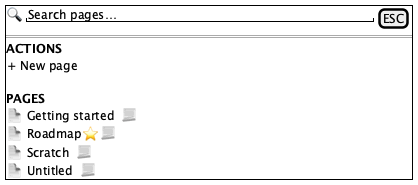 |
| 2 · Results | 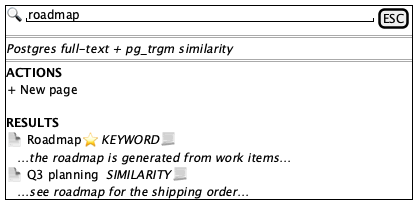 |
| 3 · Empty | 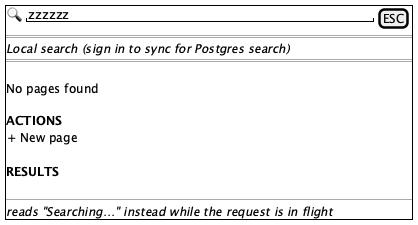 |
Tokens and always-acceptable items: tokens.md.
- Centred horizontally, top at roughly 18% of viewport height — not vertically centred
- Magnifier, then input, then
ESCbadge or spinner, on one 48 px row - A border under the search row
- Group headings 11 px, uppercase, letter-spaced, muted
- Actions → New page present in every state, including empty
- Second heading reads
Pageswith no query,Resultswith one - Mode banner present with a query, absent without
- Exactly one row
aria-selected, filledbg-muted - List scrolls internally above roughly 320 px
- Page titles, icons, hit count, snippet text
- Which engine the banner names — it reflects real storage mode
- Per-hit
keyword/similaritytags -
ESCbadge hidden below thesmbreakpoint
- Both the spinner and the
ESCbadge - The mode banner with an empty query
- A snippet line in browse mode (
showHitsgates it) - Results carried over from a previous query
- A Results heading with neither rows nor an empty message — that dead end is the bug the explicit empty state replaced
- Palette below the Settings or wizard dialog — it is
z-[100]and must win - Scrim missing, or not dismissing on click
- Input not focused on open
- Long titles overflowing instead of truncating
Ranking quality, pg_trgm behaviour, and the searchPages server function. All
better asserted through unit tests on localSearchPages than through a screenshot.