Repository navigation
Settings and Commands
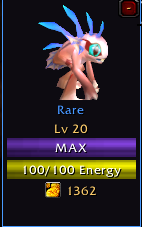
Mini view keeps the pet, progress bars, and token information close at hand. Cropped from an earlier-build screenshot; current layout may differ.
| View | Use it for |
|---|---|
| Large | The full Camp, Tower, Equipment, Talents, Collection, Crates, and Inspect interface |
| Compact | Care and tower play in a smaller window |
| Mini | A small pet portrait with level/XP, energy, tokens, sleep/warning cues, and reward alerts |
Use the Compact and Mini buttons in the large window. Clicking the mini returns to your last large/compact choice. Drag the windows to position them; the mini's minus button hides it. /cfpets pet restores or toggles it.
Escape closes the larger windows while leaving the mini available. Explicit mini visibility is remembered through reloads and instance transitions. Drag the minimap paw around the minimap to reposition it. The large window can fade while your character moves and the pointer is elsewhere; hovering it brings it back. Compact does not use that movement fade.
Open the cog or /cfpets settings. Adjust minimum text size, large/compact scaling, and mini scale from 50% to 150%. Use High Contrast and Reduced Motion as needed. Reduced Motion keeps important indications but makes supported decorative effects quieter or static.
Enable floating tower pet HP bars to follow the moving pet. Choose short stat tooltips for concise explanations or roll ranges for more detailed comparisons. Pet-farming chat rolls, map pins, and error sharing also have controls.
| Command | Action |
|---|---|
/cfpets or /companionsforever
|
Open the addon |
/cfpets small |
Toggle compact |
/cfpets pet |
Toggle mini |
/cfpets collection |
Open Collection |
/cfpets gear |
Open Equipment |
/cfpets trade |
Open Trade |
/cfpets settings |
Open Settings |
/cfpets rolls on / /cfpets rolls off
|
Show or hide farm-roll messages |
/cfpets xp |
Explain the last kill-XP result |
/cfpets errors |
Open error reports |
/cfpets errors on / /cfpets errors off
|
Control automatic error sharing |
/cfpets reset |
Reset window/icon positions, keeping progression |
The generic /cf command was retired to avoid another addon's command. Older /companions and /fcp macros remain supported; use the longer commands if another addon claims a short alias.