2.3.94 Satellite Paperless
Handle:
paperless
URL: http://localhost:35050
Paperless-ngx is a document management system that ingests scans, PDFs and office files, runs OCR on them, and turns them into a searchable, tagged archive. In Harbor it is the document store that Paperless-GPT enriches with LLM-generated titles, tags and correspondents.
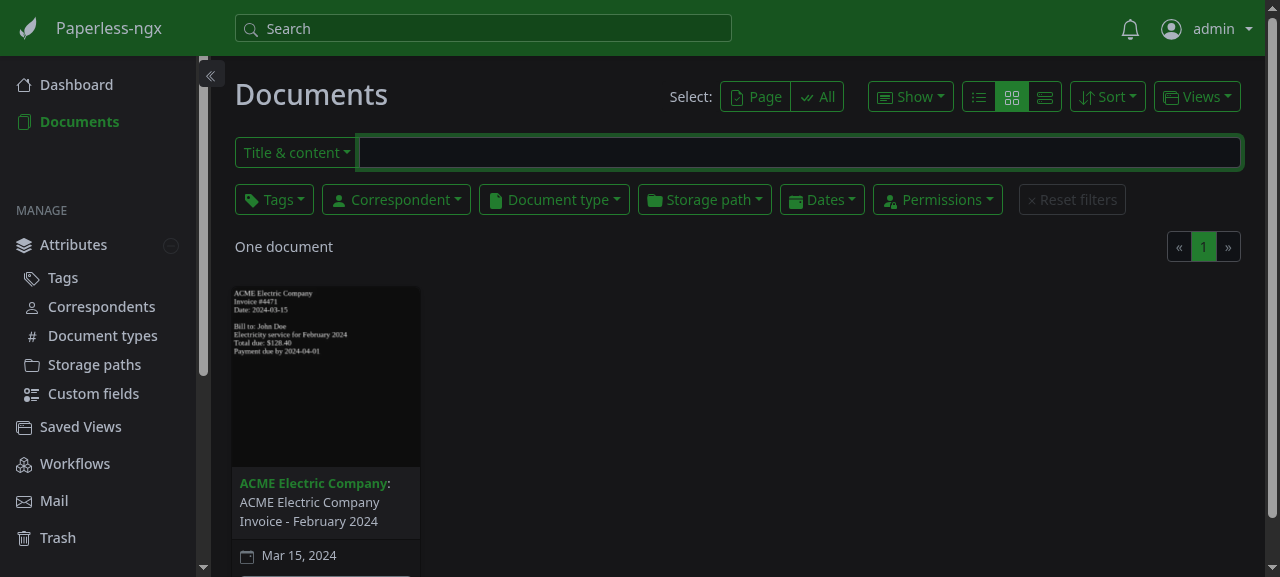
Key Features:
- OCR pipeline: Tesseract OCR with configurable languages, producing searchable archived PDFs
- Auto-import: watches a consume folder, accepts uploads via UI, API and email
- Organisation: tags, correspondents, document types, storage paths and custom fields
- Machine learning: learns to auto-assign tags and correspondents from your corrections
- Full-text search: Whoosh index with similarity search across all document content
-
REST API: everything the UI does is available under
/api/
harbor pull paperless
harbor up paperless --open
Log in with admin / admin. Change it before exposing the service beyond your machine (harbor config set paperless.admin_password <new>, then restart paperless - the change also applies to an existing stack). Also change HARBOR_PAPERLESS_SECRET_KEY from its default harbor-paperless-secret-key, it signs sessions. The stack is three containers: paperless (web server, consumer, celery worker), paperless-valkey (task broker) and the short-lived paperless-init sidecar (workspace ownership). The database is SQLite stored under the data volume.
To import a document, either upload it in the UI, drop it into services/paperless/data/consume/, or post it to the API:
curl -u admin:admin -F "document=@invoice.pdf" http://localhost:35050/api/documents/post_document/To use local LLMs for titles, tags, correspondents and OCR, start it together with Paperless-GPT and a backend:
harbor up paperless paperless-gpt ollamaFollowing options can be set via harbor config:
# Host port for the web UI / API
HARBOR_PAPERLESS_HOST_PORT          35050

# Image and tag
HARBOR_PAPERLESS_IMAGE              ghcr.io/paperless-ngx/paperless-ngx
HARBOR_PAPERLESS_VERSION            latest

# Valkey task broker
HARBOR_PAPERLESS_VALKEY_IMAGE       valkey/valkey
HARBOR_PAPERLESS_VALKEY_VERSION     9-alpine

# Root for data/, media/, consume/, export/ and valkey/
HARBOR_PAPERLESS_WORKSPACE          ./services/paperless/data

# Public URL, used for CSRF and for links; change when exposed via a different
# host. When traefik is selected, services/compose.x.paperless.traefik.yml
# overrides it with https://paperless.<HARBOR_TRAEFIK_DOMAIN> and keeps this
# value trusted via PAPERLESS_CSRF_TRUSTED_ORIGINS
HARBOR_PAPERLESS_URL                http://localhost:35050

# Django secret key - change for any non-local deployment
HARBOR_PAPERLESS_SECRET_KEY         harbor-paperless-secret-key

# Superuser credentials. Default admin / admin - change before exposing
# Paperless beyond localhost. Applied on every start: changing the password
# here updates the existing user (services/paperless/sync-admin-password.sh)
HARBOR_PAPERLESS_ADMIN_USER         admin
HARBOR_PAPERLESS_ADMIN_PASSWORD     admin

# Tesseract OCR language(s), e.g. "eng+deu"
HARBOR_PAPERLESS_OCR_LANGUAGE       eng
HARBOR_PAPERLESS_TIME_ZONE          UTC
Any other PAPERLESS_* variable from the upstream configuration reference can be added to services/paperless/override.env (or via harbor env paperless PAPERLESS_X value).
HARBOR_PAPERLESS_WORKSPACE is mounted once at /workspace and paperless-ngx is pointed at its sub-directories via PAPERLESS_DATA_DIR, PAPERLESS_MEDIA_ROOT, PAPERLESS_CONSUMPTION_DIR and PAPERLESS_EXPORT_DIR. paperless runs as your host user (USERMAP_UID/GID). The paperless-init sidecar chowns the workspace to your host user (HARBOR_USER_ID/HARBOR_GROUP_ID) before each start, so files stay manageable without sudo.
| Host path | Container path | Purpose |
|---|---|---|
services/paperless/data/data |
/workspace/data |
SQLite DB, index, classifier |
services/paperless/data/media |
/workspace/media |
Originals, archived PDFs, thumbnails |
services/paperless/data/consume |
/workspace/consume |
Drop folder for auto-import |
services/paperless/data/export |
/workspace/export |
document_exporter output |
services/paperless/data/valkey |
/data (valkey) |
Broker persistence (owned by the valkey user) |
To reset everything (WARNING: destroys all documents):
harbor down paperless
# valkey/ is owned by the valkey user, hence sudo
sudo rm -rf services/paperless/data
harbor up paperless-
Paperless-GPT reads and writes documents through the API using a token exchanged from the Harbor admin credentials; when both are started together (
harbor up paperless paperless-gpt ollama) it waits forpaperlessto become healthy and bootstraps thepaperless-gpt/paperless-gpt-autotrigger tags. - Any Harbor service on
harbor-networkcan reach the API athttp://paperless:8000/api/withAuthorization: Token <token>(generate one withcurl -u admin:admin -d 'username=admin&password=admin' http://localhost:35050/api/token/). -
Traefik:
harbor up paperless traefikserves the UI athttps://paperless.<HARBOR_TRAEFIK_DOMAIN>(https://paperless.lanby default). Django only accepts logins from origins derived fromPAPERLESS_URL, soservices/compose.x.paperless.traefik.ymlsets it to that hostname and adds the plainHARBOR_PAPERLESS_URLtoPAPERLESS_CSRF_TRUSTED_ORIGINS, sohttp://localhost:35050keeps working alongside. Paperless-GPT keeps talking tohttp://paperless:8000internally and is unaffected. -
paperlesswaits forpaperless-valkeyto pass itsvalkey-cli pinghealthcheck, and reportshealthyitself once/api/answers, so dependents can usecondition: service_healthy.
harbor logs paperless
harbor logs paperless-valkey- The container reports
healthyonce/api/answers; first start runs migrations and creates the superuser, which takes ~20s. - If uploads stay in "Processing", check the consumer output in
harbor logs paperless- OCR failures for exotic file types show up there. -
HARBOR_PAPERLESS_ADMIN_*wins on every start: a changedHARBOR_PAPERLESS_ADMIN_PASSWORDis applied to the existing user bysync-admin-password.sh, while a changedHARBOR_PAPERLESS_ADMIN_USERcreates a second superuser and leaves the old one in place - only the password syncs, the user name does not rename.