2.3.95 Satellite Paperless GPT
Handle:
paperless-gpt
URL: http://localhost:35051
Paperless-GPT is an LLM companion for Paperless-ngx. It picks up documents tagged paperless-gpt, asks an LLM for a title, tags, correspondent, document type and created date, lets you review the suggestions, and writes them back. It can also run LLM-based OCR with a vision model.
Key Features:
- Metadata suggestions: title, tags, correspondent, document type and created date from the document text
-
Review or auto mode: approve suggestions in the UI (
paperless-gpttag) or apply them hands-off (paperless-gpt-autotag) - LLM OCR: optional vision-model OCR for scans that Tesseract handles poorly
-
Editable prompts: every prompt template is a file under
prompts/and editable in the UI - Local backends: Ollama or any OpenAI-compatible endpoint, plus hosted providers
harbor pull paperless-gpt
# With a local LLM backend
harbor up paperless paperless-gpt ollama --open
# or
harbor up paperless paperless-gpt llamacpp --open
When started together with paperless, paperless-gpt waits for it to become healthy (it can also point at an external Paperless-ngx via PAPERLESS_BASE_URL in the override env). On startup, Harbor's entrypoint exchanges the Paperless admin credentials for an API token via /api/token/ and creates the paperless-gpt and paperless-gpt-auto tags in Paperless-ngx if they are missing, so a fresh stack needs no manual setup.
Security note: the Paperless-GPT UI on port 35051 has no login of its own but holds a full-access admin token for Paperless-ngx. Anyone who can reach that port can read and modify every document. Keep it on localhost or expose it only through Traefik, where Harbor gates the route with HTTP basic auth (see Backend integration), and change the default admin / admin Paperless credentials (harbor config set paperless.admin_password <new>; the new password is applied to the existing user on the next start of paperless, and paperless-gpt picks it up on restart).
Workflow:
- Upload a document in Paperless-ngx and add the
paperless-gpttag to it (or upload with the tag already set, see below). - Open Paperless-GPT, the document appears under "waiting for review". Click Generate suggestions.
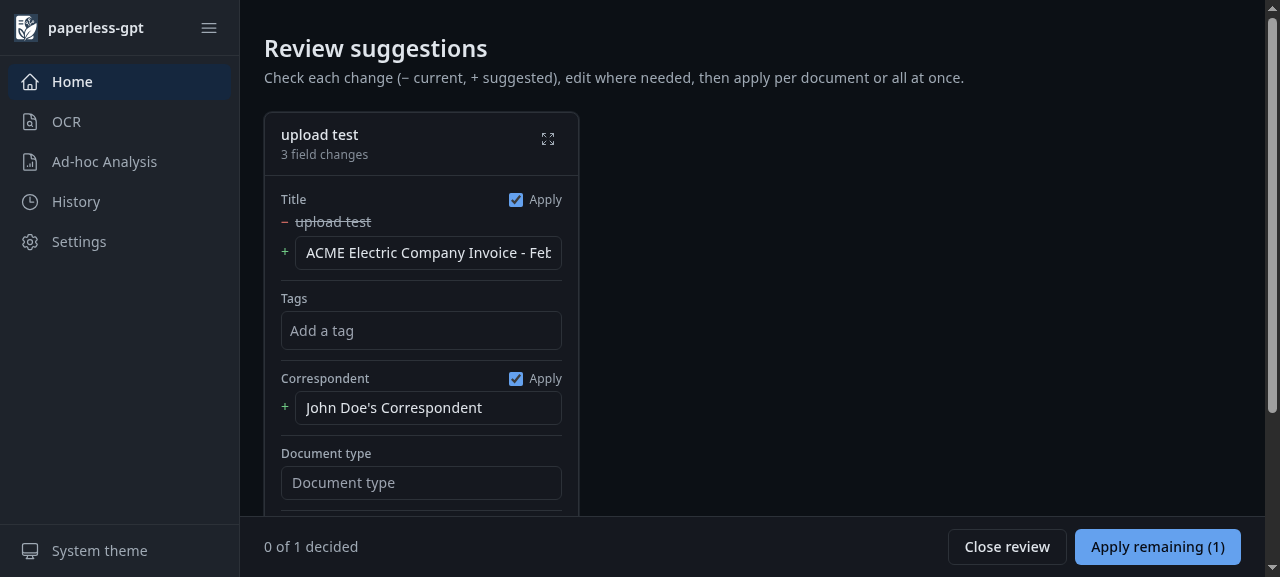
- Review the suggested title/tags/correspondent/date and click Apply - the document is updated in Paperless-ngx.
Add the paperless-gpt-auto tag instead for hands-off processing without review.
The same flow from the shell:
# id of the trigger tag
TAG=$(curl -s -u admin:admin 'http://localhost:35050/api/tags/?name__iexact=paperless-gpt' | jq '.results[0].id')
# upload a document already tagged for review
curl -u admin:admin -F 'document=@invoice.pdf' -F "tags=$TAG" http://localhost:35050/api/documents/post_document/
# once consumed, it is listed by paperless-gpt
curl -s http://localhost:35051/api/documents | jq '.[] | {id, title}'Following options can be set via harbor config:
# Host port for the web UI
HARBOR_PAPERLESS_GPT_HOST_PORT       35051

# Image and tag
HARBOR_PAPERLESS_GPT_IMAGE           icereed/paperless-gpt
HARBOR_PAPERLESS_GPT_VERSION         latest

# Root for prompts/, config/ and db/
HARBOR_PAPERLESS_GPT_WORKSPACE       ./services/paperless-gpt/data

# Explicit Paperless API token; leave empty to auto-fetch with HARBOR_PAPERLESS_ADMIN_*
HARBOR_PAPERLESS_GPT_API_TOKEN

# Standalone LLM settings (used when no backend cross-file applies)
# Provider: openai | ollama | googleai | mistral | anthropic
HARBOR_PAPERLESS_GPT_LLM_PROVIDER    openai
HARBOR_PAPERLESS_GPT_LLM_MODEL
# Any OpenAI-compatible endpoint
HARBOR_PAPERLESS_GPT_OPENAI_URL
HARBOR_PAPERLESS_GPT_OPENAI_KEY      sk-paperless-gpt
HARBOR_PAPERLESS_GPT_OLLAMA_URL

# Models used by the backend cross-files
HARBOR_PAPERLESS_GPT_OLLAMA_MODEL    qwen2.5:1.5b
HARBOR_PAPERLESS_GPT_LLAMACPP_MODEL  LiquidAI/LFM2.5-8B-A1B-GGUF:Q8_0

# Document language hint included in prompts
HARBOR_PAPERLESS_GPT_LANGUAGE        English

# Tags created in Paperless-ngx on startup (space separated); set empty to skip
HARBOR_PAPERLESS_GPT_BOOTSTRAP_TAGS  paperless-gpt paperless-gpt-auto

# htpasswd line(s) for the basic auth in front of https://paperless-gpt.<HARBOR_TRAEFIK_DOMAIN>
# (comma separated, every "$" of the hash doubled). Default is admin / admin
HARBOR_PAPERLESS_GPT_TRAEFIK_USERS   admin:$$apr1$$...
Other upstream variables (VISION_LLM_PROVIDER, VISION_LLM_MODEL, OCR_PROCESS_MODE, AUTO_TAG, ...) can be set in services/paperless-gpt/override.env.
-
ollama: setsLLM_PROVIDER=ollama,OLLAMA_HOSTto Harbor's Ollama,LLM_MODELtoHARBOR_PAPERLESS_GPT_OLLAMA_MODEL, andOLLAMA_THINK=falseso thinking models return the structured suggestion. Pull the model first:harbor ollama pull qwen2.5:1.5b. -
llamacpp: setsLLM_PROVIDER=openaiwithOPENAI_BASE_URL=http://llamacpp:8080/v1andLLM_MODELtoHARBOR_PAPERLESS_GPT_LLAMACPP_MODEL(must match a model served by the llama.cpp router; a400 model 'x' not foundin the logs means it does not -curl http://localhost:33831/modelslists the served names). The first suggestion after a start takes longer while the router loads the model (about half a minute for the default model). -
paperless: addsdepends_on: paperless (service_healthy), sopaperless-gptonly starts once the Paperless API is up. The container itself reportshealthyonce its UI on port 8080 answers. -
traefik:harbor up paperless paperless-gpt traefikserves the UI athttps://paperless-gpt.<HARBOR_TRAEFIK_DOMAIN>(https://paperless-gpt.lanby default). Because the UI has no login of its own,services/compose.x.paperless-gpt.traefik.ymlattaches a Traefikbasicauthmiddleware to that route, fed byHARBOR_PAPERLESS_GPT_TRAEFIK_USERS(defaultadmin/admin; the direct port35051stays unauthenticated). The same file setsPAPERLESS_PUBLIC_URL=https://paperless.<HARBOR_TRAEFIK_DOMAIN>so the "open in Paperless" links land on the Traefik hostname of Paperless-ngx. Change the credentials before exposing the route - every$of the hash has to be doubled because compose interpolates the value:harbor config set paperless_gpt.traefik_users "$(htpasswd -nbB user password | sed 's/\$/\$\$/g')" harbor up paperless paperless-gpt traefik
To enable LLM OCR, set VISION_LLM_PROVIDER=ollama and VISION_LLM_MODEL=<vision model> in the override env.
| Host path | Container path | Purpose |
|---|---|---|
services/paperless-gpt/data/prompts |
/app/prompts |
Editable prompt templates (also editable under Settings) |
services/paperless-gpt/data/config |
/app/config |
UI settings |
services/paperless-gpt/data/db |
/app/db |
Processing history |
paperless-gpt runs as your host user (PUID/PGID). The paperless-gpt-init sidecar chowns the workspace to your host user (HARBOR_USER_ID/HARBOR_GROUP_ID) before each start, so files stay manageable without sudo.
harbor logs paperless-gpt-
paperless rejected the credentials for 'admin'(container exits within seconds): the password inHARBOR_PAPERLESS_ADMIN_PASSWORDdoesn't match Paperless-ngx, e.g. it was changed in the Paperless UI. Either set the current password withharbor config set paperless.admin_password <pw>and restartpaperless paperless-gpt(the setting is re-applied to the user on start), or setHARBOR_PAPERLESS_GPT_API_TOKENto a token generated in Paperless-ngx (My Profile > API Auth Token). -
could not obtain a paperless API token: Paperless-ngx was not reachable within two minutes; checkdocker logs harbor.paperless. - Suggested tags and correspondents are limited to values that already exist in Paperless-ngx; the model never invents new ones. On a fresh stack the only candidates are the bootstrap tags plus
paperless-gpt-failed, so create your tags and correspondents in Paperless-ngx first, otherwise suggestions come back empty or with thepaperless-gpt-failedtag. - No documents listed: the document needs the
paperless-gpttag in Paperless-ngx (created on startup;[harbor] created paperless tagin the logs). Documents still in "Processing" in Paperless-ngx are not visible yet. - Empty suggestions with Ollama: the model is missing (
harbor ollama pull <model>) or too small;OLLAMA_THINK=falseis already set by the cross-file. -
OCR provider is set to LLM, but no VISION_LLM_PROVIDER is set. Disabling OCR.is expected until a vision model is configured.