2.3.97 Satellite Linkwarden
Handle:
linkwarden
URL: http://localhost:35070
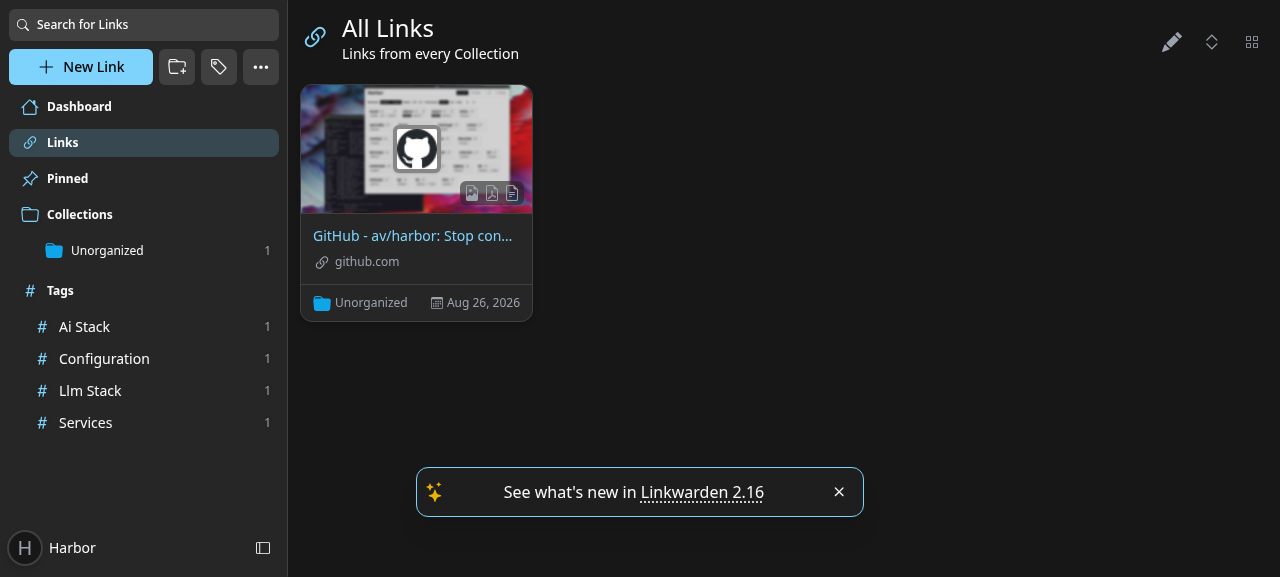
Linkwarden is a self-hosted, collaborative bookmark manager. Every saved link is archived locally so it stays readable even after the original page disappears, and a local LLM from Harbor can tag links for you automatically.
Key Features:
- Full archiving: screenshot, single-file HTML, PDF and readable view for every link
- Organisation: collections, sub-collections, tags and pinned links
- Full-text search: powered by a bundled Meilisearch instance
- AI tagging: automatic tags from any Harbor LLM backend (Ollama, llama.cpp, vLLM, MLX)
- Collaboration: share collections with other users, public collections
- Browser extension and mobile apps: save from anywhere via the official clients
# Pull the images
harbor pull linkwarden

# Start Linkwarden
harbor up linkwarden --open

# With Ollama for AI tagging (nothing pulls the model automatically)
harbor ollama pull qwen2.5:1.5b
harbor up linkwarden ollama- On the first start, create an account via Sign Up (registration is enabled by default). Set
NEXT_PUBLIC_DISABLE_REGISTRATION=trueinservices/linkwarden/override.envafterwards if the instance is reachable by others. - Linkwarden starts with two auxiliary containers:
linkwarden-db(PostgreSQL) andlinkwarden-meili(Meilisearch). The main container waits for both to report healthy before running its database migrations, so a cold first start is safe. Its own healthcheck probes the login page, which answers on an empty database, soharbor up linkwarden --openand other services waiting on it are not blocked until someone signs up (a cold first boot reacheshealthywithin seconds of the migrations finishing). - Archiving happens in a background worker; the screenshot/PDF/readable views appear a few seconds after saving a link.
- To get AI tags, open Settings → Preference → AI Settings, choose Auto-generate Tags and press the Save Changes button directly under that section (each section on the page has its own). A Settings Applied toast confirms the preference was stored; without it nothing will ever be tagged (see Archived but never tagged).
Following options can be set via harbor config or in services/linkwarden/override.env:
# Web UI port
HARBOR_LINKWARDEN_HOST_PORT           35070

# Public origin the login flow redirects back to (NEXTAUTH_URL without /api/v1/auth).
# Empty: http://localhost:<port>, or https://linkwarden.<HARBOR_TRAEFIK_DOMAIN> when traefik is in the stack
HARBOR_LINKWARDEN_PUBLIC_URL          ""

# Linkwarden image
HARBOR_LINKWARDEN_IMAGE               ghcr.io/linkwarden/linkwarden
HARBOR_LINKWARDEN_VERSION             latest

# Root directory for persistent data (data/, pgdata/, meili/)
HARBOR_LINKWARDEN_WORKSPACE           ./services/linkwarden

# NextAuth session secret - change for anything beyond local use
HARBOR_LINKWARDEN_NEXTAUTH_SECRET     harbor-linkwarden-secret

# PostgreSQL sidecar
HARBOR_LINKWARDEN_DB_IMAGE            postgres
HARBOR_LINKWARDEN_DB_VERSION          16-alpine
HARBOR_LINKWARDEN_DB_PASSWORD         linkwarden

# Meilisearch sidecar
HARBOR_LINKWARDEN_MEILI_IMAGE         getmeili/meilisearch
HARBOR_LINKWARDEN_MEILI_VERSION       v1.13.3
HARBOR_LINKWARDEN_MEILI_MASTER_KEY    harbor-linkwarden-meili

# Model used for AI tagging with Ollama (harbor up linkwarden ollama)
HARBOR_LINKWARDEN_OLLAMA_MODEL        qwen2.5:1.5b
# Model used for AI tagging with llama.cpp (harbor up linkwarden llamacpp)
HARBOR_LINKWARDEN_LLAMACPP_MODEL      LiquidAI/LFM2.5-8B-A1B-GGUF:Q8_0

# Let the archive worker fetch hosts on the private Docker network (see the security note below)
HARBOR_LINKWARDEN_ALLOW_PRIVATE_NETWORK_ACCESS  true

# Archive worker: links picked up per batch, and how many minutes the headless
# browser may spend on a single link before it is aborted
HARBOR_LINKWARDEN_ARCHIVE_TAKE_COUNT  5
HARBOR_LINKWARDEN_BROWSER_TIMEOUT     5
Any other Linkwarden environment variable can be added to services/linkwarden/override.env or set with harbor env linkwarden <KEY> <VALUE>.
ALLOW_PRIVATE_NETWORK_ACCESS=true is set by default so Linkwarden can archive pages served by other Harbor services on the internal Docker network (for example a Windmill app or an Open WebUI share link).
Security note: this also means any logged-in Linkwarden user can make the archive worker fetch any host the container can reach, including other Harbor services and their unauthenticated endpoints (an http://linkwarden-meili:7700/health link archives fine). Treat it as a server-side request path: if Linkwarden is exposed to users you do not fully trust (for example through traefik), set harbor config set linkwarden.allow_private_network_access false and keep sensitive services off the shared network.
Pinning HARBOR_LINKWARDEN_VERSION to an older tag can break archiving: older images set PLAYWRIGHT_BROWSERS_PATH/HOME differently and the bundled browser is then not found under the host user Harbor runs the container as. Stay on latest or a recent tag and check docker logs harbor.linkwarden for browserType.launch errors after changing it.
When started together with a Harbor LLM backend, Linkwarden is pre-configured to use it for automatic tagging:
harbor up linkwarden ollama     # uses HARBOR_LINKWARDEN_OLLAMA_MODEL
harbor up linkwarden llamacpp   # uses HARBOR_LINKWARDEN_LLAMACPP_MODEL
harbor up linkwarden vllm       # uses HARBOR_VLLM_MODEL
harbor up linkwarden mlx        # uses HARBOR_MLX_MODEL
Pull the Ollama model first: harbor ollama pull qwen2.5:1.5b (HARBOR_LINKWARDEN_OLLAMA_MODEL); nothing pulls it automatically, and a missing model produces no tags and no error in the UI.
Tagging is off per user until enabled: open Settings → Preference → AI Settings, pick an AI tagging method (Auto-generate Tags, Based on existing Tags or Based on predefined Tags) and save that section. Tags are generated after a link has been archived, so they appear shortly after saving (about 30 seconds with qwen2.5:1.5b; the worker polls every 10 seconds). The worker logs Auto-tagging link ... when it picks a link up. Ticking Generate tags for existing Links before saving also queues links saved before tagging was enabled.
services/linkwarden/check-runtime.sh tags runs the whole workflow unattended against a running stack (registers a harbor-check user, enables Auto-generate Tags, saves a link, waits for tags, deletes the link) and is what Harbor's fact checks use; check-runtime.sh link does the same without the AI step.
Backends other than Ollama are wired through Linkwarden's custom OpenAI-compatible provider (CUSTOM_OPENAI_BASE_URL), so only one of them can be active at a time; when it is set together with ollama, the OpenAI-compatible backend takes precedence.
To change the model on the fly:
harbor config set linkwarden.ollama_model qwen3.5:4b
harbor up linkwarden ollamaLinkwarden persists data in the following directories:
-
services/linkwarden/data/- archived files (screenshots, PDFs, HTML, readable views) -
services/linkwarden/pgdata/- PostgreSQL database (owned by the container's postgres user, sosudois needed to inspect or delete it) -
services/linkwarden/meili/- Meilisearch index
Linkwarden and its Meilisearch sidecar run as your host user (via HARBOR_USER_ID/HARBOR_GROUP_ID). A small linkwarden-init sidecar chowns data/ and meili/ before each start, since Docker creates missing bind-mount targets as root. Everything in the workspace except pgdata/ (owned by the postgres user inside the container) can therefore be managed without sudo.
- Any Harbor LLM backend can be used for tagging via the cross-files listed above; the connection is internal to the Harbor network and never leaves your machine.
-
Settings → RSS Subscriptions polls feeds into a collection of your choice; new entries are archived (and tagged, when enabled) like any saved link, and feeds on the Harbor network work thanks to
ALLOW_PRIVATE_NETWORK_ACCESS. - Linkwarden exposes a REST API at
http://localhost:35070/api/v1with API keys created under Settings → Access Tokens, which is handy for Windmill flows or other Harbor automation. - The official browser extension can be pointed at
http://localhost:35070. - With traefik in the stack (
harbor up linkwarden traefik) Linkwarden is served athttps://linkwarden.<HARBOR_TRAEFIK_DOMAIN>(defaulthttps://linkwarden.lan) and the cross-file pointsNEXTAUTH_URLat that hostname, so logging in there lands onhttps://linkwarden.lan/dashboardinstead of bouncing tolocalhost. Linkwarden switches to secure cookies whenever its public URL ishttps, so in that mode use the traefik hostname rather thanhttp://localhost:35070. Setharbor config set linkwarden.public_url <origin>to pin any other public origin (for example a reverse proxy of your own, orhttp://localhost:35070to keep the direct port canonical while traefik runs).
# All containers
harbor logs linkwarden

# Specific container
harbor logs linkwarden-db
harbor logs linkwarden-meili- Verify the AI tagging method is enabled in your user preferences and that the LLM backend container is running (
harbor ps). - Tagging runs after archiving inside the same worker queue, so on a bulk import tags show up minutes after the links and lag behind the archive backlog. Give it time before assuming it failed.
- Verify the backend answers from inside the Harbor network:
- Ollama:
harbor ollama lsmust list the model, otherwiseharbor ollama pull qwen2.5:1.5b;harbor exec linkwarden curl -s http://ollama:11434/api/tagsshould return it. - llama.cpp:
harbor exec linkwarden curl -s http://llamacpp:8080/v1/modelsmust listHARBOR_LINKWARDEN_LLAMACPP_MODEL. - vLLM / MLX:
harbor exec linkwarden curl -s http://vllm:8000/v1/models(orhttp://mlx:8080/v1/models) must listHARBOR_VLLM_MODEL/HARBOR_MLX_MODEL.
- Ollama:
- Tags are only generated for links that have extracted text or a description, so pages that fail to archive are never tagged.
- Small models sometimes return malformed output; try a larger model via
HARBOR_LINKWARDEN_OLLAMA_MODEL.
A link with its screenshot/PDF/readable view in place but no tags after a couple of minutes almost always means the tagging preference was never stored: the AI Settings section has its own Save Changes button and the change is only sent when that one is pressed (a Settings Applied toast confirms it). Check what the server holds:
harbor exec linkwarden-db psql -U postgres -c 'select username, "aiTaggingMethod" from "User"'DISABLED means the worker skips the user entirely (no Auto-tagging link lines, no requests to the backend): set the method again and save. Links archived while it was DISABLED are not revisited unless Generate tags for existing Links is ticked when saving. With the method stored, docker logs harbor.linkwarden shows Auto-tagging link <url> followed by Succeeded auto-tagging link (or the backend error) within about 20 seconds of the link's archive finishing; services/linkwarden/check-runtime.sh tags exercises the full path end to end and prints the tags it got.
- The bundled headless browser needs a few seconds per link; look for
Errorlines inharbor logs linkwarden. - Sites that block headless browsers still get a readable view when their HTML is fetchable; screenshots and PDFs will be missing.
- Non-HTML URLs (plain-text files, very large pages) can hold the browser for the full
HARBOR_LINKWARDEN_BROWSER_TIMEOUT(5 minutes) and then logBrowser has been open for more than 5 minutes; the link is marked unavailable and the worker moves on. Lower the timeout if you import many such links. -
Monolith output exceeded buffer limitmeans the single-file HTML archive for that page was too big and was skipped; the screenshot, PDF and readable view are still produced. - Small models sometimes log
Unexpected token ... in JSONfrom the tagging step; the link is archived, only its tags are missing (see above).
The image runs the web app and the archive worker in one container under concurrently -k, so a crash in either process stops the other and the whole container exits. This has been observed after a bulk import: a link that hit the 5-minute browser timeout aborted with an unhandled write EPIPE, the worker exited 1, the web app was terminated, and the remaining links were left unarchived with the UI unreachable.
Harbor sets restart: unless-stopped on the Linkwarden containers so Docker brings the container straight back and the worker resumes the backlog on its own; harbor ps shows a fresh uptime and docker logs harbor.linkwarden shows the crash followed by a new startup. If you have removed the restart policy, docker start harbor.linkwarden does the same by hand. Remaining links are picked up within a minute or two of the restart, so nothing needs to be re-added.
If migrations fail or the database is corrupted:
harbor down linkwarden
# WARNING: destroys all data
sudo rm -rf services/linkwarden/pgdata services/linkwarden/meili
harbor up linkwarden