2.3.96 Satellite Whishper
Handle:
whishper
URL: http://localhost:35060
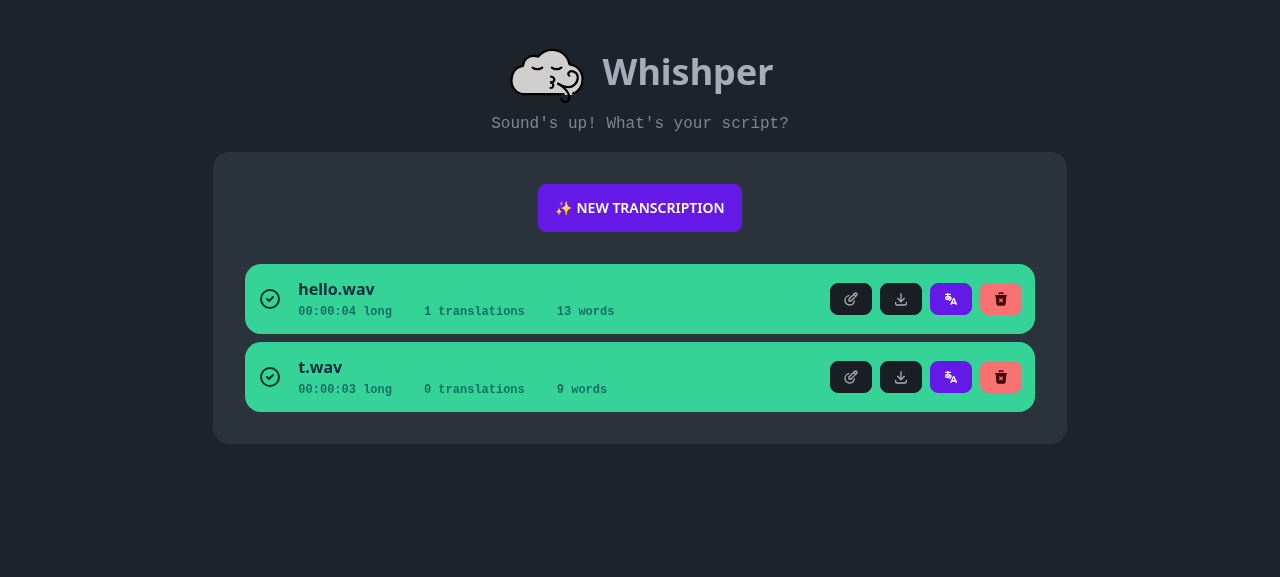
Whishper is a self-hosted, fully local audio transcription and subtitling suite built on faster-whisper. Upload audio/video files or paste a media URL, get timestamped transcripts, edit them in a subtitle editor, download them as SRT/VTT/TXT/JSON, and translate them with LibreTranslate.
Key Features:
-
Local transcription: faster-whisper models from
tinytolarge-v3, CPU or NVIDIA GPU - Subtitle editor: per-segment timing and text editing in the browser
- Exports: SRT, VTT, TXT and JSON downloads
- Translation: subtitles translated through Harbor's LibreTranslate
- URL sources: transcribe YouTube and other media URLs directly
-
REST API: transcription upload, listing, editing and translation are available under
/api(the SRT/VTT/TXT/JSON exports are rendered in the browser)
# [Optional] pre-pull the images
harbor pull whishper

# Run the service
harbor up whishper --open- Whishper ships with a MongoDB aux container (
whishper-mongo) and runs on CPU by default - On the first start, every model size in
HARBOR_WHISHPER_MODELSis downloaded from Hugging Face into the workspace. The container only reports healthy once that finished; transcriptions submitted before that fail with status-1.harbor upwaits for the healthy state; the download progress is the worker's stderr, mirrored todocker logs harbor.whishper - To enable translation, run it together with Harbor's LibreTranslate:
harbor up whishper libretranslate
- With NVIDIA GPUs (
harbor up whishper nvidia), the<HARBOR_WHISHPER_VERSION>-gpuimage tag is used and the GPU is passed through - The UI is served same-origin, so it works from
http://localhost:35060, from your LAN IP (http://<host-ip>:35060) and through the Traefik routehttps://whishper.<HARBOR_TRAEFIK_DOMAIN>without any extra configuration. Only setHARBOR_WHISHPER_PUBLIC_URLif the API must be reached on a different origin than the page (see below)
- New transcription: pick a file (or a YouTube/media URL), choose a model size and language, click Start. Larger models are slower on CPU but far more accurate
- Edit: opens the subtitle editor with per-segment timing and text
-
Translate: requires
libretranslateto be running; pick a target language and the translation is added to the transcription. Translating into a language the transcription already has makes the backend answer 500 and leaves the row stuck in thetranslatingstate (status 3) with no buttons, even after a reload. The only recovery is deleting the row withcurl -X DELETE http://localhost:35060/api/transcriptions/<id>(get<id>fromGET /api/transcriptions) and re-transcribing - Download: export as SRT, VTT, TXT or JSON
The same workflow is available from the shell via the REST API:
# Submit a file (language, modelSize and device match the UI form)
curl -F file=@hello.wav -F language=en -F modelSize=tiny -F device=cpu \
  http://localhost:35060/api/transcriptions

# Poll until "status": 2, then read result.text
curl http://localhost:35060/api/transcriptions/<id>

# Translate (with libretranslate running), stored under "translations"
curl http://localhost:35060/api/translate/<id>/esFollowing options can be set via harbor config:
# Host port for the web UI
HARBOR_WHISHPER_HOST_PORT          35060

# Origin the browser uses for /api calls (sets PUBLIC_API_HOST). Empty means
# same-origin, i.e. whatever URL the page was opened on - keep it empty unless
# the API is exposed on a separate origin, e.g. http://whishper.example.com
HARBOR_WHISHPER_PUBLIC_URL         ""

# Image and tag (the nvidia cross-file switches the tag to <version>-gpu)
HARBOR_WHISHPER_IMAGE              pluja/whishper
HARBOR_WHISHPER_VERSION            latest

# MongoDB aux container
HARBOR_WHISHPER_MONGO_IMAGE        mongo
HARBOR_WHISHPER_MONGO_VERSION      7

# Persistent data root (uploads, models, logs, db)
# Either relative to $(harbor home) or an absolute path
HARBOR_WHISHPER_WORKSPACE          ./services/whishper/data

# Comma-separated whisper model sizes preloaded on startup (the UI's model
# picker is a fixed list; sizes outside it can be requested via the API)
# (tiny, base, small, medium, large-v2, large-v3, plus .en variants)
HARBOR_WHISHPER_MODELS             tiny,base,small

# CPU threads used by faster-whisper
HARBOR_WHISHPER_CPU_THREADS        4

# MongoDB credentials (shared by both containers)
HARBOR_WHISHPER_DB_USER            whishper
HARBOR_WHISHPER_DB_PASSWORD whishperAll persistent data lives under HARBOR_WHISHPER_WORKSPACE:
-
services/whishper/data/uploads/- uploaded media files (/app/uploads) -
services/whishper/data/models/- downloaded faster-whisper models (/app/models) -
services/whishper/data/logs/- supervisor stdout logs for backend, frontend, transcription worker and nginx plus nginx/frontend stderr (/var/log/whishper); the worker's and backend's stderr go to the container log instead -
services/whishper/data/db/- MongoDB data ofwhishper-mongo(owned by the mongo user)
The image hardcodes /app/uploads and /app/models, so Harbor starts the container through services/whishper/entrypoint.sh, which symlinks both into the single /workspace mount. The whishper-init sidecar chowns the workspace to your host user (HARBOR_USER_ID/HARBOR_GROUP_ID) before each start, so files stay manageable without sudo. The entrypoint also runs the backend, frontend and transcription worker as that user (only nginx stays root to bind port 80), so uploads and downloaded models written mid-session are host-owned immediately, not just after the next harbor up. The entrypoint also re-creates and chowns uploads/ and models/ itself on every start, so wiping the model cache and then docker compose restart/force-recreating whishper without the sidecar still yields host-owned directories and a working worker.
-
compose.x.whishper.libretranslate.yml- setsTRANSLATION_ENDPOINT=libretranslate:5000and the entrypoint rewrites nginx's/languagesupstream to it (the image hardcodestranslate:5000and nginx would refuse to start without it, so standalonewhishperserves/languagesas 502 instead). It also adds a/languageshealthcheck tolibretranslateand makeswhishperwait for it (condition: service_healthy), soharbor psshowswhishperas healthy only once the TRANSLATE modal can list languages. On a cold LibreTranslate cache this is several minutes of model downloads, during whichwhishperstays inCreated. -
compose.x.whishper.nvidia.yml- switches to the${HARBOR_WHISHPER_VERSION}-gpuimage and reserves NVIDIA GPUs -
compose.x.traefik.whishper.yml- exposes the UI aswhishper.<HARBOR_TRAEFIK_DOMAIN>when running with Traefik
harbor logs whishper
harbor logs whishper-mongo

# Worker and backend errors (model downloads, PermissionError, crash-loops) are in the container log
docker logs harbor.whishper

# Supervisor stdout logs of the in-container processes (nginx, backend, frontend, worker)
ls services/whishper/data/logs/The worker only accepts jobs once every model in HARBOR_WHISHPER_MODELS is downloaded. Wait for harbor ps to show whishper as healthy, then resubmit. First use of a model size not in the list downloads it on demand; on CPU, medium/large models are slow.
libretranslate is not running. Start with harbor up whishper libretranslate. When both are selected, whishper only starts after LibreTranslate answers /languages, so an empty list means it was started alone; LibreTranslate downloads its language models on first boot, harbor logs libretranslate shows the progress.
The frontend calls ${HARBOR_WHISHPER_PUBLIC_URL}/api/... from the browser. Keep the variable empty (same-origin, the default) unless the API really lives on another origin; a value like http://localhost:35060 only works when the browser runs on the Docker host.
Switch to a larger model (small.en, medium) or use the GPU image via harbor up whishper nvidia.
harbor down whishper
# WARNING: destroys all transcriptions (db/ is owned by the mongo user, hence sudo)
sudo rm -rf services/whishper/data/db
harbor up whishper