Raspberry Pi 2 Home Assistant domain with SSL (duckdns.org and letsencrypt.org)
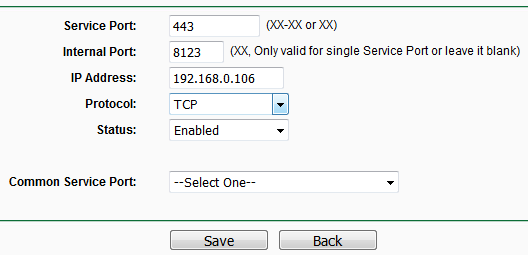
- Routeryje padarom port forward 443->8123 (192.168.0.106):
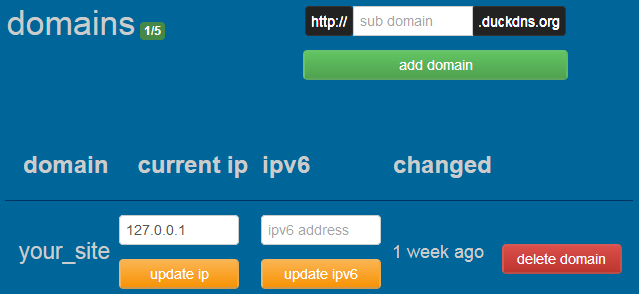
- Duckdns.org sukuriam domain:
- Nuklonuojam certbot:
pi@raspberrypi:~ $ sudo mkdir -p /mnt/pihdd/letsencrypt && cd /mnt/pihdd/letsencrypt
pi@raspberrypi:/mnt/pihdd/letsencrypt $ sudo git clone https://github.com/certbot/certbot.git
Cloning into 'certbot'...
remote: Enumerating objects: 63544, done.
remote: Total 63544 (delta 0), reused 0 (delta 0), pack-reused 63544
Receiving objects: 100% (63544/63544), 20.89 MiB | 3.42 MiB/s, done.
Resolving deltas: 100% (46292/46292), done.- Sukuriam certbot image:
pi@raspberrypi:/mnt/pihdd/letsencrypt $ cd certbot/
pi@raspberrypi:/mnt/pihdd/letsencrypt/certbot $ sudo nano Dockerfile
Pakeičiam base image iš FROM python:2-alpine3.9 į FROM arm32v7/python:3.7.3-alpine3.9 ir išsaugom.
pi@raspberrypi:/mnt/pihdd/letsencrypt/certbot $ docker build -t arm32v7/certbot .
pi@raspberrypi:/mnt/pihdd/letsencrypt/certbot $ cd ..
pi@raspberrypi:/mnt/pihdd/letsencrypt $ sudo rm -rf certbot- Išbandom ar veikia certbot (su --staging parametru leidžiama testuotis neribotai):
pi@raspberrypi:~ $ docker run -it --rm \
-v /mnt/pihdd/letsencrypt/etc/letsencrypt:/etc/letsencrypt \
-v /mnt/pihdd/letsencrypt/var/lib/letsencrypt:/var/lib/letsencrypt \
-v /mnt/pihdd/letsencrypt/var/log/letsencrypt:/var/log/letsencrypt \
-p 80:80 \
arm32v7/certbot \
certonly \
--standalone \
--preferred-challenges http \
--register-unsafely-without-email \
--agree-tos \
--staging \
-d your_site.duckdns.org- Jei viskas gerai, tai pašalinam testo rezultatą:
pi@raspberrypi:/mnt/pihdd $ sudo rm -rf letsencrypt- Generuojam sertifikatus:
pi@raspberrypi:~ $ docker run -it --rm \
-v /mnt/pihdd/letsencrypt/etc/letsencrypt:/etc/letsencrypt \
-v /mnt/pihdd/letsencrypt/var/lib/letsencrypt:/var/lib/letsencrypt \
-v /mnt/pihdd/letsencrypt/var/log/letsencrypt:/var/log/letsencrypt \
-p 80:80 \
arm32v7/certbot \
certonly \
--standalone \
--preferred-challenges http \
--email your@ema.il \
--agree-tos \
--no-eff-email \
-d your_site.duckdns.org
Saving debug log to /var/log/letsencrypt/letsencrypt.log
Plugins selected: Authenticator standalone, Installer None
Obtaining a new certificate
Performing the following challenges:
http-01 challenge for your_site.duckdns.org
Waiting for verification...
Cleaning up challenges

IMPORTANT NOTES:
 - Congratulations! Your certificate and chain have been saved at:
   /etc/letsencrypt/live/your_site.duckdns.org/fullchain.pem
   Your key file has been saved at:
   /etc/letsencrypt/live/your_site.duckdns.org/privkey.pem
   Your cert will expire on 2019-07-05. To obtain a new or tweaked
   version of this certificate in the future, simply run certbot
   again. To non-interactively renew *all* of your certificates, run
   "certbot renew"
 - Your account credentials have been saved in your Certbot
   configuration directory at /etc/letsencrypt. You should make a
   secure backup of this folder now. This configuration directory will
   also contain certificates and private keys obtained by Certbot so
   making regular backups of this folder is ideal.
 - If you like Certbot, please consider supporting our work by:

   Donating to ISRG / Let's Encrypt:   https://letsencrypt.org/donate
Donating to EFF: https://eff.org/donate-le- Patikrinam ar sukūrė sertifikatą:
pi@raspberrypi:/mnt/pihdd $ sudo su
root@raspberrypi:/mnt/pihdd# cd /mnt/pihdd/letsencrypt/etc/letsencrypt/live/your_site.duckdns.org
root@raspberrypi:/mnt/pihdd/letsencrypt/etc/letsencrypt/live/your_site.duckdns.org# ls
cert.pem chain.pem fullchain.pem privkey.pem README- Kopijuojam sertifikatus, kad matytų Home Assistant:
$ sudo mkdir -p /mnt/pihdd/homeassistant/cert
$ sudo cp /mnt/pihdd/letsencrypt/etc/letsencrypt/live/your_site.duckdns.org/fullchain.pem /mnt/pihdd/homeassistant/cert/fullchain.pem
$ sudo cp /mnt/pihdd/letsencrypt/etc/letsencrypt/live/your_site.duckdns.org/privkey.pem /mnt/pihdd/homeassistant/cert/privkey.pem- Sukonigūruojam, kad Home Assistant naudotų šiuos sertifikatus:
$ sudo nano /mnt/pihdd/homeassistant/configuration.yamlĮrašom šias eilutes:
http:
  base_url: https://your_site.duckdns.org:443
  ssl_certificate: /config/cert/fullchain.pem
  ssl_key: /config/cert/privkey.pem
- Restartuojame Home Assistant, kad veiktų su SSL sertifikatu:
$ docker-compose -f homeassistant.yml restart- Naršyklėje bandome ar veikia http://your_site.duckdns.org
Links: