STM8S103F3P6 (1. Įvadas)
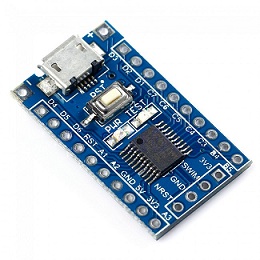
| Model | STM8S103F3P6 | |
|---|---|---|
| Max. frequency | 16MHz | |
| Flash memory | 8K | |
| RAM | 1K | |
| Test LED port | PB5 (PB_ODR&=~(1<<5) - Led On, PB_ODR|=(1<<5) - Led Off) | 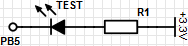 |
-
Parsisiunčiam Small Device C Compiler suite iš http://sdcc.sourceforge.net/ (sdcc-3.6.0-x64-setup.exe) ir sudiegiam (paskutiniame žingsnyje uždedame varnelę, kad kelią pridėtų prie sistemos PATH)
-
Parsisiunčiam Make for Windows iš http://gnuwin32.sourceforge.net/packages/make.htm (make-3.81.exe), sudiegiam pridedam prie PATH
-
Einam į Control Panel->System and Security->System ir spaudžiam ant Advanced system settings
-
Einam į Advanced skiltį ir spaudžiam Environment Variables...
-
System Variables skiltyje, pažymim Path ir spaudžiam Edit...
-
Pridedam ;C:\Program Files (x86)\GnuWin32\bin reikšmę ir spaudžiam OK, OK, OK
-
Sujungiam ST-LINK V2 su STM8S103F3P6 ir prijungiam prie USB
| ST-LINK V2 | STM8S103F3P6 |
|---|---|
| RST | NRST |
| GND | GND |
| SWIM | SWIM |
| 3.3V | 3V3 |
-
Parsisiunčiam tvarkykles (stsw-link009.zip) iš http://www.st.com/content/st_com/en/products/embedded-software/development-tool-software/stsw-link009.html ir sudiegiam
-
Atsisiunčiam jau sukompiliuotus stm8flash.exe ir libusb-1.0.dll į C:\stm8flash-master arba susikompiliuojam stm8flash patys iš https://github.com/vdudouyt/stm8flash
- Sukuriam blinky.c failą
#define PB_ODR *(unsigned char*)0x5005 // Port B data output latch register (Datasheet, 32 page, Table 7. I/O port hardware register map)
#define PB_DDR *(unsigned char*)0x5007 // Port B data direction register (Datasheet, 32 page, Table 7. I/O port hardware register map)
#define PB_CR1 *(unsigned char*)0x5008 // Port B control register 1 (Datasheet, 32 page, Table 7. I/O port hardware register map )

int main()
{
    int i = 0;
    PB_DDR = 0x20; // PB5 port as output ~ 0x20 = 0b0010 0000 (0: Input mode, 1: Output mode)
    PB_CR1 = 0x20; // PB5 port push-pull ~ 0x20 = 0b0010 0000 (In output mode (DDR = 1): (0: Pseudo open drain, 1: Push-pull))
    do {
         PB_ODR ^= 0x20; // PB5 port toggle ~ 0x20 = 0b0010 0000 (Writing to the ODR register when in output mode applies a digital value to the I/O through the latch)
         for (i = 0; i < 10000; i++) { } // delay
    } while(1);
}- Sukuriam Makefile
SDCC=sdcc
STM8FLASH=C:\stm8flash-master\stm8flash.exe
OBJECTS=blinky.ihx

.PHONY: all clean flash

all: $(OBJECTS)

clean:
   rm -f $(OBJECTS)

flash: $(OBJECTS)
   $(STM8FLASH) -c stlinkv2 -p stm8s103f3 -w $(OBJECTS)

%.ihx: %.c
$(SDCC) -lstm8 -mstm8 --out-fmt-ihx $<- Pasileidžiam cmd ir einam į ten kur sukūrėm blinky.c ir Makefile (pvz.: C:\stm8s103f3p6):
C:\>cd C:\stm8s103f3p6

C:\stm8s103f3p6>
- Kompiliuojam:
C:\stm8s103f3p6>make
sdcc -lstm8 -mstm8 --out-fmt-ihx blinky.c

C:\stm8s103f3p6>
Jei rodo klaidos pranešimą
C:\Users\win7\Desktop\blinky>make
makefile:10: *** missing separator.  Stop.
tai problema tikriausiai, kad Makefile yra ne TAB simboliai, o SPACE simboliai tose eilutėse kur tekstas atitrauktas nuo eilutės pradžios (pvz. rm -f $(OBJECTS))
- Rašom į STM8S103F3P6:
C:\stm8s103f3p6>make flash
C:\stm8flash-master\stm8flash.exe -c stlinkv2 -p stm8s103f3 -w blinky.ihx
Determine FLASH area
Writing Intel hex file 191 bytes at 0x8000... OK
Bytes written: 191

C:\stm8s103f3p6>
Jei rašant į STM8S103F3P6 rodomas toks klaidos pranešimas
Determine FLASH area
Writing Intel hex file X bytes at 0x8000... Tries exceeded
tai tikriausiai yra uždėta Read-out protection (ROP) apsauga. Ją pašalinti galima:
- Susidiegus ST Visual Programmer, nuėjus į OPTION BYTE skiltį, paspausti dešinį pelytės klavišą ir pasirenkti Program current
ARBA paprastesnis būdas - Parsisiųsti standartinių nustatymų atvaizdą (optdefault.bin) ir jį įrašyti su komanda:
stm8flash.exe -c stlinkv2 -p stm8s103f3 -s opt -w optdefault.bin