STM32F103C8T6 (6.1 Derinimas (angl. debugging) Visual Studio Code aplinkoje)
- VSCode sudiegiame Native debug extension'ą
- Papildome platformio.ini
[env:bluepill_f103c8]
platform = ststm32
board = bluepill_f103c8
framework = cmsis
build_flags = -g
- Atidarome Debug panelę (CTRL+SHIFT+D), pasirenkame Add Configuration->GDB ir launch.json papildome
{
	"name": "GDB",
	"type": "gdb",
	"request": "launch",
	"cwd": "${workspaceRoot}",
	"target": "C:/Users/username/Documents/PlatformIO/Projects/BluePill01/.pioenvs/bluepill_f103c8/firmware.elf",
	"gdbpath" : "C:/Users/username/.platformio/packages/toolchain-gccarmnoneeabi/bin/arm-none-eabi-gdb.exe",
	"autorun": [
                "target remote localhost:3333",
                "monitor arm semihosting enable", // Ši eilutė reikalinga siųsti duomenis į gdb terminalą
                "monitor reset halt",
                "symbol-file C:/Users/win7/Documents/PlatformIO/Projects/BluePill02_ILI9341/.pioenvs/bluepill_f103c8/firmware.elf"
                ]
}
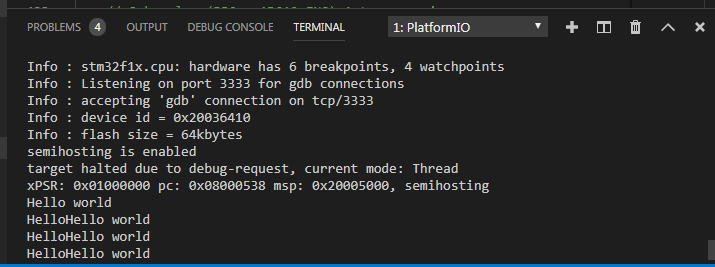
- Spaudžiame New Terminal ir paleidžiame OpenOCD:
C:\Users\username\.platformio\packages\tool-openocd\bin>openocd.exe -f ../scripts/interface/stlink.cfg -f ../scripts/target/stm32f1x.cfg
Jei rodo klaidos pranešimą:
Error: init mode failed (unable to connect to the target)
in procedure 'init'
in procedure 'ocd_bouncer'
ir RESET nepadeda tai reikia atjungti BluePill ir vel prijungti prie STLinkV2
- Spaudžiam Start Debugging ir pasirenkam GDB
Debug'inant einame į "DEBUG CONSOLE" langą ir po juo kur yra ">" rašome: "x/8xw 0x08000000"
- x - komanda
- 8 - kiek duomenų rodyti
- x - formatas (hexadecimal)
- w - tipas (word (keturi baitai))
https://sourceware.org/gdb/onlinedocs/gdb/Memory.html
Pvz.: (pažiūrėti GPIOA reikšmes, adresas iš "STM32F Reference Manual.pdf" 50 ir 193 psl.):
x/4xw 0x40010800
0x40010800:	0x44444444	0x88844444	0x0000dff9	0x00000000
- Atminties adresas - 0x40010800
- GPIOA_CRL reikšmė - 0x44444444
- GPIOA_CRH reikšmė - 0x88844444
- GPIOA_IDR reikšmė - 0x0000dff9
- GPIOA_ODR reikšmė - 0x00000000
void send_command(int command, void *message)
{
   asm("mov r0, %[cmd];"
       "mov r1, %[msg];"
       "bkpt #0xAB"
         :
         : [cmd] "r" (command), [msg] "r" (message)
         : "r0", "r1", "memory");
}

void put_char(char c)
{
    asm (
    "mov r0, #0x03\n"   /* SYS_WRITEC */
    "mov r1, %[msg]\n"
    "bkpt #0xAB\n"
    :
    : [msg] "r" (&c)
    : "r0", "r1"
    );
}

int main(void)
{
    // Some code
    for (;;)
    {
        const char s[] = "Hello world\n";
        uint32_t m[] = { 2/*stderr*/, (uint32_t)s, sizeof(s)/sizeof(char) - 1 };
        send_command(0x05/* some interrupt ID */, m);

        put_char('H');
        put_char('e');
        put_char('l');
        put_char('l');
        put_char('o');
    }
}
http://sushihangover.github.io/arm-cortex-m-semihosting-with-qemu/
https://electronics.stackexchange.com/questions/149387/how-do-i-print-debug-messages-to-gdb-console-with-stm32-discovery-board-using-gd