Repository navigation
Folders and Files
Polygluttony works on one folder at a time. This page covers what it reads, what it writes, and what happens to your subtitle files on the way.
- Click Open folder on the welcome screen, or press Ctrl+O (Cmd on macOS).
- Or drag a folder onto the window, on any page. Dropping an
.assfile opens the folder it's in. - On Episodes, Switch folder ▾ lists your recent folders, plus Open another… and Close folder.
- The welcome screen lists up to 10 Recent folders. Click one to reopen it; hover it for Remove, or use Clear all. Removing a folder from the list doesn't touch the folder.
- Folders called
translate, or with "season" in the name, are listed under the show's name.…/Ranger Wars/Season 1/translateshows as Ranger Wars.
-
Only
.assfiles, and only those directly in the folder. Subfolders are ignored, and so are.srt,.ssaand.vttfiles. - Files that are already translations are skipped: anything with
.warning.in its name, and anything ending in the target language's tag, such as.eng.assor.en.assfor English, when its source sits next to it.
If Polygluttony says there are no subtitle files in the folder, check that the files really are .ass and aren't in a subfolder.
Copied new episodes in while the folder was open? Press Rescan on Episodes.
The top of Episodes sums up the folder's settings in one line, like "Chinese → English · World type: Xianxia · Tone: Xianxia". Edit opens them. They start open the first time you open a folder, so you can check what was detected.
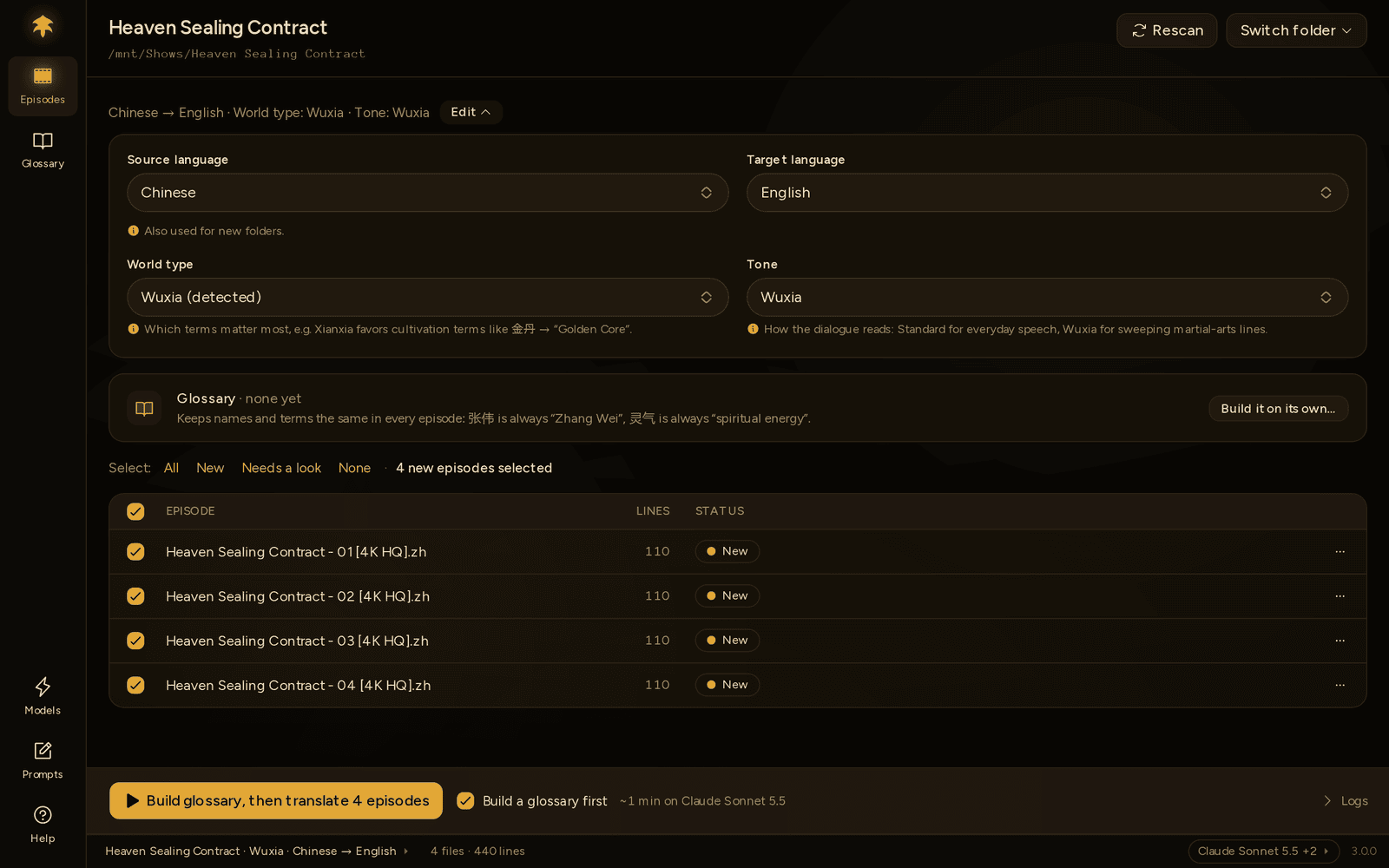
| Setting | What it's for |
|---|---|
| Source language | Detected from the text the first time you open the folder. Change it if the guess is wrong. |
| Target language | What to translate into. Changing the pair also makes it the default for new folders. |
| World type | Chinese sources only: xianxia, wuxia, historical or modern. Steers the glossary and sets the tone. |
| Tone | How the dialogue reads. See Tones. |
The settings wait while a run is going in the folder. They're remembered per folder, in Polygluttony's own data folder, along with whether the glossary tick next to the button is on. Which episodes are ticked isn't kept: every time a folder opens, the episodes without a translation are ticked.
Opening a folder writes nothing into it. Files appear there once you build a glossary or translate.
Everything Polygluttony writes into your subtitle folder:
| File | What it is |
|---|---|
Episode 01.eng.ass |
The translation |
Episode 01.warning.eng.ass |
A translation that still has problems; see Reading the results |
glossary.json |
This folder's glossary |
.polygluttony/glossary-meta.json |
What Polygluttony knows about the glossary: where each term came from, the NEW tags, which episodes it has read, and the show name for Look up names online |
.polygluttony/glossary-history/ |
The last 10 versions of the glossary, for Restore an earlier version… |
glossary-reference.json |
Terms taken from translations you already had; see The glossary |
glossary.prev.json |
Only from 2.x: the old single backup. Nothing writes it any more; it shows up in Restore an earlier version… until you delete it. |
The .polygluttony folder is hidden on macOS and Linux. On Windows you'll see it. It's safe to delete. You lose the NEW tags, which terms are yours, the show name, the glossary's history and its record of which episodes it has read, but glossary.json keeps every term.
Each episode's result (its status, open issues and translated lines) is kept in Polygluttony's data folder instead, so Review and Resume still work after a restart. See Privacy & your data.
Output names: the source name, minus any language tag it already had, plus the target's tag. With Chinese → English:
| Source | Output |
|---|---|
ep01.ass |
ep01.eng.ass |
ep01.chi.ass |
ep01.eng.ass |
ep01.ass, with problems left |
ep01.warning.eng.ass |
An episode has one output at a time. Writing the clean one removes the .warning one, and the other way round. Mark episode done in the episode window renames the .warning file to the clean name.
Warning
Translating an episode again overwrites its earlier translation without asking; the button only says how many it replaces. Rename or move a translation you've edited by hand before re-running it.
Fixes made in the episode window are more careful: if the file was changed in another editor since Polygluttony wrote it, it says so instead of overwriting it.
Your source file is only ever read, never changed. In the translated copy:
Translated: the text of every Dialogue: line, whatever its style.
Kept exactly: [Script Info], [V4+ Styles], and each line's layer, start and end time, style, actor, margins and effect.
Tags: override tags like {\an8} and {\pos(…)} are taken out before translating and put back afterwards. A tag at the start or end of a line goes back exactly there. A tag in the middle of a line goes back at the same relative position, which can put it next to a slightly different word, since a translation rarely has the same word order.
Changed:
-
Comment:lines are left out. - The
[Fonts],[Graphics]and[Aegisub Project Garbage]sections are left out. If your file embeds fonts, the translation won't. Keep the fonts installed, or attach them when you mux. - Dialogue is sorted by start time.
- The file is saved as UTF-8 (with a byte-order mark), and gains the comment
; Translated at home with Polygluttonyunder[Script Info].
Encodings: source files can be in any common encoding: UTF-8, UTF-16, GBK/GB18030, Big5, Shift-JIS, EUC-KR. Polygluttony detects which.