Repository navigation
Reading the Results
Every episode gets checked after it's translated. You don't get a score. You get a list of specific lines to look at, or nothing at all.
The Status column on the Episodes page says where each episode stands:
| Status | In your folder | What it means |
|---|---|---|
| New | No translation yet | Not translated. New episodes are ticked each time you open the folder. |
| Done | ep01.eng.ass |
Translated and checked. Nothing was flagged, or everything flagged was fixed. |
| Needs a look | ep01.warning.eng.ass |
Saved, but some lines are worth checking. The count says how many, such as Needs a look · 3, or Needs a look · 20 lines missing, 8 more when lines were left out. |
| Not finished | Nothing new | The run stopped while this episode was going. Its finished batches are kept, and the next run carries on from them. |
| Not started | Nothing new | The run ended before it got to this episode. |
| Failed | Nothing new | An error stopped this episode. The reason is shown next to it. |
While a run is going you also see live states, such as Translating… and Verifying…. See Translating.
Results are kept between sessions, so the statuses and issues are still there after you close Polygluttony. If you fix or rename a file by hand, the list follows what's on disk: rename ep01.warning.eng.ass to ep01.eng.ass and it reads Done.
Click the Needs a look chip on a row to fold out its issues:
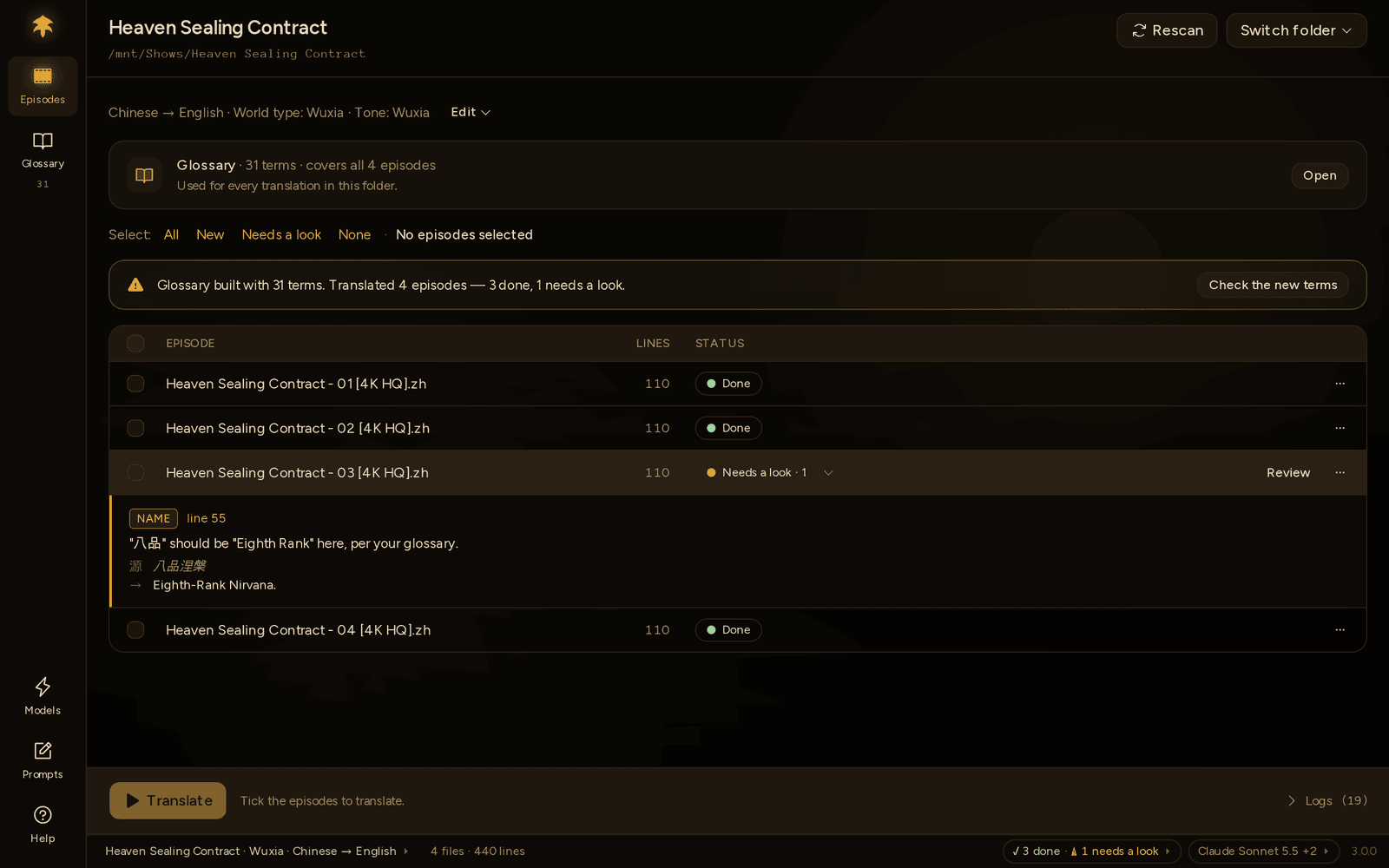
Each issue shows:
- its type: NAME, MEANING or UNTRANSLATED;
- the line number, which opens the episode window on that line;
- what's wrong;
- the source line (源) and the translation (→).
To work through them, press Review on the row. See Reviewing in the episode window.
Note
Episodes translated before Polygluttony 3.0.0 have no stored result. Their row says Needs a look without a count or issues, and the episode window says the episode has a translation but no record of how it went. Fix their .warning. file in your subtitle editor, or translate them again to review them line by line.
NAME means a glossary name didn't make it into the line: 林动 should be "Lin Dong" here, per your glossary. Every line is checked against your glossary at the end. Name issues are listed for you; on their own, they don't make Polygluttony translate the line again. Often the translation is fine and the name is just phrased differently, and sometimes the glossary is what needs fixing.
MEANING means the line may have wandered from the original: This line may not say what the original says. It comes from one of two checks:
- the automatic comparison, which marks the line where the translation starts going off track: questions that stopped being questions, glossary terms that went missing, lines far too long or short;
- the Verify model's spot-check. Its reason follows in brackets when it gave one.
UNTRANSLATED means This line couldn't be translated and was left out of the file. The model kept getting it wrong, so Polygluttony gave up on it. The line is missing from the .warning. file until you fix it. A file lists the first 10 of these, then …and N more untranslated lines.
Review (or Open in episode window in a row's ··· menu) opens the episode in its own window, with every line's time, original and translation. Flagged lines have an amber edge, with their issues and what you can do right under them.

At the top right, 3 left and the ‹ › arrows step through the flagged lines. Only flagged hides everything else.
Each flagged line offers:
| Button | What it does |
|---|---|
| Retranslate line | Sends the line to your Translate model again, with the lines around it for context. |
| Edit | Type your own translation. Enter saves, Esc cancels. You can also double-click any translation to edit it. For a line that wasn't translated, this is Write it myself. |
| Looks fine | You checked it and it's OK. The issue goes away. |
| Fix in glossary | Brings the main window forward on the Glossary page, at the term the line gets wrong, so you can change it there. When a line misses several names, there's one button per name. On a line without a name issue, select the name in the original first. |
When you act on a line and it no longer needs a look, the window moves on to the next one. Retranslate all 3 at the bottom sends every flagged line at once.
Adding a term. Select a name in any line and press Add to glossary (or Ctrl+E, ⌘+E on macOS). A small form opens with Original, Translation and Category, filled in from what you selected. Press Add. If finished episodes use that term, the window offers to retranslate those lines: You changed 林动 in the glossary. Retranslate 14 lines in 3 episodes. The folder needs a glossary first.
Mark episode done is the last step. It's available once nothing is left to look at, so every line has a translation and every issue is fixed or marked Looks fine. It renames ep01.warning.eng.ass to ep01.eng.ass, and the episode shows Done.
Every change is written straight into the translated file. A few things to know:
- Review actions are off while a run is going. They come back when it ends.
- If you changed the translated file in another program, Polygluttony won't overwrite it. It says ep01.warning.eng.ass was changed outside Polygluttony since it was written; finish it in your editor, or translate the episode again.
- If the original
.asschanged since it was translated, the stored lines no longer match it, and you need to translate it again to review it.
A banner above the episode list says what happened, and the buttons next to it are the way forward.
| The banner says | What happened | What you can do |
|---|---|---|
| Stopped. 2 episodes weren't finished. | You pressed Stop. Finished batches are kept. | Resume 2 episodes carries on. |
| Stopped: Anthropic rejected the API key used for Translate. 2 episodes weren't finished. | An error no retry can fix stopped the whole run. | For a key, credit or model problem, Open Models and fix it. Then Try again. |
| Couldn't start: … | The run never began, for the reason given. | Open Models if no model is ready, or Try again. |
| Translated 3 episodes — 2 done, 1 needs a look, 1 failed. | The run finished, but one episode hit an error. Its reason is on its row. | Try again runs the failed ones. |
| Stopped while building the glossary. 12 terms kept; nothing was translated. | You pressed Stop during the glossary step. | Press the gold button again when you're ready. |
| The glossary couldn't be built: The model didn't answer. Check it on the Models page. Nothing was translated. | The glossary step failed, so translating was skipped. | Open Models to check the model, then Try again. |
A run only stops on its own for errors that retrying can't fix. The banner says who answered and for which step, so you know where to look:
- Anthropic rejected the API key used for Translate.
- OpenAI says the account used for Verify is out of credit.
- Google doesn't recognise the model "…" used for Translate.
- For a model on your computer: Ollama refused the request for Translate. Check the address, and that the model is installed.
Other trouble, such as a slow or unreachable provider, is retried first. If it doesn't clear, only that episode fails, with a reason on its row, such as Couldn't reach Ollama, so no line got translated.
If the glossary step only partly worked, the run still goes on: Glossary built with 12 terms, but part of the episodes couldn't be read; they'll be offered again next time. Logs shows the exact spot. For more fixes, see Troubleshooting.
Polygluttony already tried to fix every MEANING and UNTRANSLATED issue you see. Flagged parts were translated again, up to twice, before the file was saved.
The AI check is deliberately lenient. It reads a sample of lines from the start, middle and end of each episode and flags only translations that are clearly about something else. It doesn't judge style, and a Done file is not a proofread one. Watch it before you release it.
The episode window is usually quickest. If you'd rather use your subtitle editor, such as Aegisub:
- Open
ep01.warning.eng.assand fix each flagged line. For untranslated lines, take the timing from the source file and add the line back. - Save it as
ep01.eng.ass, and delete the.warning.file.
Or translate it again, after one of these:
- Lots of meaning issues: try a stronger Translate model, a higher thinking level, or fewer Lines per request.
- Names keep breaking: check them in the glossary.
- Many untranslated lines: lower Lines per request. Local and smaller models especially do better with short batches.
Translating again replaces the earlier output. See Translating again.