Repository navigation
Translating
Translating happens on the Episodes page: you pick the episodes, press one button, and watch it go. For Chinese sources the same button builds or updates the glossary first.
- A model is connected, with a key if it needs one. See Connecting a model.
- A folder is open. Click Open folder on the welcome screen, press Ctrl+O (⌘+O on macOS), or drag a folder onto any page.
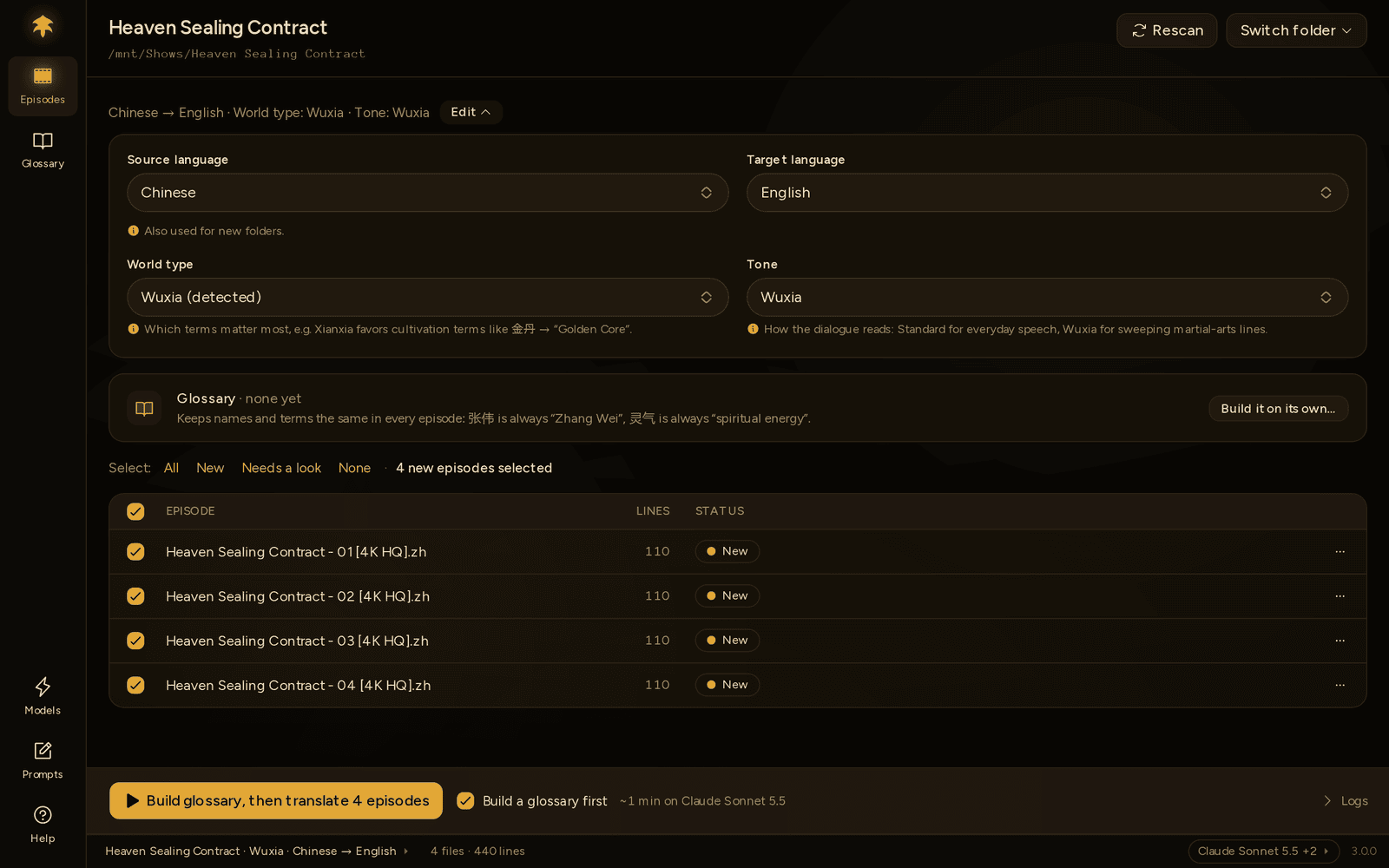
From top to bottom:
| Part | What it does |
|---|---|
| Folder name and path | Rescan reads the folder again. Switch folder ▾ lists your recent folders, plus Open another… and Close folder. |
| Settings line | Sums up the folder, such as Chinese → English · World type: Xianxia · Tone: Xianxia. Edit opens Source language, Target language, World type and Tone. It starts open the first time you open a folder. |
| Glossary row | Chinese sources only. What the glossary covers, and a way in. See The glossary step. |
| Select: | All · New · Needs a look · None, then how many episodes are ticked. |
| Episode list | One row per episode: its name, number of lines and status. |
| Footer | The gold button, a time estimate, and Logs. |
A few things worth knowing:
- Ticks. Every time you open a folder, the episodes without a translation are ticked. A new episode you drop into the folder shows up ticked when you come back to Polygluttony, or after Rescan. After a run, the episodes it translated are unticked; failed and unfinished ones stay ticked for another go.
- Settings. A language change is also used for new folders. The settings are locked while a run is going.
- Long lists. A long stretch of finished, unticked episodes folds into one line, such as · · · 10 more done · · ·. Click it to show them all.
- The estimate, such as ~3 min on Claude Sonnet 5.5 · uses glossary (232), is a rule of thumb, not a measurement. Your model and thinking level change it a lot.
For Chinese sources, a tick next to the gold button decides whether the glossary comes first. What it says depends on your glossary and the ticked episodes:
| Your glossary | The tick | The button |
|---|---|---|
| None yet | Build a glossary first | Build glossary, then translate 3 episodes |
| Some ticked episodes aren't in it | Add 1 episode to the glossary first | Update glossary, then translate 1 episode |
| Every ticked episode is already in it | No tick | Translate 1 episode |
The tick is on by default. If you untick it, Polygluttony remembers that for the folder. The glossary step uses Tidy up and leaves Look up names online off; for that, use the Glossary page. Updating only adds new terms. Terms already there, including your edits, stay as they are.

The glossary row above the list tells you where the glossary stands:
| The row says | What it means |
|---|---|
| none yet, with Build it on its own… | No glossary. The button opens the Glossary page, where you choose the episodes and options yourself. |
| 12 terms · covers 3 of 4 episodes, with Open | The glossary has read 3 of the episodes. When a ticked episode isn't in it, the row names it: Episode 04 isn't in it yet, so new names there may not match the rest. |
| 12 terms · covers all 4 episodes | Every episode is in it. |
| has a mistake on line 14, with Fix it |
glossary.json can't be read, so translations won't use it until it's fixed. |
Note
A glossary made with Polygluttony 2.x has no record of which episodes it read. Polygluttony counts every episode that already has a translation as read, so only the new ones are offered, and the row shows no coverage count.
Press the gold button, or Ctrl+Enter.
Step 1: the glossary. Above the list, two steps appear: Build the glossary (or Update the glossary), then Translate 3 episodes, with Step 1 of 2 and a line such as Finding names · 2 of 4 episodes read · 37 terms found. Each episode shows Reading names…, Names read or Waiting.

Step 2: translating. The progress line switches to lines and episodes, such as 1,200 of 2,400 lines · 1 of 4 episodes finished, with Step 2 of 2. Each episode moves through these states:
| State | Meaning |
|---|---|
| Waiting | Queued; starts when a slot frees up. Also shown while a provider has asked to slow down. |
| Translating… | Batches of lines are going to the model |
| Retranslating… | Redoing part of the episode: a batch that came back broken, or lines the checks flagged |
| Cleaning up… | Re-sending lines that still contain source-language text |
| Verifying… | The checks are running |
| Done, Needs a look, Failed | Finished. See Reading the results. |

Next to the state you see lines done and the current batch, such as 200/612 · batch 1 of 3. An amber ↺ counts retries and says why, such as ↺ 1 · a reply came back incomplete. When a provider asks Polygluttony to slow down, the row says so and counts down: Waiting — Anthropic asked us to slow down · 18s. The progress bar only moves when a batch actually comes back. Nothing is smoothed or estimated.
The status bar at the bottom of the window shows what's running on every page. Click it to come back here.
Click Watch on any episode in the run to open it in its own window. You see every line with its time, the original and the translation. Lines in the batch being sent shimmer until it comes back. Lines being redone show their old text dimmed. A line that couldn't be translated says not translated.
The window follows the batch being sent. Scroll away and a Jump to live button brings you back. Review actions are off until the run ends; then the same window is where you go through the episode's flagged lines. See Reading the results.
A banner above the list says how it went:
- Translated 4 episodes — 3 done, 1 needs a look.
- With the glossary step: Glossary built with 12 terms. Translated 3 episodes — 3 done. or Glossary updated with 2 new terms. …
- When a model left lines out: … · 60 lines weren't translated.
Check the new terms opens the Glossary filtered to its new, not yet reviewed terms, so you can look them over. If some episodes failed, Try again runs just those.
If Polygluttony isn't the active window when a run ends, you get a desktop notification. The status bar keeps the result, such as ✓ 3 done · ⚠ 1 needs a look, until the next run. Click it to get back to the list.
For what to do with Needs a look, see Reading the results.
Stop replaces the gold button while a run goes.
- While translating, finished episodes keep their files, and every batch that already came back is kept. Episodes in progress become Not finished; those that hadn't started become Not started. The banner says Stopped. 2 episodes weren't finished. and offers Resume 2 episodes, which carries on from the kept batches.
- While on the glossary step, the terms found so far are kept and nothing is translated: Stopped while building the glossary. 12 terms kept; nothing was translated.
Resuming works after a restart too. A Not finished episode is ticked the next time you open the folder; press the button and it carries on where it stopped. If the source file, the languages or the tone changed in between, it starts over instead.
A run stopped by an error, such as a rejected API key, says why in plain words. See When a run stops or fails.
- To redo one episode, open the ··· menu on its row and choose Translate again. It asks first, because the new translation replaces the current one.
- Or tick the episodes and press the button. The button warns you, such as Translate 3 episodes · 1 replaces an existing translation.
- A finished episode is translated from scratch. Only Not finished episodes carry on from where they were.
- Writing a translation removes the other variant: a clean
ep01.eng.assreplaces an oldep01.warning.eng.ass, and the other way round. If both are there anyway (left from an older version, say), the row says Old ep01.warning file is still here. Delete the one you don't want.
The ··· menu also has Show in folder and Open in episode window.
Logs at the bottom right opens a panel with what's happening under the hood: lines parsed, each request with its time and token counts, clean-up results, and why a part was retranslated. During the glossary step it shows the glossary's log instead. It keeps the last 500 lines, clears when a new run starts, and isn't saved anywhere.

The footer says why:
| The footer says | What to do |
|---|---|
| Tick the episodes to translate. | Tick at least one episode. |
| No model is ready to translate. Set one up in Models. | Connect a model, or add its API key, on Models. |
| Source and target languages are the same. | Change one of them under Edit. |
| Another folder is translating. You can start when it's done. | One run at a time, across all folders. Wait, or stop the other run. |
| A glossary job is running. You can translate when it's done. | Something is running on the Glossary page, such as a build or Improve. Wait for it to finish. |