Repository navigation
Property
Homes, cars, rentals and other things you own: what they're worth, what's owed on them, when the loan is paid off, and how they change the money each month.
Settings › Property › + Add property (or properties in config.yaml, see
Config Reference). The section appears once there is at least one.
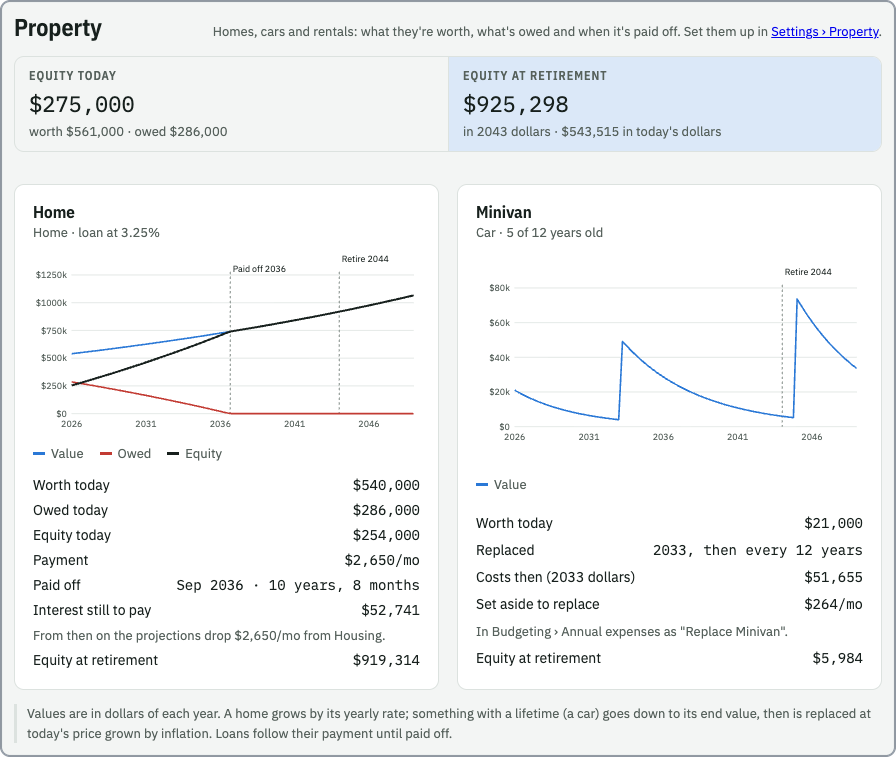
One per property: a chart of its value, what's owed and the equity (value minus owed) by year, in dollars of each year, with the payoff and retirement marked. Below it: worth today, the loan figures, the replacement or rent, and the equity at retirement.
Enter what's owed today, the interest rate and the monthly payment (from the statement). The card shows when it's paid off and the interest still to pay.
Pick the category the payment shows up in (e.g. Housing). Today's budget doesn't change (the payment is already in your transactions), but from the payoff on, Spending Over Time and Retirement's projected spending drop the payment from that category.
Give it a lifetime, its age today and what it's worth at the end. Its value goes down to the end value over the years it has left.
With Replace it at the end of its life ticked (the default), a new one at the replacement cost starts the next lifetime. That cost is either today's price (it grows with inflation until you buy it) or the actual price then (used as entered). The card shows what it costs in that year's dollars.
Budgeting gets an annual expense Replace … of (replacement cost in today's dollars − end value) ÷ lifetime a year: the money to set aside so the next one is paid for. Like any annual expense you can change or remove it in each budget. Budgets saved before the property was added keep their own annual list, so add it there if you want it counted.
Rent per month, after its costs is an income line in Budgeting (Rent, …). It continues after retiring, where it's taxed at the retirement tax rate like other retirement income, and shows as Rent in the Retirement chart. A mortgage on the rental works like any other loan.
The totals at the top show the equity today and at retirement (in that year's dollars and in today's dollars). Retirement shows the same equity beside its savings totals. Equity isn't turned into retirement income: selling or downsizing is up to you.