Beoremote Halo
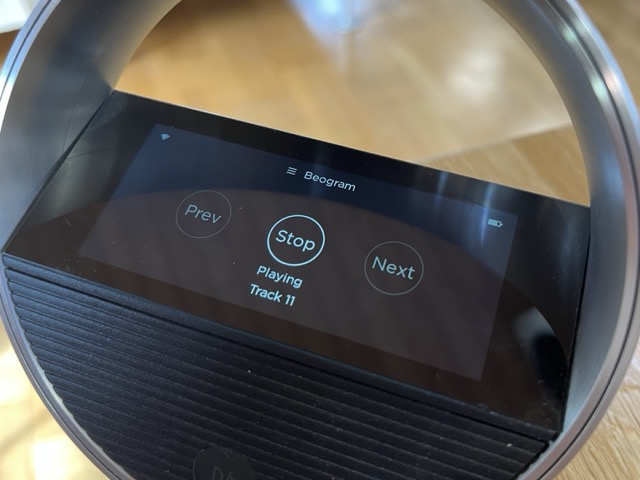
If you have a Beoremote Halo, BGAdaptor can give your old deck its own control page on it — Play, Stop, Next, Previous, and (for a turntable or tape deck) proper Play/Stop buttons rather than a single toggle, since those decks can't report "paused" on their own.
- On the Control page, press show Settings and go to the Beoremote Halo section.
- Click Start Halo scan to find your Halo on the network, or enter its IP address manually.
- Press Connect to confirm.
- The deck's controls appear as a page on the Halo. Its title matches the Adaptor Name you've set.
Warning
A Halo can only be controlled by one client at a time. If you're already using its custom pages for something else — for example through a Beoliving Intelligence system — don't also link it here, or the two will fight over it.
- On wake-up: Jump to player controls if a deck is playing — determine if the custom Halo page should show automatically when you approach the Halo. This setting only applies when the deck is playing. If disabled, swipe up on Halo to reach the custom page.
- Show an icon on the Play button — show icon style buttons instead of a text labels.
- Volume control of connected product on Play button — let the Halo's wheel adjust your primary B&O product's volume while this page is active. Be aware that it cannot control speakers defined on the Auto-expand page.
- Start playback by pressing the PLAY button. Easy access to Next and Previous.
- Track number (for CD's) and playback state (playing/stopped/standby) update on the Halo automatically as the deck plays.
- If you rename the adaptor or change what's linked to it, the Halo page briefly disappears and reappears with the new details — that's normal.
- BGAdaptor only sends updates to the Halo while its screen is on, to save power — when it wakes up, it catches up almost instantly, so you shouldn't notice any delay.
If you have a second BGAdaptor (a second deck) on the network, you can link the two together so both appear as separate pages on the same Halo — see Peer Mode.