Repository navigation
Family History Reminder
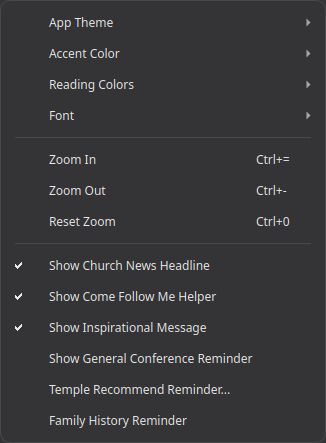
An opt-in nudge to spend a few minutes on family history now and then. Off by default, like the other reminders and extras.
Unlike General Conference or Temple Recommend, this one isn't tied to any particular date - a fixed schedule gets tuned out fast, so instead it fires at random intervals (never less than 4 days apart) for as long as it's turned on, so it stays noticeable rather than becoming background noise.
Open Menu → View → Family History Reminder - a plain on/off toggle, nothing to configure.
Turning it on doesn't show the reminder right away - the first one is scheduled at a random point in the future, same as every one after it.

Click the link to open FamilySearch. There's no "don't remind me again" here, unlike the other reminders - since this one already recurs at irregular, spaced-out intervals rather than around one specific instance, the View menu toggle is the only on/off switch.
- Installation - installing the Snap, first launch
- AI Integration - connecting your own AI endpoint for AI-assisted search
- Choosing an AI Setup - which AI service and models to use, with step-by-step setups
- Talk Prep - finding scriptures, talks, and articles for a talk or lesson
- Sync - keeping your notes, tags, and highlights in sync across devices
- Landing Page Extras - Church News, Come Follow Me, and Inspirational Message
- Journal - one searchable entry per day, optionally linked to a passage
- Listen - have any chapter read aloud, verse by verse, in a choice of 4 voices (each downloaded once)
- General Conference Reminder - an opt-in heads-up before Conference starts
- Temple Recommend Reminder - an opt-in, offline heads-up before your recommend expires
- Family History Reminder - an opt-in nudge at random, spaced-out intervals