Repository navigation
Talk Prep
Talk Prep helps you prepare a talk or a lesson. It asks a few questions about what you've been asked to speak on, then finds a short list of scriptures, General Conference talks, and Ensign/Liahona articles, with the key verse of each passage brought to the front.
It never writes your talk. A reminder stays at the top the whole time: rely on the Holy Ghost, and prayerfully ask the Lord for help as you prepare. Talk Prep only finds sources - what you say, and how, is yours.
Talk Prep uses AI Integration and the study index. Once AI Integration is set up, Talk Prep appears on the menu bar, next to Journal. If the study index hasn't been built yet, Talk Prep says so and offers Build Study Index....
Any AI service works - see Choosing an AI Setup. A small model running on your own computer is enough: the verses come mostly from what Conference talks on your topic cite (below), not from the AI's own judgment.
-
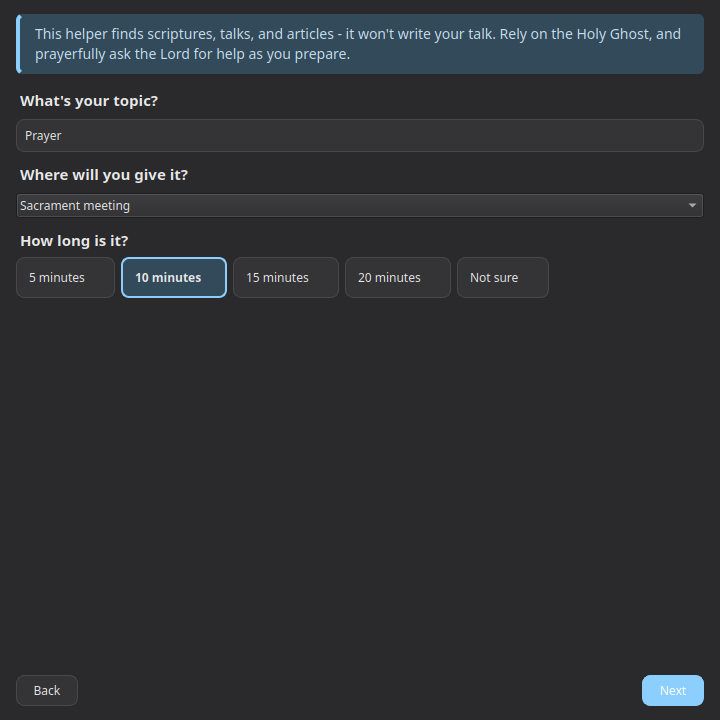
Your topic - e.g. "repentance" or "temple worship" - where you'll give it (sacrament meeting, stake conference, youth, Primary, or a lesson), and how long (5, 10, 15, or 20 minutes). Longer talks get more results: at most 5, 8, 12, or 15.
- For a lesson, choose what it's based on: this week's Come Follow Me reading (looked up online when you pick it), a scripture reading you type (e.g. "Alma 32-35"), or a lesson from a manual (its title). Passages from the reading come first.
- Were you given a specific talk or article? If so, type part of its title or the speaker's name and pick it from the list. The verses it cites are then always considered. You can also paste a passage from it that stood out to you - it only steers the search. (The app knows each talk's title, speaker, date, and the verses it cites, but never its text.)
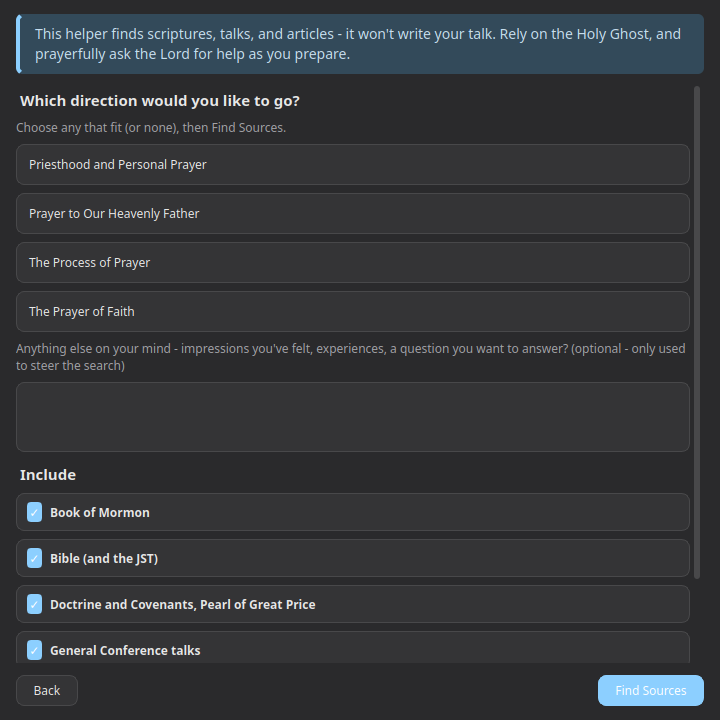
- Which direction? Talk Prep offers a few distinct directions, drawn from real talk titles and Topical Guide topics on your subject. Choose any that fit, or none. You can also describe impressions you've felt, experiences, or a question you want to answer - again, only to steer the search - and choose which sources to include.
- Results. Up to three key verses lead the list, then the passages, grouped: the Standard Works, General Conference talks, Ensign/Liahona articles, and anything else (Lectures on Faith, the Journal of Discourses, the Topical Guide, your own notes). In each passage, the key verse is highlighted.
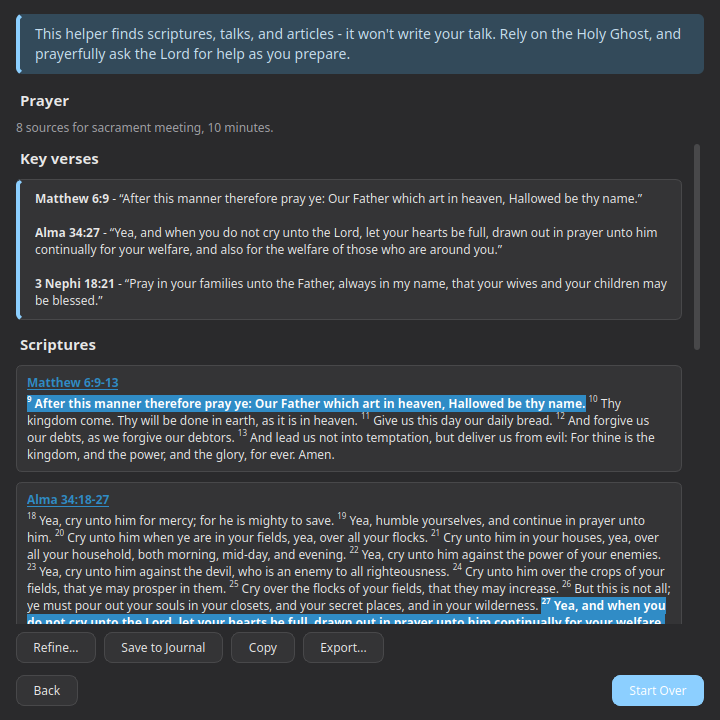
- Click a scripture to open it in the reader. Talk Prep stays open beside it.
- Click a talk or article to open it on churchofjesuschrist.org.
- Refine... goes back to the directions, to try another.
- Save to Journal adds the list to today's Journal entry. Copy puts it on the clipboard; Export... saves it as a text file - both ready to paste wherever you're writing.
Every preparation is saved. Close Talk Prep and open it again to see your recent ones - Open one to see its results again, or Delete it.
The verses Talk Prep suggests come mostly from what Church leaders actually cite when they speak on your topic: it finds the Conference talks and articles closest to it, and favors the verses they cite - more so the verses cited mostly in talks on this topic, rather than ones cited on nearly every subject. The Topical Guide's hand-picked key passages come first when your topic is one of its topics, and a passage has to be closely related to your topic by meaning to be shown at all. The AI picks the talks and articles and the directions, and fills in scripture only where citations run thin.
That's why the results are usually the verses you'd expect - D&C 121:7-8 and 122:7-8 for adversity, Isaiah 9:6 and Micah 5:2 for the Messiah - even when the words of your topic never appear in them. If a direction you choose leans elsewhere, the results follow it.
Preparations stay on this computer unless you turn on Menu → Sync → Sync Talk Prep Sessions - on each computer that should share them. See Sync.
Talk Prep sends your topic, the direction you choose, anything you type as impressions, and any passage you paste to the AI service you set up in AI Integration - with a service on your own computer, nothing leaves it. Choosing this week's Come Follow Me reading looks up the week's reading on churchofjesuschrist.org. Nothing else leaves your computer.
- Installation - installing the Snap, first launch
- AI Integration - connecting your own AI endpoint for AI-assisted search
- Choosing an AI Setup - which AI service and models to use, with step-by-step setups
- Talk Prep - finding scriptures, talks, and articles for a talk or lesson
- Sync - keeping your notes, tags, and highlights in sync across devices
- Landing Page Extras - Church News, Come Follow Me, and Inspirational Message
- Journal - one searchable entry per day, optionally linked to a passage
- Listen - have any chapter read aloud, verse by verse, in a choice of 4 voices (each downloaded once)
- General Conference Reminder - an opt-in heads-up before Conference starts
- Temple Recommend Reminder - an opt-in, offline heads-up before your recommend expires
- Family History Reminder - an opt-in nudge at random, spaced-out intervals