Repository navigation
Landing Page Extras
The landing page has three small boxes above Scripture of the Day, each entirely opt-in and off by default: Inspirational Message, Come Follow Me, and Church News. Until you turn one on, it shows a "click to enable" prompt and never makes a network request.
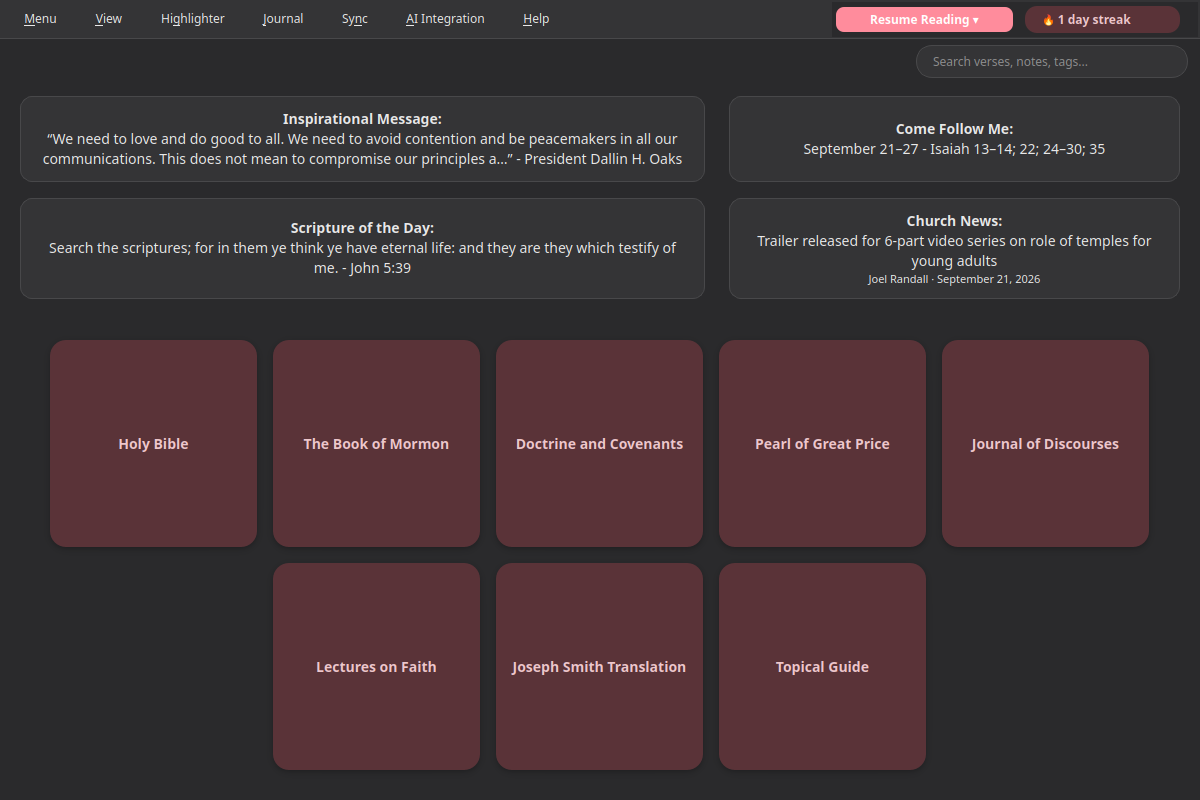
Two ways to enable any of them:
- Click the box itself - a disabled box's prompt ("Off - click to show...") is itself the opt-in gesture. Clicking it turns the feature on and fetches immediately.
- View menu - each has its own checkable toggle, so you can also turn one off again later without hunting for the box:
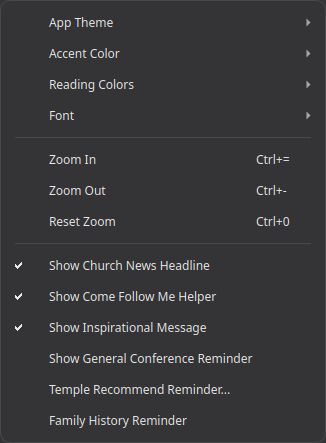
(The last three items in that screenshot - Show General Conference Reminder, Temple Recommend Reminder..., and Family History Reminder - are separate features, covered on their own pages: General Conference Reminder, Temple Recommend Reminder, and Family History Reminder.)
Whatever message is currently featured on churchofjesuschrist.org's own homepage - a quote from a Church leader, with attribution. Click the box to open the full page. This isn't confirmed to change on any fixed daily schedule; it shows whatever the Church's site currently has featured.
This week's Come Follow Me lesson - the date range and scripture block (e.g. "September 21-27 - Isaiah 13-14; 22; 24-30; 35"), read directly from the Church's own manual page for the current year's course of study. Click the box to open that week's full lesson.
The latest headline from Church News' own RSS feed - title and byline. Click the box to open the full article.
- All three re-fetch each time you return to the landing page, rather than caching for the session - each is a small, quick request, so this keeps whatever's shown current without adding session-state complexity.
- If a fetch fails (e.g. no internet connection), the box just shows "Couldn't load..." rather than an error dialog - it won't interrupt anything else you're doing.
- None of these send any of your own data anywhere - each only ever does a plain read of a public page.
- Installation - installing the Snap, first launch
- AI Integration - connecting your own AI endpoint for AI-assisted search
- Choosing an AI Setup - which AI service and models to use, with step-by-step setups
- Talk Prep - finding scriptures, talks, and articles for a talk or lesson
- Sync - keeping your notes, tags, and highlights in sync across devices
- Landing Page Extras - Church News, Come Follow Me, and Inspirational Message
- Journal - one searchable entry per day, optionally linked to a passage
- Listen - have any chapter read aloud, verse by verse, in a choice of 4 voices (each downloaded once)
- General Conference Reminder - an opt-in heads-up before Conference starts
- Temple Recommend Reminder - an opt-in, offline heads-up before your recommend expires
- Family History Reminder - an opt-in nudge at random, spaced-out intervals