Repository navigation
ESP32 S3 and C6
Status: supported with a plain ESP32-C6 Super Mini as the radio. Tried on 2026-10-26 with an ESP32-S3 N16R8: four labels online, replies to their polls in about 2.3 ms, and the radio updated over the cable. The C6 with screen as the radio is experimental: not tried yet. Labels: 1000.
Two boards: an ESP32-S3 with 8 MB PSRAM runs the AP (WiFi, API, dashboard, drawing), and an ESP32-C6 next to it is nothing but the label radio. WiFi never takes the radio from the labels, and each chip can have its own antenna. The S3 cannot talk to the labels without the C6: its radio does WiFi and Bluetooth, not 802.15.4.
With room to spare, the S3 also serves the label designer next to the dashboard, working on the layouts stored on the AP. Its layouts may also hold more: twice the lines of text, boxes, lines and icons of a C6 (Layout elements and limits). It can also fetch the weather for labels by itself.
| Chip | Release file |
|---|---|
| ESP32-S3 N16R8 (the AP) | openesl-ap-esp32s3-n16r8-<version>.bin |
| ESP32-C6 (the radio) | openesl-ap-radio-esp32c6-<version>.bin |
| or ESP32-C6 with 0.96" screen (the radio) |
openesl-ap-radio-esp32c6-lcd-<version>.bin; the screen shows the AP's status like the C6 with screen does |
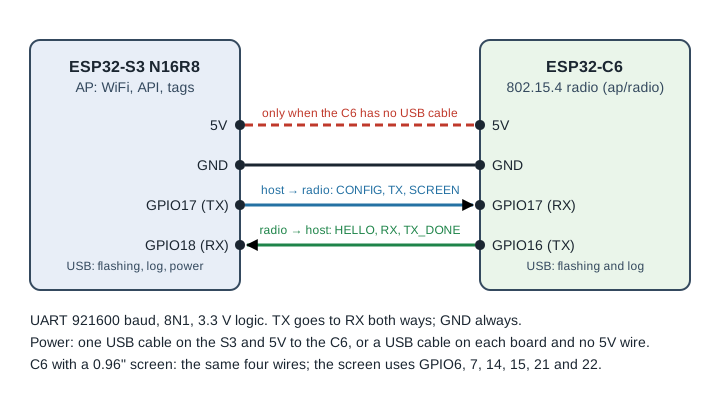
| ESP32-S3 | ESP32-C6 |
|---|---|
| GPIO17 (TX) | GPIO17 (RX) |
| GPIO18 (RX) | GPIO16 (TX) |
| GND | GND |
| 5V | 5V, only when the C6 has no USB cable of its own |
The C6 with screen is wired the same way.
TX goes to RX both ways: the S3's GPIO17 to the C6's GPIO17, and the C6's GPIO16 to the S3's GPIO18 (not GPIO16). On the C6 Super Mini, GPIO16 and GPIO17 are the holes marked TX and RX. The C6 needs power too: its own USB cable, or the 5V wire from the S3.
On the Flash AP tab, pick S3 + C6 on cable and the C6 radio you have (plain or with screen). The page flashes:
-
The C6 radio. Its log says
OpenESL 802.15.4 radio. - The S3, plugged in on its port marked USB. That port also gives the S3 its WiFi in the next step: the S3's WiFi setup and serial API answer only there, not on the COM port.
Then it shows the wiring. The S3's log, on its USB port, says radio 1.1 up when it reaches the C6, or no answer from the radio every two seconds when it does not: check that TX and RX are crossed and that GND is connected. The S3's COM port shows only the chip's boot text, not this log.
The easiest log to read is the C6's, on its own USB port (115200 baud). It starts with OpenESL 802.15.4 radio 1.1 (0.8.2), link v2 on UART1 (TX GPIO16, RX GPIO17, 921600 baud) (radio 1.0, link v1 before 0.8.2), and then:
| The C6's log | Means | Check |
|---|---|---|
channel 25, PAN 0x4553, ... once, then only a stats line every minute |
the link works both ways | |
no channel line at all, and rx 0 ... link errors 0 every minute |
nothing from the S3 reaches the C6 | the wire from S3 GPIO17 to C6 GPIO17 (RX), GND, TX and RX swapped |
channel .. again every 2–3 seconds |
the C6 hears the S3, but the S3 does not hear the C6, so it keeps sending its settings | the wire from C6 GPIO16 (TX) to S3 GPIO18 |
Since 0.8.2 the dashboard shows the radio under Firmware: its version, and whether the AP hears it (radio in GET /api/ota). Newer firmware also shows it in the AP facts as Radio (C6), with when it was last heard, and puts a red line at the top of the dashboard when the S3 has not heard the C6 for 30 seconds. The same is radio_lost in the health report and webhook, and a repair in Home Assistant. Once the C6 says channel only once, wake a label: on the dashboard it shows as seen just now, and replies.polls in GET /api/tags goes up.
With esptool instead: esptool --chip esp32c6 write_flash 0 openesl-ap-radio-esp32c6-<version>.bin.
The S3 is updated over the air like any AP. Since 0.8.2 the C6 radio is too, through the S3 and the cable, so no USB cable and no BOOT or RESET pin is needed:
- On the dashboard, under Firmware, the Radio line shows what the C6 runs, with an arrow button when the page has newer radio firmware. Or pick the radio firmware in the list and Send.
- With esl-client:
esl-client ota openesl-ap-radio-esp32c6-<version>-ota.bin --wait(the-lcd-one for a C6 with screen).
The S3 passes the image on to the C6 as it arrives, which takes some 10–20 seconds, and the C6 restarts into it. It keeps the new firmware once the S3 configures it, and goes back to the old one by itself after a minute if that does not happen.
A C6 flashed before 0.8.2 works with a newer S3, but takes new firmware only over USB: flash it once more from the Flash AP tab (flash the C6, then skip the S3). That gives it the second app slot it needs, and after that it is updated over the cable.
The link between the chips: docs/ap-radio-link.md.
Want the C6 somewhere else, with no wire? That is a separate setup with real limits: ESP32-S3 with a wireless C6 radio.