Repository navigation
Weather
An AP with PSRAM can put the weather forecast on labels by itself, with no computer or Home Assistant running. It fetches the forecast for a place from MET Norway (the data behind yr.no) every half hour or so, and a label is only sent a new screen when the weather on it changed.
| AP | Weather by itself |
|---|---|
| ESP32-C6 | no: send the weather from Home Assistant instead (below) |
| ESP32-C6 with screen | no: the same |
| ESP32-C5 | yes (experimental board) |
| ESP32-S3 + C6 | yes |
| ESP32-S3 + wireless C6 | yes |
The C6 has no PSRAM, and fetching a forecast over HTTPS takes more memory than it has next to its labels. On a C6 the Dashboard simply does not show the weather card.
The AP must reach the internet and know the time (it gets it over NTP), and the time zone decides what "tomorrow" means (set it under Settings → General on the Dashboard; without one it is UTC).
- On the Dashboard, tick the labels that should show the weather and choose Send → The weather (MET Norway), then Choose the place ….
- Pick a place the AP already has, or A new place: start typing the place, and pick it in the list that comes up:
Bergalready offers Bergen. Places in Norway come from Kartverket's place names, places abroad from Open-Meteo (type the whole name). The place's name is shown on the label. Your browser asks for the suggestions, so the computer needs the internet; without it, open Coordinates and paste them from a map, such as59.9139, 10.7522. - If the AP has no Weather layout for a label size yet, the dialog offers to add it (your other layouts stay). Keep the box ticked.
- Show the weather. The AP fetches the forecast at once, and the labels show it at their next check-in.
The Weather card under the label table lists the places and how their last fetch went. Remove stops a place; its labels keep what they show.
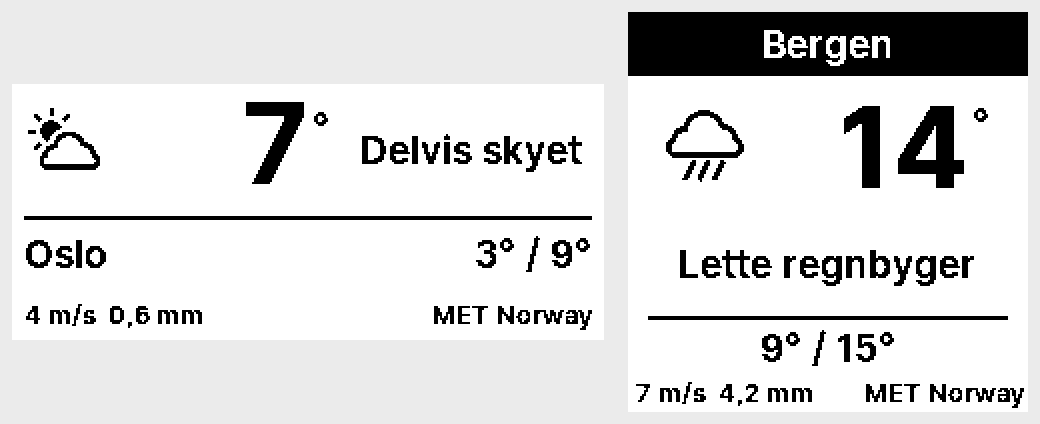
Fetch now asks the AP to fetch again. A forecast that has not expired yet is not fetched again: MET says in each answer when it has a new one, usually within the hour.
The template shows the place, the temperature now, a weather symbol, the weather in words, the lowest and highest temperature of the next 24 hours, wind and rain, and the credit "MET Norway". With the HTTP API (PUT /api/sources) you can write your own fields from values such as {temp}, {wind}, {dir}, {humidity} or tomorrow's {tmin} and {tmax}, for this layout or any other. Every value is listed in docs/data-sources.md.
-
Battery: the forecast changes a few times a day, so a weather label redraws a few times a day. Leave
{updated}out of your own fields: it changes with every new forecast and makes the label redraw about once an hour. - Credit: MET's data is free under CC BY 4.0. Keep "MET Norway" on the label (the template has it).
- One source per label: a label can only be in one place's list. Sending a label anything else (text, a picture, from the Dashboard, the API or Home Assistant) takes it out of its place, so the forecast does not overwrite it. Choose The weather again to put it back.
The weather template works on every AP: send its six fields yourself with the HTTP API or from Home Assistant. docs/data-sources.md has a Home Assistant example.