Repository navigation
ESP32 S3 with wireless C6
Status: experimental, and not secure yet. It has run on one S3 and one C6 with two labels, and new prices reached both screens, but it is not in a release. The link between the two chips has no password yet: any device on your network could pretend to be the radio or the AP. Use it only on a network you trust until that is done.
A separate setup from the ESP32-S3 + C6 on a cable: the ESP32-S3 runs the AP, and the ESP32-C6 that talks to the labels sits somewhere else on the same WiFi network, each on its own USB charger, with no wire between them. Useful when the labels are in a room the S3 cannot be in. The S3 can fetch the weather for labels by itself, as on a cable.
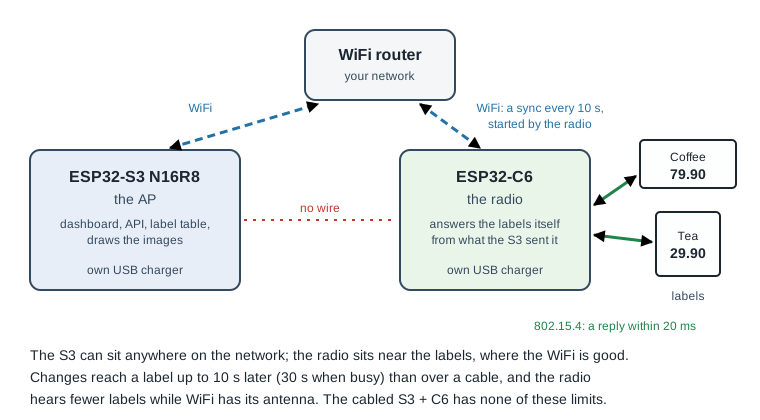
If the C6 can sit next to the S3, use the cable instead. It has none of the limits below.
These come from measurements on a C6, not guesses.
- Changes show up later. A new price reaches the radio at its next sync with the S3, normally within 10 s (about 5 s on average), up to 30 s when the labels keep the radio busy, and is shown when the label next wakes up. Add that to the label's usual interval.
- Big updates take longer. Images (about 5 KB each) and label firmware (about 53 KB) go over WiFi in the pauses between labels, and while they do the radio hears almost no labels. Measured: a sync with nothing new takes 0.1–0.2 s, one with images up to 4.6 s, and the few label replies that failed in the test all failed during the images. New label firmware rolls out more slowly than with a cable.
- A change to every label takes minutes. At most 4 images go to the radio per sync, so new prices on 1000 labels take roughly 4 minutes of image traffic or more (an estimate), and some labels show the change an interval or two later than others.
- The dashboard lags. "Last seen", battery and whether a label got its image come in batches and can be up to 30 s old.
- WiFi takes the radio from the labels. The C6 has one radio for WiFi and the labels. Each WiFi packet blocks the labels for about 90 ms, while a label listens only 20 ms for a reply. The radio therefore uses WiFi as little as it can, between labels. About 2–3 % of first replies were missed when measured with one small packet every 5 s (the label simply tries again); real syncs are larger and not measured yet. The AP never sends to the radio on its own, it only answers. The radio has no web page of its own: opening its address in a browser sends you on to the S3's dashboard (or says it has not found the S3 yet). Do not point anything else at it while it runs.
- It needs good WiFi where the radio sits. Weak WiFi makes every packet longer and costs more label replies.
- Many labels on one radio: more retries, as the quiet moments between labels get shorter. Not measured yet.
- New labels and new images cost a little battery. Until the radio has what a label needs, it tells the label to come back in 5 s, at most 3 times in a row.
- If WiFi or the S3 goes down, the labels keep showing what they have and get nothing new. After a long outage the dashboard misses some battery readings.
- No password on the link yet (see Status).
- Two chips to update: the S3 over the air as usual, the radio separately.
On the Flash AP tab, pick S3 + C6 over WiFi. The page flashes the C6 radio, then the S3 (on its port marked USB), gives the S3 its WiFi and API token, and then gives the C6 the same network and the S3's address. It shows the C6's log until the C6 says it is connected to the AP, with the WiFi signal at the C6; below −75 dBm it warns.
By hand instead:
- Flash the S3 with the
s3-n16r8-netradiofirmware, as any AP. - Flash the C6 with the radio firmware (
openesl-ap-netradio-c6). - Open the C6's USB port in a serial terminal and type
ssid <your network>,pass <password>andreboot. It finds the S3 on its own; if not, typehost <the S3's address>(it still looks for the S3 by itself if that address stops answering).statusshows how it is doing.
The dashboard's AP facts show the radio as Radio (C6): its address and when it was last heard, or how long it has not been connected. After 30 seconds without it the dashboard shows a red line at the top, and the health report and webhook say radio_lost. The address comes from the connection, so there is nothing to set for it on the AP. Settings for the radio on the dashboard are not there yet.
The details: docs/ap-netradio.md.
Over a cable the radio asks the S3 for each reply, which takes a few milliseconds. Over WiFi that takes 20–110 ms, too slow for a label. So the S3 tells the radio in advance what each label should get (its image, settings and firmware), the radio answers the labels on its own, and afterwards it tells the S3 what happened.
The technical details and the measurements: docs/ap-netradio.md.
One S3 can have up to 4 wireless radios, to cover a shop or a house that one radio cannot reach. Not tried on hardware yet, only tested on a PC. Set up each C6 the same way (the Flash AP tab, or by hand above); the S3 tells them apart by themselves.
- The first radio is on the AP's channel, as with one radio. Every other radio gets a channel of its own when it first connects, and keeps it.
- A label is served by the radio that heard it last. If its radio stops answering, the label looks on the other channels after three missed rounds and moves to a radio that answers there (labels with firmware 0.9.0 or newer; older ones stay where they are). It does not move just because another radio is closer.
- The dashboard shows a line per radio (channel, address, how many labels) and, next to each label's signal, which radio serves it.
- Replacing a broken radio: first press Forget next to it in the dashboard's AP facts (it shows while the radio is not connected), then connect the new C6. It takes the old one's place and channel. A fifth radio is turned away until one is forgotten.
- Extra limits: each radio costs the S3 some memory, the radios' syncs take turns, and changing the AP's channel only moves the labels on the first radio.
The details: docs/ap-netradio.md, "Several radios".