Repository navigation
The Popup
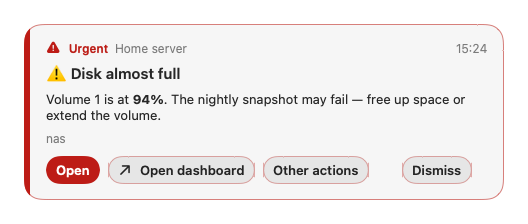
A popup is a floating panel that does not steal focus from the app you are typing in. Popups stack neatly. A popup shows:
- the topic label and time
- the priority as a colour, an icon and a word
- the title and the message (markdown is rendered; long text is cut with Show more)
- the message's tags (as emoji in the title)
- an attachment line (name and size)
- buttons
- Timeout. Set in the topic's plan (Close the popup after; important messages can have their own): Stays, 5 s … 5 min. The countdown pauses while the pointer is over it. Stays means it stays until dismissed.
- Level. Floating (above your windows) or over full-screen apps.
- Position. Top centre or top right.
- Sound. Set in the topic's plan (important messages can have their own); plays with the popup or the notification.
A topic can use a plugin card instead of this popup (Settings › Topics › Popup › Style), for example Alert Card. The card's own parameters decide its timing and look; the sound still comes from the plan.
| Button | What it does |
|---|---|
| Copy file, Download, Open folder | shown when the message has an attachment. Download saves it to ~/Downloads/NtfyBar (a name that exists gets (2)); Copy file downloads it if needed and puts it on the clipboard: images paste as a picture, other files paste as a file in Finder. Open folder selects the saved file in Finder, or opens ~/Downloads/NtfyBar if it has not been saved. The server's sign-in goes only to that server, never to external attachment links. |
| Buttons from the message |
view actions open a link (shown with ↗), http actions send a request (shown with ⇄). Hover to see the target host. |
| Copy | copies the message |
| Open | opens the message's click URL (http/https only) |
| Dismiss | closes the popup |
| Rule button | the one optional extra button from a Show popup rule action |
| Plugin buttons | up to three, from a plugin popup |
Buttons that come from the message are written by the sender. They are never the default button. ntfy's Android broadcast actions do not apply on a Mac and are hidden. If there are too many buttons, extra ones go into an Other actions menu.
Pressing a link button or Open marks the message read. A failed http button shows "Failed ✗".
Keys work once you click into the popup.
| Key | Does |
|---|---|
| Return | the highlighted button: Open if the message has a click URL, otherwise Dismiss |
| 1 to 3 | the first buttons |
| ⌘C | copy the message |
| Esc | dismiss |
More than 5 live messages on one topic within 10 seconds count as a burst. Further notifications and popups collapse into one notice ("Lots of messages") and one counting popup with an Open History button, until the burst ends.
Pausing and quiet hours are described in Usage.
