Repository navigation
Topics and Rules
Each topic has one plan. For every ntfy priority — Urgent, High, Default, Low, Min — the plan says what you see (nothing, a macOS notification, NtfyBar's popup or a plugin card), how long a popup stays and which sound plays. Below that, the plan can also copy the message, download attachments or run a command. Rules are exceptions to a plan: "when a message matches this, also do that — or do that instead". Plugins add cards, conditions and actions you can pick in a plan or in a rule.
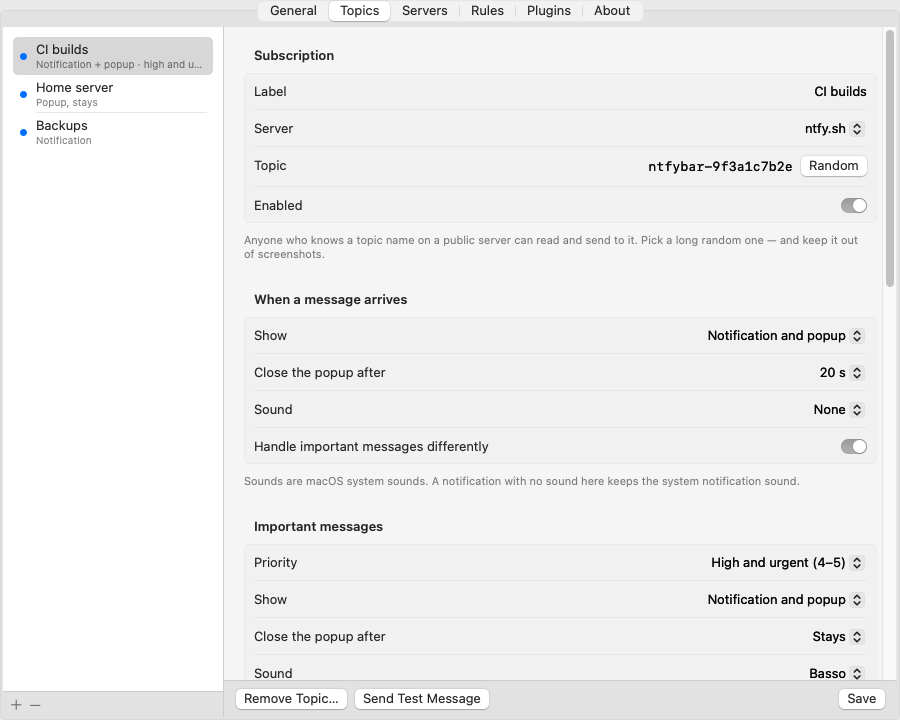
Settings › Topics › When a message arrives sets the plan:
| Row | Choices |
|---|---|
| Show | Nothing · A macOS notification · NtfyBar's popup · Notification and popup |
| Close the popup after | Stays, 5 s, 10 s, 15 s, 20 s, 30 s, 1 min, 2 min, 5 min (popup only; a plugin card decides its own timing) |
| Sound | None or a macOS system sound (Basso, Blow, Bottle, Frog, Funk, Glass, Hero, Morse, Ping, Pop, Purr, Sosumi, Submarine, Tink). A notification without a sound here keeps the system notification sound. |
Handle important messages differently adds a second block, Important messages, with the same three rows, for priority 4 and up (High and urgent (4–5)) or 5 only (Urgent only (5)); the sender sets the priority with the ntfy header Priority: 1–5. Switching it on starts the block as the plan above with Stays and Basso (the plan's own sound is kept if it has one). A plan that fits neither shape (hand-edited in config.json, or carried over from 1.3) shows as Custom per priority, one row per priority; Use simple settings… replaces the rows with one plan plus one for important messages (priorities 3, 2 and 1 take the Default row, 5 and 4 the Urgent row).
Popup (shown when any priority pops up): Style is NtfyBar's popup or a plugin card from an enabled plugin (for example "Alert Card · Show alert card"), with the card's own parameters. For NtfyBar's popup: Show over (normal windows / full-screen apps too), Position (top center / top right), Copy and Open buttons.
Also (every priority, in addition to the plan):
- copy the message to the clipboard
- download the message's attachment to
~/Downloads/NtfyBar, and optionally copy that file to the clipboard (text first, the file a second later; files over 100 MB are skipped) - run your own shell command
- also run all this for messages missed while away
Rules that also apply lists the rules that touch the topic, marked Also or Instead.
Other topic options: label, server, history retention.
A topic's plan is alerts (keys "1"…"5") plus popup:
"alerts": {
  "5": { "show": "popup", "timeoutSec": 0, "sound": "Basso" },
  "4": { "show": "popup", "timeoutSec": 0, "sound": "Basso" },
  "3": { "show": "popup", "timeoutSec": 10 },
  "2": { "show": "popup", "timeoutSec": 10 },
  "1": { "show": "popup", "timeoutSec": 10 }
},
"popup": { "level": "floating", "position": "topRight", "showCopy": true, "showOpen": true }
show is nothing, notification, popup or both; timeoutSec 0 = stays; sound is optional. A plugin card goes in popup.card: { "providerId": "com.ntfybar.alert-card.show", "params": { … } }. A topic written with the 1.3 keys (notify, popup.enabled, popup.timeoutSec, …) and no alerts still works: NtfyBar expands it on load and writes the new shape on the next save. Keep topic ids.
A topic (or a rule) can run a shell command with /bin/zsh in your home folder. The message is never pasted into the command. It arrives in environment variables and on stdin.
| Variable | Contains |
|---|---|
NTFY_MESSAGE, NTFY_TITLE
|
message text and title |
NTFY_PRIORITY, NTFY_TAGS, NTFY_CLICK
|
priority 1 to 5, comma-separated tags, click URL |
NTFY_ID, NTFY_TIME, NTFY_JSON
|
message id, unix time, the full message JSON |
NTFY_TOPIC, NTFY_TOPIC_LABEL
|
the topic name and your label |
say "$NTFY_TITLE"                                  # speak the title
jq -r .message <<< "$NTFY_JSON" >> ~/ntfy.log      # append the text to a log
Rules for safe commands:
- Always quote the variables.
- Never paste them into code another interpreter runs (
eval,sh -c "…$NTFY_MESSAGE…",osascript -e "…"). Anyone who can post to your topic controls that text. - Commands time out after 30 s by default and run one at a time per topic.
- On timeout NtfyBar stops the shell, not any background processes it started.
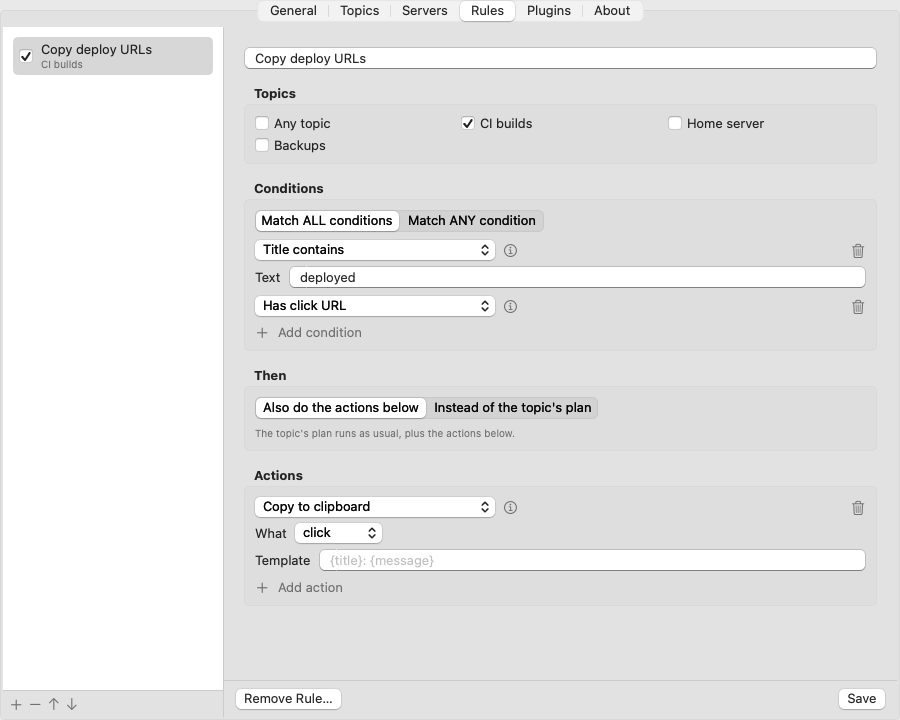
Settings › Rules. Rules are exceptions to a topic's plan. Every enabled rule whose conditions match runs, top to bottom. The list shows each rule's topics ("Any topic", or their labels; "Instead ·" in front when it replaces the plan). A rule can:
- be limited to some topics (empty means any topic)
- match all or any of its conditions
-
Then: Also do the actions below (the topic's plan runs as usual, plus the rule's actions) or Instead of the topic's plan (for matching messages the plan — notification, popup, sound, copy, download, command — is skipped; only the rule's actions run). In
rules.jsonthis isskipTopicDefaults.
A rule with no conditions never runs. To change what a topic always does, edit its plan in Topics. Messages that arrive while you were away do not run rules unless the topic processes missed messages. Rules live in rules.json; Edit rules file… opens it.
| Name | Matches when |
|---|---|
| Priority | priority >=, == or <= a value (1 to 5) |
| Title contains | case-insensitive text in the title |
| Title matches regex | regular expression on the title |
| Message contains | case-insensitive text in the body |
| Message matches regex | regular expression on the body |
| Has tag | the message carries a tag |
| Has click URL | the message has a click URL |
| Has attachment | the message has an attachment |
| Message is JSON | the body is a JSON object or array |
Regex runs on the first 8 KB of text with a time limit. A pattern that takes too long counts as no match and is logged.
| Name | Does |
|---|---|
| Show notification | posts a macOS notification |
| Show popup | shows the popup, with optional timeout, level, position and one extra button |
| Copy to clipboard | copies the message, title, click URL, JSON or a template |
| Run command | runs a shell command (same rules as above), with timeout and notify-on-failure |
| Open click URL | opens the message's click URL (http/https only) |
| Open URL | opens a URL built from a template (http/https only) |
| Publish message | publishes to one of your topics, from templates |
| Run Shortcut | runs a macOS Shortcut with the message as input |
| Play sound | plays a system sound (for example Glass, Basso, Ping) |
| Skip the topic's plan | don't run the topic's plan for this message (same as Instead with no actions) |
Template fields accept {title}, {message}, {priority}, {tags}, {click}, {topicLabel}, {id} and {time}. In URL templates the values are URL-encoded.
Example: an Open URL action with https://example.com/search?q={title}.
Plugins add their own conditions and actions to the same lists, shown as "Plugin name › Provider". See Plugins.
A plugin action that shows a card (Alert Card, ACK Button, the JSON Fields table, Reply Buttons) can also be a topic's popup style: Settings › Topics › Popup › Style.
The first launch of 1.4 folds rules that only set what a priority band shows (a priority condition, Skip topic defaults on, and only popup / plugin card / sound / notification actions) into the topic plans, once. Example: "priority ≥ 4 → popup stays + Basso" and "priority ≤ 3 → popup 10 s" become the topic's plan Popup, 10 s, with important messages (High and urgent) Popup, Stays, Basso. Every other rule (other conditions, extra buttons, copy, commands, additive rules, disabled rules) is kept as it was. A rule that uses a plugin card is folded in only if the plugin was enabled at that moment; otherwise set the card in the topic's Popup › Style and delete the rule.
The previous files are kept next to the new ones as config.pre-1.4.json and rules.pre-1.4.json, and one notification says how many rules became topic plans. To go back to 1.3.1: quit NtfyBar, restore those two files as config.json and rules.json, then install 1.3.1. (1.3.1 reads a 1.4 file as notification-only topics without the folded rules.)
Two behaviour changes to know:
- A rule's Show popup without its own timeout uses the topic plan's Close the popup after for that priority; a rule popup with its own timeout no longer stays for urgent messages (1.3 applied the topic's "urgent stays" to it).
- The "N messages while you were away" summary comes for every topic whose plan shows anything (notification, popup or card); a topic set to Nothing for every priority stays quiet.
