Reading your WinterDash
What the screen, light, and web page are telling you — in plain words.


Good to know up front: unplugging your WinterDash is always safe — it remembers your WiFi and settings, so you can pull the plug any time without losing anything.
📖 On this page
Every WinterDash has its own web page — open a browser on the same WiFi and type its name (like
http://winterdash-a1b2c3.local/) for the full live view and all the settings; on a screenless device it's the
main way to see your charger. Full tour: the web dashboard · put your own vehicle on it
with custom banners.

Run Home Assistant? WinterDash can appear there too — completely optional, nothing here needs it. See Home Assistant.
Mostly you don't have to think about volts — the status word does the work:
| Status word | What it means |
|---|---|
| Charging | The charger is doing its job. (Its exact phase — Bulk, Absorption, or Float — shows on a second line right under the status word, along with how long it's been in it.) |
| Charged | Topped up and kept there — the happy resting state for a stored vehicle. |
| Idle | On, but not actively pushing charge right now. Normal between top-ups. |
| Recond | Occasionally the charger runs a reconditioning cycle at a higher voltage to refresh the battery. Normal on some batteries — it passes on its own. |
None of these need anything from you. And the numbers don't worry you either:
- A little low while charging is normal — voltage rises and settles through the cycle. The dashboard bar shows where it sits in the expected range.
- "Lower than expected" is a note, not an alarm — usually the charger just paused or only started. Check again later.
- When to actually ask someone: a red Fault, or voltage stuck low / red for days. Then check the charger itself, or ask whoever set it up.
WinterDash reads the charger; it doesn't diagnose your battery. When in doubt, trust the charger.
| What you see | What it means | What to do |
|---|---|---|
| Charger readings — a voltage and a word like Charging, Charged, Idle | All normal. It's showing your charger. | Nothing. |
| Waiting for charger / Charger offline | It can't hear your charger over Bluetooth right now. After a couple of minutes the full-screen notice settles back to your banner with a small Offline tag — that's normal (e.g. you unplugged and drove off). | Check the charger is on and nearby. Just set it up? Double-check the Bluetooth code — see Connecting your charger. |
| A red Fault screen with the charger's error | Your charger reported a problem — not the WinterDash. | Look at the charger itself. |
| NETWORK FAULT — "unplug and replug to restart" | Its network got stuck and it couldn't self-fix. Not broken — just a small glitch. | Unplug, wait ~5 s, plug back in. (Safe — keeps your settings.) |
| A setup screen (QR / "join my WiFi") | New or reset — waiting to join your WiFi. | Scan the QR, or join the WinterDashAP WiFi network, then follow the prompts. |
💡 Some devices (the CYD) also have a coloured status light: 🟢 charged · 🟠 charging · 🔵 idle · 🔴 fault. It only comes on once the screen has dimmed, so a dark light next to a bright screen is normal — not a fault.
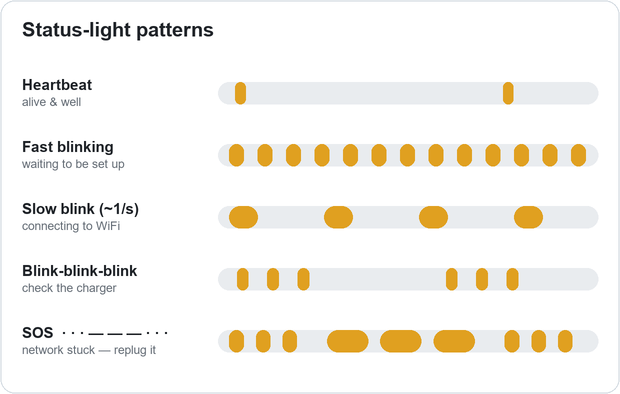
The light is your only signal, so it uses a few easy-to-tell-apart patterns:
| Light pattern | What it means | What to do |
|---|---|---|
| A brief flash every ~6 seconds (slow heartbeat) | Alive and well. | Nothing. |
| Fast, steady blinking | Waiting to be set up. | Scan the QR / join WinterDashAP, then follow the prompts. |
| A slower blink, ~once a second | Connecting to WiFi. | Give it up to a minute. |
| Blink-blink-blink (three, then a pause) | Needs attention — usually the charger is offline or faulting. | Check the charger. |
| SOS — · · · — — — · · · , repeating | Network stuck, needs a restart. Not broken. | Unplug, wait ~5 s, plug back in. |
| Solid on, then fast blinking — only while you hold the button | You're mid-reset. | Didn't mean to? Let go — nothing is lost. |
Now and then it restarts itself to clear a network glitch — back in ~10–15 seconds, nothing for you to do. Only if it can't self-fix after a few tries does it stop (so it won't loop forever) and ask you — NETWORK FAULT on the screen or SOS on the light (both in the tables above). The fix is always unplug, wait a few seconds, plug back in; if that doesn't help, leave it off a minute and check your home WiFi.
- It reads, it doesn't control. It shows what the charger broadcasts — it can't start, stop, or change the charger. Use VictronConnect for that.
- Some chargers don't send a temperature. Many IP65 models (including the tested 12/5) don't broadcast one, so it shows a dash ("–"). Normal — the charger's choice, not a WinterDash fault.
- It shows the charge stage, not exact target voltages. There's a charge-profile setting in two places: Victron's app controls the charger; WinterDash Settings does not — it only tells the coloured bar which range to expect. Set both to the same profile. Changing it in WinterDash never touches the charger.
- Best with one web page open at a time. Many at once can make it briefly restart (it comes back on its own).
- Demo mode shows made-up data. Switch to Live (or Auto, once paired) for real readings.
For the curious: checking its health — you never need this for everyday use
Skip this unless you enjoy poking around, or you're troubleshooting with someone who does. The one check that
matters: your device is healthy if netdis is 0 and probe is 1.
On the same WiFi, open these in a browser using your device's own name (yours has different letters/numbers):
-
http://winterdash-a1b2c3.local/— the main dashboard -
http://winterdash-a1b2c3.local/wd/info.json— a plain health snapshot -
http://winterdash-a1b2c3.local/wd/live.json— live readings
| Value | In plain terms | Healthy |
|---|---|---|
netdis |
In the "gave up, needs a restart" state right now? | 0 (1 = NETWORK FAULT / SOS) |
probe |
Is its own network self-check working? | 1 |
recov / life
|
How many times it has auto-restarted its network | 0 (a few over its life is fine) |
heap |
Free memory | tens of thousands |
uptime (on the live page)
|
Seconds since it last started | keeps counting up |
Next: The web dashboard — the full view · Troubleshooting — if something looks off.