Whats new in GhostDeck 1.22
Your screen finally knows when you unplugged.
Small release, big quality-of-life win — and a milestone: the first GhostDeck feature that works on every laptop, MSI or not, recognised or not. Because this one doesn't talk to the EC at all.
High-refresh panels are glorious — and merciless to your battery. A 240 Hz screen redrawing itself four times more often than it needs to while you're reading PDFs on a train is pure waste. Armoury Crate owners have had automatic switching for years; MSI Center never got it.
Now GhostDeck has it:
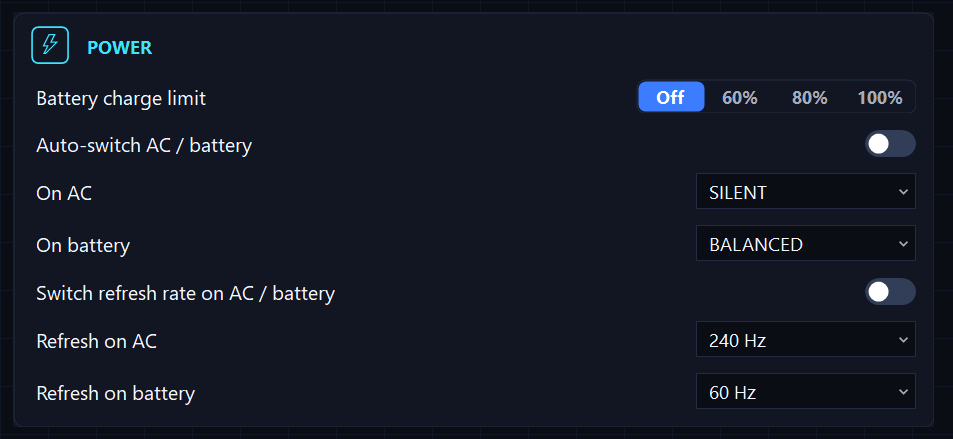
- Settings → Power: turn on Switch refresh rate on AC / battery and pick your two rates — say, 240 Hz on AC and 60 Hz on battery.
- The pickers aren't guessing: they list exactly the modes your panel reports at its current resolution. A 144 Hz laptop will offer 144, a 240 Hz one 240 — nothing you can't actually run.
- Unplug → the panel drops to your battery rate, with an OSD toast ("240 Hz → 60 Hz") and an entry in the change history. Plug back in → your high refresh is back before you've settled into the chair.
- It also applies once at startup, so the screen always matches the current power source — even if the plug was pulled while GhostDeck wasn't running.
- Frequency only. Resolution and colour depth are never touched, and the switch uses the same Windows display API the Settings app does — fully reversible, no driver tricks.
- Primary display only. Your external monitors are none of our business.
- Works everywhere. No EC write means no model gate: this runs on unrecognised firmware too, where the rest of the app stays read-only.
- Scripts can read the current rate:
GhostDeck.exe --statusnow includesrefreshHz.
Credit where it's due: this one was requested by @alibi90 in discussion #18 — keep the ideas coming.
- The History Export… button no longer clips its label at 125–140% display scale.
- The Models tab intro now shows a live count of tested models (it stubbornly said "1 tested" long after the community pushed it to five), and the whole tab is finally translated into all 8 languages.
Update from the Updates tab (one click) or grab the build from the latest release. Full details in the changelog. Got a feature that would make your laptop behave? Discussions is where 1.22 was born. 👻