Whats new in GhostDeck 1.24.0
Settings that know where you left off - and a signature on the box.
A quality-of-life release: the Settings tab got a full redesign around icon sub-tabs and a live Start dashboard, the Updates tab became a proper release browser, every download is now digitally signed, and a thirteenth model joins the Tested club.
One long two-column page had quietly grown to eleven sections (called out in discussion #9 - thanks @its475). Settings is now split into six groups behind an icon strip, the same pattern you know from the Status tab: General / Power / Notifications / Gaming / Hotkeys / System.
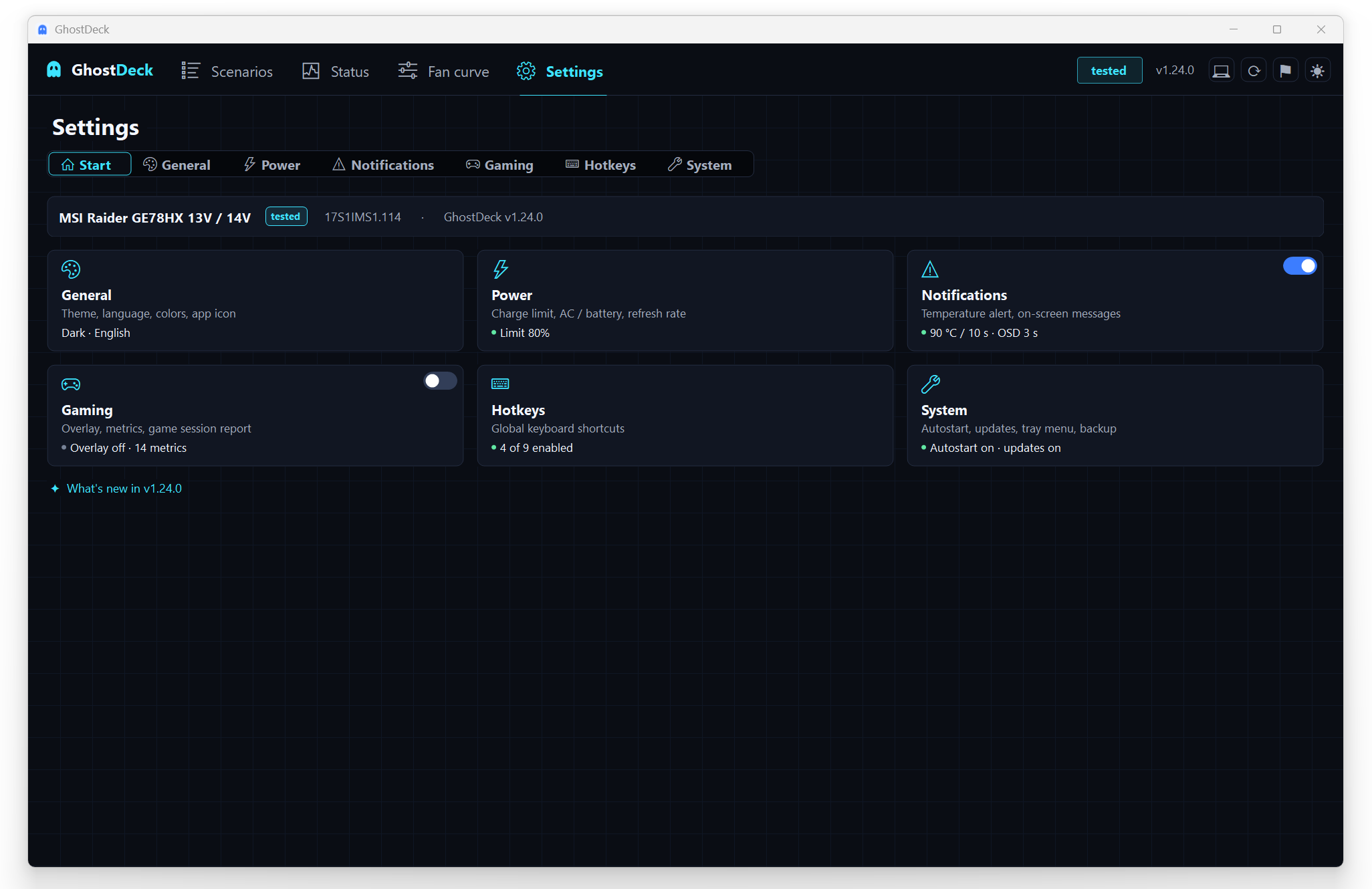
- Start page = dashboard. The first sub-tab shows one tile per group, and every tile carries a live third line with your current values - charge limit and refresh rates, alert threshold, overlay state and metric count, enabled hotkeys, autostart - with a small on/off dot. You see your whole configuration without a single click.
- Quick switches. The Gaming and Notifications tiles have a master toggle right on the tile: flip the overlay or the temperature alert without entering the group.
- Status header. Your laptop model, support tier, firmware and app version sit above the tiles - and when the daily check finds a new release, the header grows a clickable "new version available" chip.
- It remembers where you were. GhostDeck reopens Settings on the sub-tab you used last, even after an app restart.
- "What's new in vX" under the tiles jumps to Updates with the current version's notes already expanded.
- Display settings (refresh-rate switching) moved into their own card next to Power, and the active page is now always highlighted in the top bar - including the icon-only buttons.
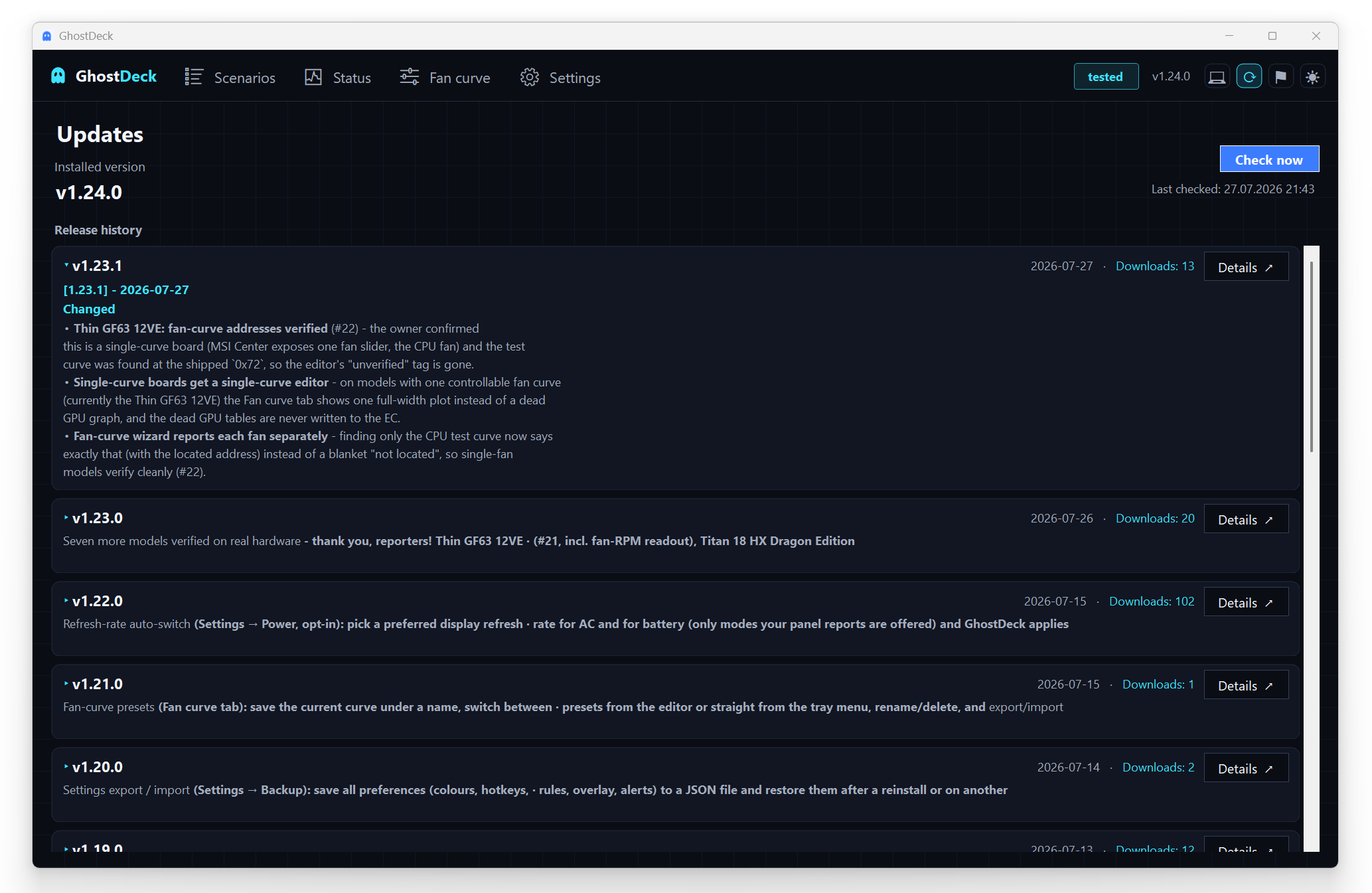
- The list now covers the last 20 releases, each with its download count.
- Click a release to read its full notes right there - formatted headers, bullets and bold, expand and collapse inline. The Details button still takes you to GitHub.
- Lost connection? The tab recovers on its own: a Try again button, an automatic re-check every 30 s, and a fresh attempt every time you open it. No more "error until restart".
Starting with 1.24.0, the GhostDeck.exe published on GitHub carries an Authenticode digital signature: "WYGODA DAWID FENIX INSPIRE" (Azure Artifact Signing, RFC 3161 timestamp).
What that means for you:
- Right-click the exe → Properties → Digital Signatures shows a verified publisher, and the UAC prompt names the publisher instead of "Unknown publisher".
- A signed file cannot be tampered with - any modification breaks the signature.
- The release pipeline refuses to publish an unsigned or wrongly-signed build.
- SmartScreen warnings for new releases will gradually disappear as the signature builds reputation.
The Crosshair 16 HX AI D2XW (15P4EMS1) is promoted to ✅ Tested with a verified fan curve (#43 / #44) - a clean per-scenario EC capture confirmed the register map and the wizard found the owner's test curve exactly where expected. Thank you @Harsh3456D!
-
A refused hardware read can no longer crash the app. Windows occasionally recycles its WMI service (the interface every EC read goes through); one such moment used to raise a scary ".NET unhandled exception" box. GhostDeck now keeps the last reading, retries on the next tick, and logs anything truly unexpected to
errors.loginstead of showing a dialog. - A switched-off gaming overlay no longer polls the hardware in the background.
- Settings always reflect the live state - switch the language from the tray menu or the theme from the header button and the page follows instantly.
Update from the Updates tab (one click) or grab the signed build from the latest release. Full details in the changelog. 👻