Repository navigation
Device Automation
Make a knob move by itself while the pattern plays: a filter that opens through the bar, a chord that swells. You draw the movement as points on the steps of a lane.
Press K5 until the second line says AUTOMATION: three times from a sound page. As on SEQ, PLAY repeats the
pattern here, so you can draw a lane while it goes round. Automation is the song's: it moves the MUSIC kit.
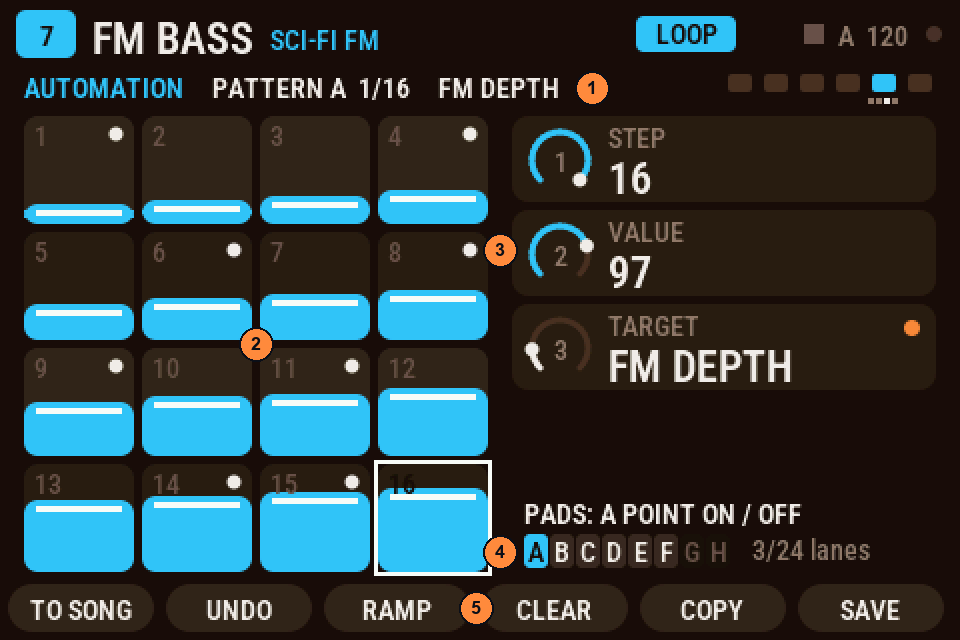
| What it is | |
|---|---|
| 1 | the pattern, its grid, and the knob this lane moves: here FM DEPTH of the FM BASS |
| 2 | the lane, as the 16 pads: a bar for each step, its height the value. Bright with a white edge: a point. Dim: the value still held from the last point. The dot in a corner: the sound plays on that step |
| 3 | STEP · VALUE (in the knob's own unit; -- where the step has no point) · TARGET (which knob; OFF: none chosen). The orange dot says this knob has a lane |
| 4 | the eight patterns, and how many of the song's 24 lanes are in use: 3/24 lanes
|
| 5 | TO SONG (or TO LOOP) · UNDO · RAMP · CLEAR · COPY · SAVE |
AUTO opens on the knob you turned last.
flowchart LR
  A["Turn the knob<br/>on its own page<br/>(MUSIC kit, MIX or MASTER)"] --> B["K5 until AUTO<br/>TARGET names that knob"]
  B --> C["Pad 1<br/>a point where the knob stands<br/>encoder 2: its value"]
  C --> D["Pad 16<br/>a second point<br/>encoder 2: its value"]
  D --> E["F3 RAMP<br/>straight lines between the points"]
| Do this | You see | |
|---|---|---|
| 1 | select a sound of the MUSIC kit and turn the knob you want to move: CUTOFF on the FILTER page, VOLUME on MIX, ROOM SIZE on MASTER | the knob's value |
| 2 | press K5 until AUTO, with the same sound selected | TARGET already names that knob. Or turn encoder 3 to choose another |
| 3 | hit pad 1, then turn encoder 2 down | a point on step 1, where the knob stood; then lower |
| 4 | hit pad 16, then turn encoder 2 up | a point on step 16 |
| 5 | press F3 RAMP | every step between gets a value on the straight line from one point to the next: the picture above. The top line says RAMP
|
| 6 | press PLAY | the knob moves, round after round |
For a second lane on the same sound, turn TARGET to another knob and put points on it. Both play.
On the sound's own page an orange dot beside a value says a lane moves that knob. Here FM DEPTH of the FM BASS:

| Targets | |
|---|---|
| the sound's own | any of its 25 values: CUTOFF, FM DEPTH, POSITION, a send ... Not its ENGINE |
| its place in the mix | VOLUME, PAN |
| the master | DELAY TIME, FEEDBACK, ROOM SIZE, DAMPING, DRIVE. Not OUTPUT |
| Control | What it does | The top line says |
|---|---|---|
| a pad | a point on that step, on (where the knob stands) or off | without a target: TURN TARGET FIRST
|
| SHIFT + a pad | hear that pad's sound and select it | |
| DATA | select a sound: it has its own lanes | |
| encoder 1 | STEP: the step in the frame | |
| encoder 2 | VALUE of the point on that step. Where there is no point, the first click makes one where the knob stands | without a target: TURN TARGET FIRST
|
| encoder 3 | TARGET: which knob the lane moves. OFF, then the 32 knobs, round and round |
|
| F2 UNDO | takes back points, a RAMP or a CLEAR. Again: redo |
UNDO: EDITS, UNDO: RAMP, UNDO: CLEAR
|
| F3 RAMP | joins the points with straight lines |
RAMP, or SET TWO POINTS FIRST
|
| F4 CLEAR | empties the lane in this pattern |
LANE CLEARED, or NOTHING TO CLEAR
|
| F5 COPY | copies the pattern, with its points, into the next empty one, and goes there | COPIED A > G |
| LEFT · RIGHT | the pattern before / after | |
| A | the tempo. SHIFT + A: the swing |
The grid's keys work here too: SHIFT + F5 and F6 change the pattern's grid, SHIFT + LEFT and RIGHT move the 16 steps the pads show (Device Finer Grids). B has no job on AUTO.
| A point holds | until the next point, or the end of the bar |
| Nothing is written | a lane never changes the sound or the mix you saved: at every bar line each knob is back where you set it by hand |
| It moves in steps | a step at a time: a 16th note, or a 32nd or a 64th in a pattern with a finer grid. RAMP makes a sweep sound smooth |
| 24 lanes a song | the first point of a knob takes a lane, for all eight patterns; clearing its last point gives it back. With none left: ALL 24 LANES IN USE
|
| I want | Do this |
|---|---|
| a chord that swells | STRINGS: a note on step 1, LENGTH 12 (on SEQ). AUTO: TARGET VOLUME, a low point on step 1, a high one on step 12, RAMP |
| a filter sweep into the drop | AUTO, the bass, TARGET CUTOFF, points on steps 1 and 16, RAMP |
The demo song has two lanes of its own: the bass's CUTOFF opens through pattern F, and the strings' VOLUME swells through pattern E.
- Device The Stage - draw a lane with the mouse
- Device Mixer And Effects - the faders and master values a lane can move
- Device Finer Grids - finer steps for a lane
- Device Layers And Intensity - the other way music changes by itself
- The manual, section 12: Automation: what a lane can move, the quick way, four rules
-
fw_sequencer.h -
aut_put,auto_turn,auto_toggle,auto_ramp -
fw_softkeys.h -
soft_auto -
fw_pages.h -
set_page: AUTO opens on the knob turned last -
sfx_song.h -
SFX_AT_*: what a lane can move;SFX_LANES