Repository navigation
Device Cheat Sheet
Every page and every shortcut: first on one picture, then as one small table for each page. For those who know their way around and want to look something up.
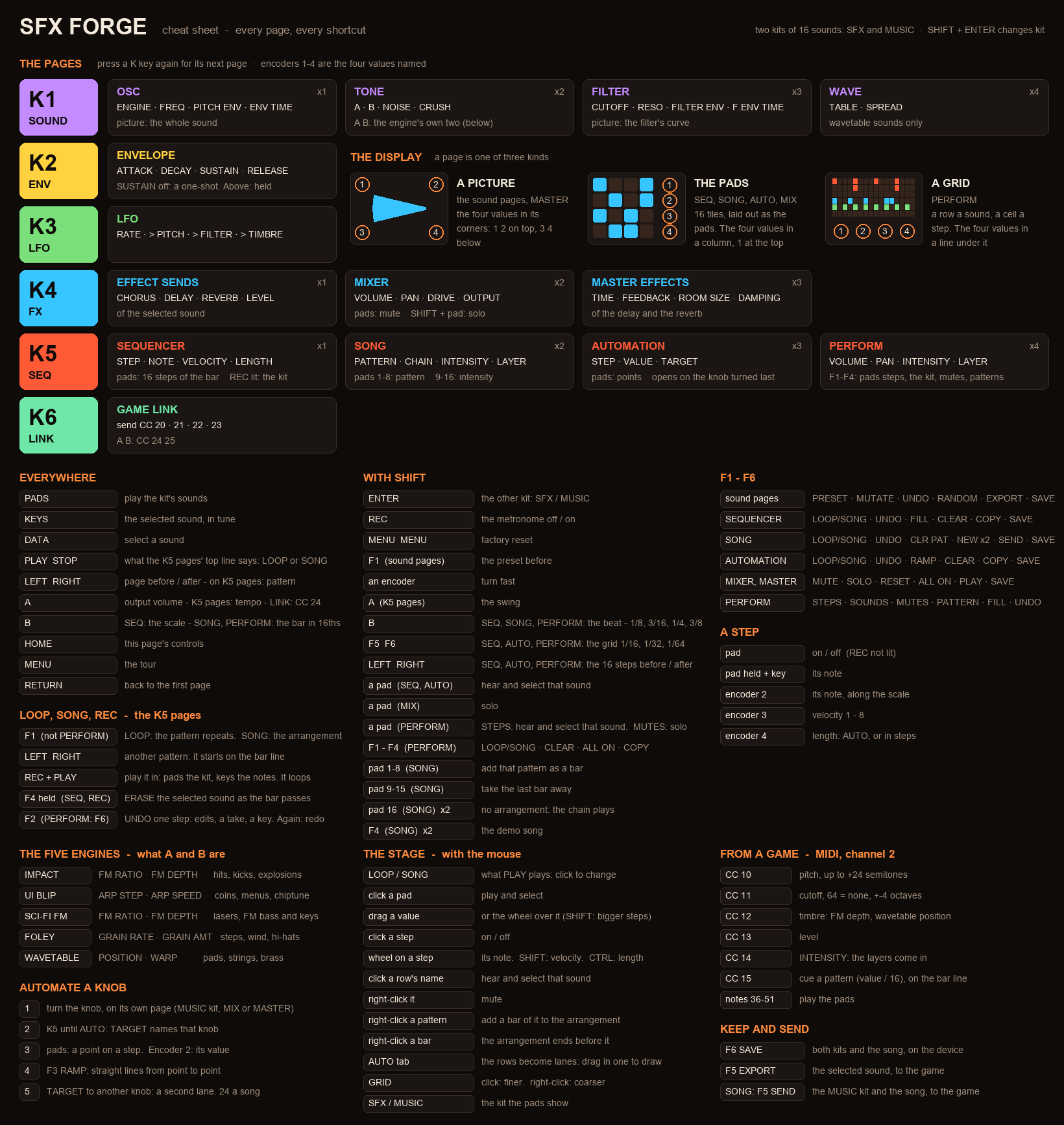
On the device itself, HOME shows the controls of the page that is open.
"K5 ×2" below means: press K5 twice, coming from a page of another key. The first press opens the key's first page; each press after that goes to its next page.
| Control | What it does |
|---|---|
| pads | play the kit's sounds (on SEQ, SONG, AUTO, PERFORM and MIX they have another job: below) |
| keys | the selected sound, in tune |
| DATA | select a sound |
| SHIFT + ENTER | the other kit: SFX / MUSIC |
| PLAY · STOP | a pattern round and round (LOOP) or the song (SONG). PLAY again stops too |
| REC | lit: while it plays, what is played is recorded into the pattern. SHIFT + REC: the click on / off |
| K1 - K6 | the pages. Again: the key's next page |
| LEFT · RIGHT | the sound page before / after. On SEQ, SONG, AUTO, PERFORM: the pattern before / after |
| A | the output volume. On SEQ, SONG, AUTO, PERFORM: the tempo (SHIFT: the swing). On LINK: CC 24 |
| HOME · RETURN | this page's controls · back to the first page |
| MENU | the tour. SHIFT + MENU, twice within three seconds: factory reset |
| SHIFT + an encoder | turn fast: eight times |
| Page | Key | Encoders 1 - 4 |
|---|---|---|
| OSC | K1 | ENGINE · FREQ · PITCH ENV · ENV TIME |
| TONE | K1 ×2 | A · B · NOISE · CRUSH |
| FILTER | K1 ×3 | CUTOFF · RESO · FILTER ENV · F.ENV TIME |
| WAVE | K1 ×4, wavetable sounds only | TABLE · SPREAD |
| ENV | K2 | ATTACK · DECAY · SUSTAIN · RELEASE |
| LFO | K3 | LFO RATE · > PITCH · > FILTER · > TIMBRE |
| FX | K4 | CHORUS · DELAY · REVERB · LEVEL |
F1 - F6 on all of them: PRESET (SHIFT: the one before) · MUTATE · UNDO · RANDOM · EXPORT · SAVE. More: Device Make A Sound, Device The Five Engines.
| Control | What it does |
|---|---|
| pads | 16 steps of the bar, on / off. REC lit: they play the kit |
| SHIFT + pad | hear and select that pad's sound |
| pad held + key | the step plays the key's note |
| encoders 1 - 4 | STEP · NOTE · VELOCITY (1 - 8) · LENGTH |
| B | the scale NOTE moves in. SHIFT + B: the beat |
| F1 - F6 | TO SONG / TO LOOP · UNDO · FILL · CLEAR (REC playing: ERASE, held) · COPY · SAVE |
| SHIFT + F5 · F6 | the pattern's grid coarser · finer |
| SHIFT + LEFT · RIGHT | at 1/32 and 1/64: the 16 steps before / after |
More: Device Make A Beat, Device Recording, Device Finer Grids.
| Control | What it does |
|---|---|
| pads 1 - 8 | pattern A - H: at once while stopped, from the next bar line while it plays |
| pads 9 - 16 | INTENSITY, 12 % to 100 % |
| SHIFT + pad 1 - 8 | add that pattern to the arrangement as a bar |
| SHIFT + pad 9 - 15 | take the last bar away |
| SHIFT + pad 16, twice | no arrangement |
| encoders 1 - 4 | PATTERN · CHAIN · INTENSITY · LAYER of the selected sound |
| B | the bar's length in sixteenths, 1 - 16. SHIFT + B: the beat |
| F1 - F6 | TO SONG / TO LOOP · UNDO · CLR PAT · NEW (SHIFT: DEMO), both twice · SEND · SAVE |
More: Device Song And Arrangement, Device Layers And Intensity, Device Time Signatures.
| Control | What it does |
|---|---|
| pads | a point on that step, on / off |
| SHIFT + pad | hear and select that pad's sound |
| encoders 1 - 3 | STEP · VALUE · TARGET (the page opens on the knob turned last) |
| A | the tempo (SHIFT: the swing). B does nothing here |
| F1 - F6 | TO SONG / TO LOOP · UNDO · RAMP · CLEAR · COPY · SAVE |
| SHIFT + F5 · F6, SHIFT + LEFT · RIGHT | the grid, and the steps shown, as on SEQ |
More: Device Automation.
| Control | What it does |
|---|---|
| F1 STEPS | pads: 16 steps of the selected sound. SHIFT + pad: hear and select a sound. Pad held + key: the step's note |
| F2 SOUNDS | pads: the kit. REC playing: recorded |
| F3 MUTES | pads: mute. SHIFT + pad: solo |
| F4 PATTERN | pads 1 - 8: pattern A - H · pads 9 - 16: INTENSITY |
| F5 · F6 | FILL the selected sound · UNDO (again: redo). No SAVE here: F6 on SEQ |
| SHIFT + F1 - F6 | TO SONG / TO LOOP · CLEAR · ALL ON · COPY · the grid coarser · finer |
| encoders 1 - 4 | VOLUME · PAN · INTENSITY · LAYER |
| B | the bar's length. SHIFT + B: the beat |
| REC | lights REC, and makes the pads SOUNDS |
| SHIFT + LEFT · RIGHT | at 1/32 and 1/64: the 16 steps before / after |
More: Device Perform.
| Page | Pads | Encoders 1 - 4 | F1 - F6 |
|---|---|---|---|
| MIX | mute · SHIFT: solo | VOLUME · PAN · DRIVE · OUTPUT | MUTE · SOLO · RESET (the selected fader and pan) · ALL ON · PLAY · SAVE |
| MASTER | play | DELAY TIME · FEEDBACK · ROOM SIZE · DAMPING | the same; RESET: the master's values |
More: Device Mixer And Effects.
| Control | What it does |
|---|---|
| encoders 1 - 4, A, B | send CC 20 - 25 to the game, on MIDI channel 1 |
| pads | play, and send notes 36 - 51 |
| from the game, MIDI channel 2 | CC 10 - 13: pitch, cutoff, timbre, level · CC 14: intensity · CC 15: pattern |
| notes from the game | 36 - 51 play the pads |
| F1 - F6 | as the sound pages. F5 EXPORT: the selected sound as SysEx |
More: Unity Device Link Setup, Link Protocol.
| It says | It means |
|---|---|
LOOP: PATTERN REPEATS · SONG: PLAYS IN ORDER
|
F1 (on PERFORM SHIFT + F1): what PLAY plays now |
REC ON: PATTERN LOOPS |
REC changed SONG to LOOP |
CLICK ON · CLICK OFF
|
SHIFT + REC |
ERASE: HOLD F4 |
F4 while REC plays on SEQ: held, it erases the selected sound |
MUSIC KIT ONLY: K5 SEQ |
a hit of the SFX kit was not recorded |
UNDO: ... · REDO: ... · NOTHING TO UNDO
|
F2 (on PERFORM F6) |
PRESS AGAIN: ... · AGAIN: ...
|
a key that asks twice: press it again while this stands |
EVERY 1/4 · EVERY 1/8 · EVERY 1/16 · EVERY 1/32 · SOUND CLEARED
|
FILL: where the sound stands now |
CLEARED - F2: UNDO · LANE CLEARED · PAT CLEARED - F2: UNDO · NOTHING TO CLEAR
|
CLEAR on SEQ · on AUTO · CLR PAT on SONG |
COPIED A > G · NO EMPTY PATTERN
|
COPY |
GRID 1/32 · GRID 1/16 - F2: UNDO · AGAIN: G DROPS 4 · FINEST: 1/64 · COARSEST: 1/16
|
SHIFT + F6 and SHIFT + F5: the grid |
STEPS 17-32 · 1/16: ALL STEPS SHOWN · BAR ENDS AT STEP 8
|
SHIFT + LEFT or RIGHT |
BAR: 12/16 = 3/4 · BEAT 3/8: BAR 6/8
|
B · SHIFT + B |
BAR ADDED · BAR REMOVED · 32 BARS: FULL · NO ARRANGEMENT · ARRANGEMENT IN USE
|
the arrangement, and CHAIN while there is one |
MUTED · UNMUTED · SOLO · SOLO OFF · ALL ON · FADER RESET · MASTER RESET
|
F1 - F4 on MIX and MASTER |
TURN TARGET FIRST · SET TWO POINTS FIRST · ALL 24 LANES IN USE
|
AUTO |
SAVED · NOT SAVED: STORE FULL
|
F6 SAVE |
FACTORY RESET · RESET - NOT SAVED
|
the factory reset: done · done, but the store did not take it |
SFX KIT · MUSIC KIT
|
SHIFT + ENTER |
EXPORTED · SENDING · SENDING - NO GAME SEEN · SONG SENT
|
F5 EXPORT · F5 SEND on SONG |
SONG LOADED · BAD SONG · NEWER SONG: UPDATE
|
a song came from a game: taken · damaged · from a later format |
- Device Controls And Pages - the same, explained
- Device Quick Start - five minutes from nothing
- FAQ
- Glossary
- The manual, section 20: Every control, page by page
- The cheat sheet's picture in the repository, drawn by figures.py
-
fw_events.h - the HOME texts:
HELP_SOUND,HELP_SEQ,HELP_SONG,HELP_AUTO,HELP_PERFORM,HELP_LINK,HELP_MIX -
fw_state.h -
SOFT: the captions of F1 - F6 on every page - fw_softkeys.h - what each soft key does
