Repository navigation
Device The Stage
Work with the mouse. In the Playground and the plugin, Stage opens a bigger picture of the whole instrument: the kit and the selected sound on the left, the pattern of every sound on the right.
The stage is the same device, not a second one: a click there calls the same functions the keys call. It works on the song and the kits you have on the display.
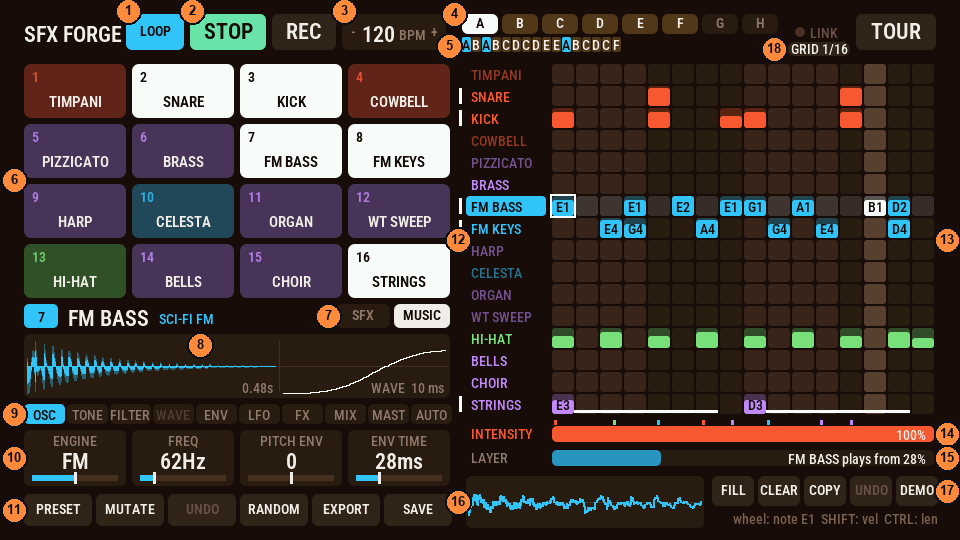
The picture shows pattern A repeating: LOOP is lit, and the FM BASS is selected.
| What it is | With the mouse | |
|---|---|---|
| 6 | the kit's 16 pads | click to play and select. White: it sounds now |
| 7 | SFX / MUSIC | choose the kit the pads show |
| 8 | the selected sound's picture | |
| 9 | the ten tabs: OSC, TONE, FILTER, WAVE, ENV, LFO, FX, MIX, MAST, AUTO | click. WAVE only for a wavetable sound |
| 10 | the tab's four values | drag, or the wheel (SHIFT + wheel: eight steps at a time) |
| 11 | PRESET · MUTATE · UNDO · RANDOM · EXPORT · SAVE | click. Right-click PRESET: the one before. UNDO also takes a drag of a sound's value back |
| What it is | With the mouse | |
|---|---|---|
| 1 | LOOP / SONG: what PLAY plays | click: the other one |
| 2 | PLAY / STOP · REC | click |
| 3 | the tempo | click its left half (slower) or right half (faster), or the wheel |
| 4 | the patterns A - H. White: playing. Blue: the one shown | click: go there, on the bar line while it plays · right-click: add a bar of it to the arrangement |
| 5 | the arrangement | click a bar: its pattern · right-click: the arrangement ends before it (BARS REMOVED; UNDO brings it back) |
| 18 | GRID: the grid of the pattern shown | click: finer · right-click: coarser |
TOUR, top right, starts the tour, as MENU does; any click ends it. LINK beside it turns green once something has come in from a game.
| What it is | With the mouse | |
|---|---|---|
| 12 | the rows' names | click: hear and select · right-click: mute, and again: heard |
| 13 | the pattern: every sound's steps over the whole bar, in 16, 32 or 64 cells | click a step: on or off, and it is the selected step · wheel: the note of the step clicked last · SHIFT + wheel: its velocity · CTRL + wheel: its length |
| 14 | INTENSITY, with each sound's mark above | drag, or the wheel |
| 15 | the selected sound's LAYER mark | drag, or the wheel |
| 16 | what sounds now, as a wave. Messages appear over it | |
| 17 | FILL · CLEAR · COPY · UNDO · DEMO | click. DEMO asks twice |
SHIFT-click does the same as right-click everywhere.
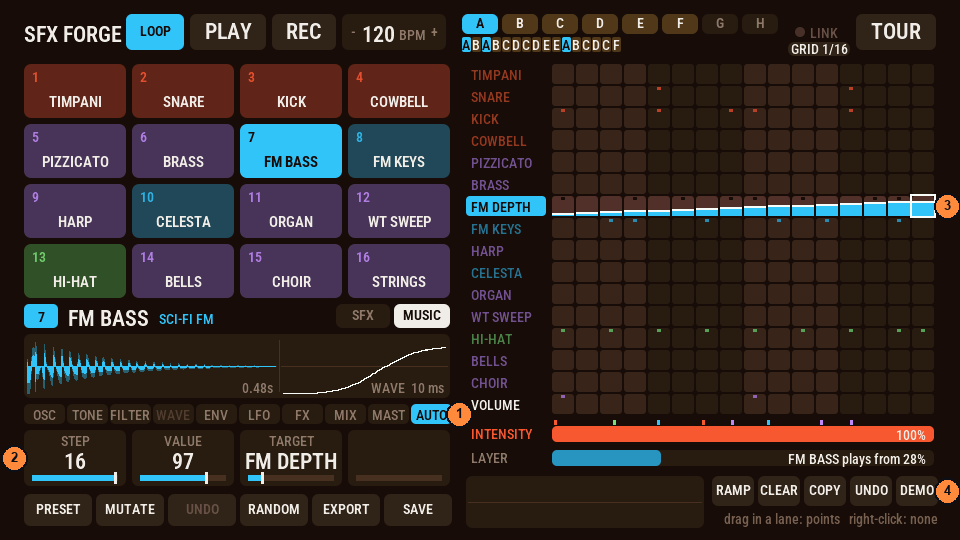
| Do this | |
|---|---|
| 1 | click the AUTO tab: the 16 rows become the sounds' lanes |
| 2 | choose the TARGET (drag the cell, or the wheel). Drag VALUE to set one point exactly |
| 3 | click or drag in a sound's row to draw: the click selects that sound. The height is the value; drag across to paint a curve. Right-click removes a point |
| 4 | FILL has become RAMP, and CLEAR empties the lane |
If no target is chosen yet the stage says CHOOSE A TARGET FIRST. The rules of a lane are on
Device Automation.
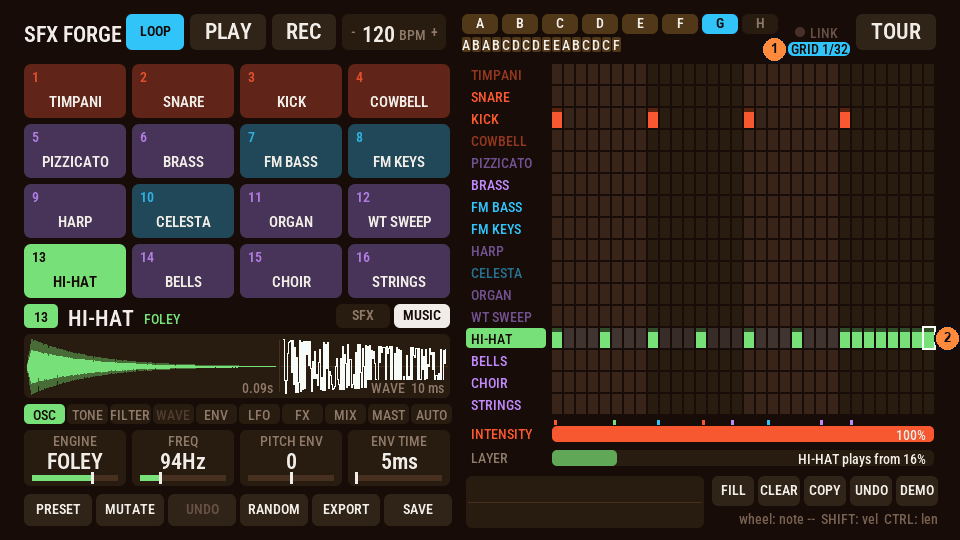
| What it is | With the mouse | |
|---|---|---|
| 1 | GRID: it is blue when the grid is finer than 1/16 | click: finer · right-click or SHIFT-click: coarser. It asks as SHIFT + F5 does: click it the same way again |
| 2 | a row is the whole bar, in 16, 32 or 64 cells. Here the hats with a roll at the end | click a cell: that step, on or off |
The stage always shows the whole bar, so it has nothing like SHIFT + LEFT and RIGHT.
flowchart LR
  subgraph ST["On the stage"]
    A["pads, kit, sound tabs"]
    B["steps, notes, velocity, length"]
    C["patterns, arrangement, GRID"]
    D["INTENSITY, LAYER, automation"]
  end
  subgraph DV["On the device only"]
    E["the swing"]
    F["the click's switch"]
    G["the bar's length and the beat"]
    H["ERASE"]
    I["the PERFORM page"]
  end
The stage has no tab for PERFORM: its right half already shows every sound's steps. NEW, SEND and CLR PAT are on the device's SONG page; solo is on MIX and PERFORM.
The scripted checks press the device's keys; they do not click on the stage: What Is Tested.
- Device Automation - lanes, points and RAMP
- Device Finer Grids - what GRID does to a pattern
- Device Controls And Pages - the same instrument by its keys
- Device Cheat Sheet - the stage in one column
- The manual, section 15: The stage: automation on the stage, the grid on the stage
-
fw_stage_input.h -
stage_event: every click, in the order of its rectangles - fw_stage_draw.h - how the stage is drawn