Repository navigation
Unity Held Sounds
The held route: start a sound, keep it sounding for as long as the game wants, bend it every frame, then let it go. Use it for a sound that follows the game: an engine, wind, a charge.
A sound is held when its patch has sustain above 0. Such a sound does not end by itself: it sounds until you
call Release().

A sketch, not a measurement. Left: with SUSTAIN at 0 the sound rises over ATTACK, falls over DECAY and ends.
Right: with SUSTAIN above 0 it falls to the SUSTAIN level and stays there until Release(), then fades over
RELEASE.
sequenceDiagram
  participant S as Your script
  participant P as SfxPlayer
  participant T as Audio thread
  S->>P: Play(1, 0, midiNote)
  T->>P: next block, note on
  loop every frame while it is held
    S->>P: write pitchSemitones, cutoffOctaves, fm, level
    T->>P: every block, glide to them over 30 ms and render
  end
  S->>P: Release()
  T->>P: next block, note off
  Note over P,T: the note fades over the patch's RELEASE
The four live values are plain fields. Your script writes them on the main thread; the audio thread reads them every block and glides to each over 30 ms, as the device does. So you can write them every frame without clicks.
using CatSplat.SfxForge;
using UnityEngine;

[RequireComponent(typeof(SfxPlayer))]
public class EngineHum : MonoBehaviour
{
    [Range(0f, 1f)] public float speed01;        // your game sets this: 0 standing … 1 flat out
    readonly SfxPatch hum = SfxPatch.Create(SfxEngine.SciFiFm, 22, 64, 0, 21, 55, 8, 78, 45, 60, 0, 60, 127, 60);
    SfxPlayer player;

    void Start()
    {
        player = GetComponent<SfxPlayer>();
        player.Play(hum, 1f, 0f, 40);            // held (sustain 127), as the MIDI note E2
    }

    void Update()
    {
        player.pitchSemitones = speed01 * 12f;
        player.cutoffOctaves = Mathf.Lerp(-1f, 1.5f, speed01);
        player.fm = speed01 * 0.5f;
        player.level = Mathf.Lerp(0.35f, 1f, speed01);
    }

    void OnDisable()
    {
        if (player != null) player.Release();
    }
}
Steps:
- On a GameObject: Add Component > SFX Forge > SFX Player.
- Add the script above to the same object. The patch is written in the script, so the player needs no preset.
- Press Play. A low, quiet hum starts and stays.
- Drag Speed 01 in the script's Inspector to the right. The script raises the hum's pitch by up to an octave, opens its filter and raises its level.
In the patch above, the twelfth number is sustain: 127, so the sound is held.
| Live value | Range | What it moves |
|---|---|---|
pitchSemitones |
0 … 24 | the pitch, upwards |
cutoffOctaves |
−4 … 4 | the filter, in octaves from the patch's cutoff |
fm |
0 … 1 | the timbre: FM depth, or a wavetable's position |
level |
0 … 1 | the loudness. 1 = as designed |
The ranges are those of the sliders in the player's Inspector, and of what telemetry sets. A script can write any
number: the engine limits level to 0 … 1 and takes the other three as they come.
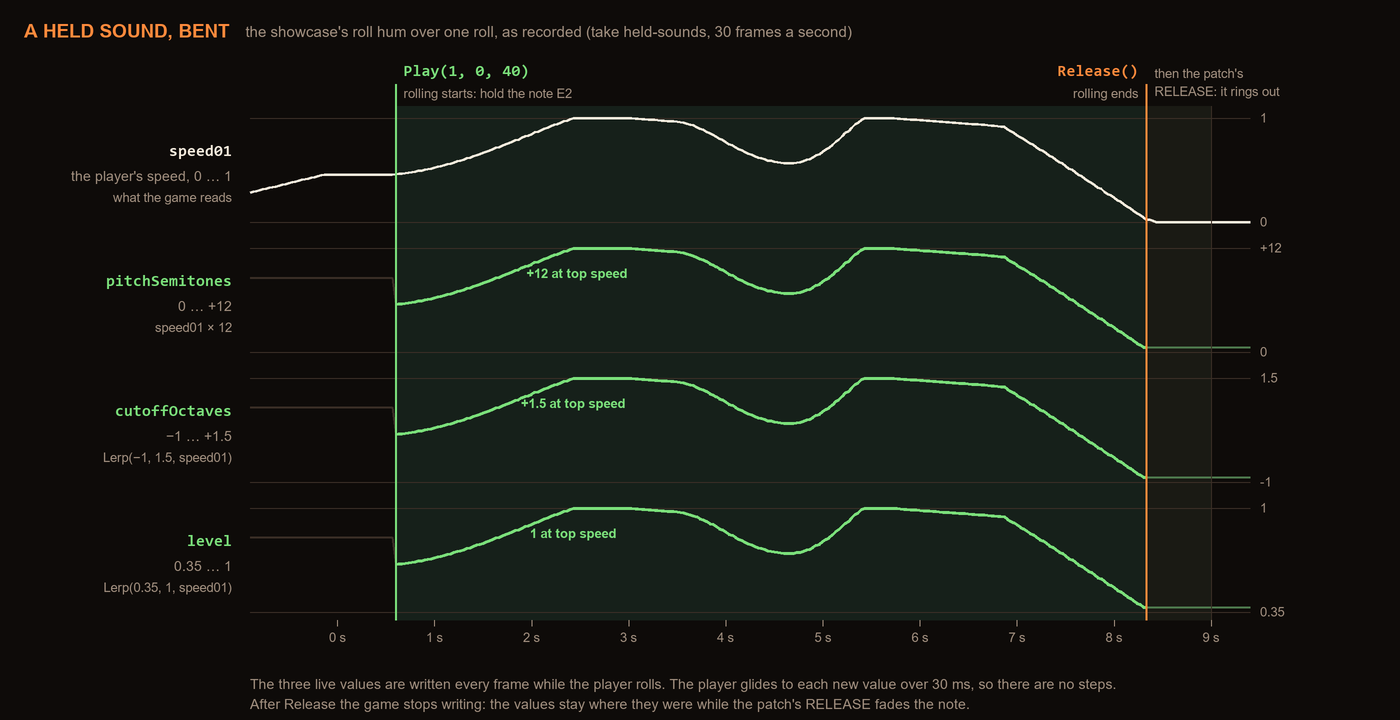
The showcase's roll hum over one roll, as recorded. The white curve is the player's speed. The three green curves
are live values the game writes from it every frame, between Play(1, 0, 40) and Release().
-
With a preset: set the preset's SUSTAIN above 0 on its ENV page, put it in the player's Preset field,
and call
player.Play(1f, 0f, 40). - Started by itself: tick Play On Enable on the SFX Player. It then starts at the patch's own FREQ.
-
Without a script: an
SfxTelemetrySenderwrites a live value from a Rigidbody's speed, an Animator float or your own value. Put theSfxPlayerinto itslocalPlayers. See Unity Telemetry And Encoders.
| What you see | What it is |
|---|---|
| the sound never stops | nobody called Release(). A held sound needs it, also when the object that started it goes away |
| a click when it fades out | you faded with volume. volume is not smoothed: fade with level, which glides |
| the hum is out of tune | a bare Play() sounds at the patch's FREQ. Start a pitched held sound with its MIDI note. Noise, such as wind, has no note: start it with 0 |
| it stops after 1.5 seconds | that is a baked held patch: a clip holds for holdSeconds, then lets go. For as long as you want, use a player |
| two held sounds fight | one sound per player. Release() lets go of every note of that player. Give each held sound its own SfxPlayer
|
| the pitch slider will not go below the note | the slider of pitchSemitones goes from 0 to 24. Start on the lowest note you need |
- Unity Telemetry And Encoders: the same without code, and from the device
- Unity Live Voices: the player's other fields, and the one-patch rule
- Unity Presets And Patches: SUSTAIN, RELEASE and the ENV page
- Unity Recipes: an engine hum that follows speed