Repository navigation
Device Layers And Intensity
One song that is many: calm with only the kick, all-out with the whole band, and every stage between. This is how the music follows the game.
Every sound has a LAYER mark. The song has one INTENSITY. A sound plays only while INTENSITY is at or above its mark.
flowchart LR
  G["The game<br/>(or encoder 3 on SONG and PERFORM)"] -- "one number, 0 - 100 %" --> I["INTENSITY<br/>the song's"]
  I --> C{"at or above<br/>this sound's LAYER mark?"}
  L["LAYER<br/>one mark for each of the 16 sounds"] --> C
  C -- "yes" --> Y["the sound's steps play"]
  C -- "no" --> N["its steps are skipped"]
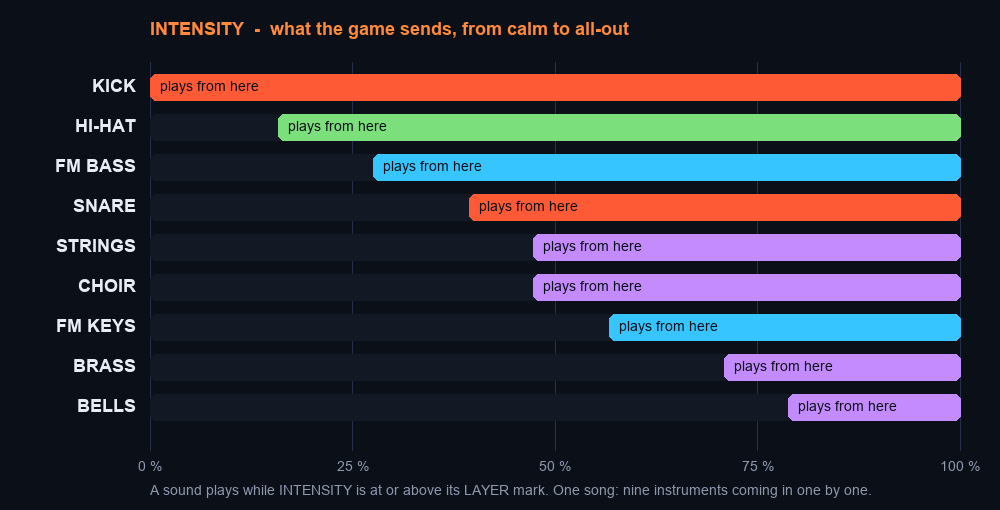
The demo song is set up this way. Each bar begins where its instrument comes in:
| Sound | Its LAYER mark in the demo song |
|---|---|
| KICK | 0 %: it always plays, as does every sound you have not given a mark |
| HI-HAT | 16 % |
| FM BASS | 28 % |
| SNARE | 39 % |
| STRINGS, CHOIR | 47 % |
| FM KEYS | 57 % |
| BRASS | 71 % |
| BELLS | 79 % |
- Press PLAY. The demo song plays; INTENSITY is 100 % as the device comes.
- Press K5 twice, for the SONG page.
- Turn encoder 3 (INTENSITY) down, slowly, to 0 %. The instruments drop out in the order of the table, from the bottom up, until only the kick is left.
- Turn it up again, or hit pads 9 - 16: eight levels, an eighth each, from 12 % to 100 %.

Here pad 12 was hit: INTENSITY is 50 %, and the tiles of pads 9 - 12 are lit, up to the current level. LAYER, under it, is the mark of the selected sound: TIMPANI, 0 %.
PERFORM (K5 until PERFORM) shows which sounds are heard. Pattern A of the demo song at 100 %, and at 44 %:
| INTENSITY 100 % | INTENSITY 44 % |
|---|---|
 |
 |
At 44 % the kick, snare, FM bass and hi-hat still play. FM KEYS and STRINGS have their marks above 44 %: their names and their steps are grey, and you do not hear them. BRASS, BELLS and CHOIR are grey too; they have no steps in pattern A. (The picture is the first one with encoder 3 turned 28 clicks down.)
| You want | Do this |
|---|---|
| to set a sound's LAYER mark | select the sound (DATA), then turn encoder 4 on SONG or PERFORM. SONG calls it LAYER of this sound
|
| a sound that always plays | LAYER 0 % |
| to set INTENSITY by hand | encoder 3 on SONG or PERFORM, or pads 9 - 16 on SONG (on PERFORM after F4 PATTERN) |
| the game to set it | it sends one number: Unity Adaptive Music |
A recipe: low LAYER marks for the calm instruments, high marks for the tense ones. The game then sets the intensity from how close the enemy is.
-
"I set steps and hear nothing." The sound's layer is off at the current intensity. SEQ says
ITS LAYER IS OFF NOWunder the values (andlayer offin its second line, where there is room). Turn INTENSITY up, or the sound's LAYER down. - LAYER is the song's, not the sound's. It is one mark for each pad of the MUSIC kit, saved with the song, and the same in every pattern. F4 NEW sets every mark to 0.
- The SFX kit has no layers. Sound effects play beside the song, whatever the intensity is.
- F2 UNDO does not take a layer or the intensity back. Turn the knob back.
- A note that sounds is not cut. The intensity decides when a step starts; what already plays rings out.
- INTENSITY is not saved with the song. It is a value the game sends (CC 14 on MIDI channel 2), and a DAW can automate it. As the device starts it is 100 %.
- Unity Adaptive Music - drive the intensity from a game
- Device Song And Arrangement - the rest of the SONG page
- Device Perform - the page that greys what is not heard
- Device Automation - move a knob by itself
- The manual, section 11: Layers: music that follows the game
-
fw_factory.h -
demo_song: the demo song's layers (SONG.level) -
fw_pages.h -
encoder: INTENSITY and LAYER on SONG and PERFORM -
sfx_song.h -
levelinsfx_song: "the sound plays while intensity >= this" - The Unity manual, section 5: Music