Repository navigation
Unity Copy The Showcase Pattern
How to give your own game the showcase's audio structure: one seam of events, one table of sounds, three small scripts and one music script. You can take the showcase's folder and rename, or build the same shape from nothing. Read Unity Showcase Walkthrough first if you have not seen the structure.
The showcase's code is under the same licence as the package, the GNU General Public License, version 3 or any later version. What you copy from it stays under that licence: FAQ, Shipping.
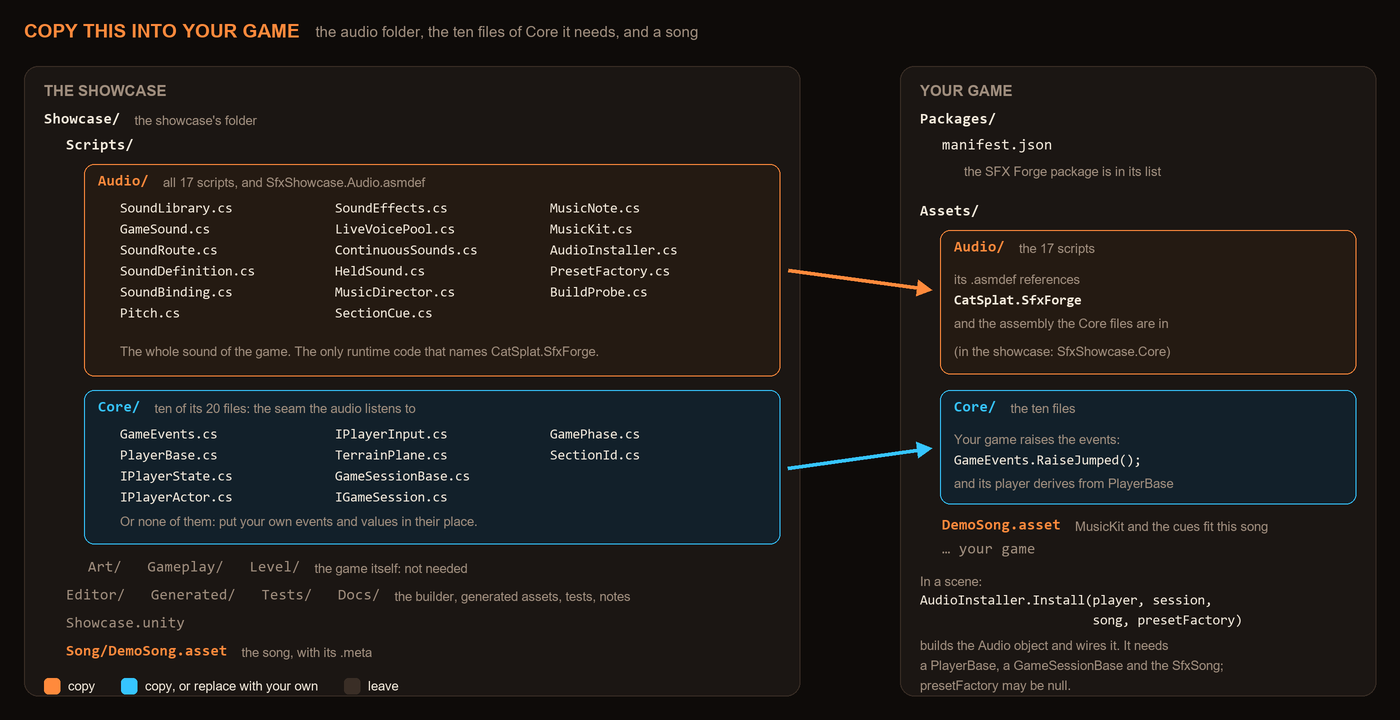
Left: the showcase's folder. Orange is copied, blue is copied or replaced with your own, grey is left. Right: where it lands in your game.
flowchart LR
    subgraph GAME["Your game (never names SFX FORGE)"]
        GP["Gameplay code"]
        EV["Your events<br/>(GameEvents)"]
        ST["Your player's state<br/>speed, rolling ..."]
    end
    subgraph AUD["Your audio assembly (references CatSplat.SfxForge)"]
        LIB["SoundLibrary<br/>patch, route, note, volume"]
        ONE["SoundEffects + LiveVoicePool"]
        HELD["ContinuousSounds + HeldSound"]
        MUS["MusicDirector"]
    end
    subgraph PKG["Unity and the package"]
        SRC["AudioSource.PlayOneShot<br/>of clips from SfxPreset.Bake"]
        PL["SfxPlayer"]
        MP["SfxMusicPlayer"]
    end
    GP --> EV
    GP --> ST
    EV --> ONE
    EV --> HELD
    EV --> MUS
    ST -.-> HELD
    ST -.-> MUS
    LIB --> ONE
    LIB --> HELD
    ONE --> SRC
    ONE --> PL
    HELD --> PL
    MUS --> MP
| File | Path A: take the folder | Path B: build your own |
|---|---|---|
Packages/manifest.json |
add the package (Unity Install) | the same |
Scripts/Audio (17 scripts and SfxShowcase.Audio.asmdef) |
copy all of it | read it; write your own four scripts |
ten files of Scripts/Core
|
copy them | none: use your own events and values |
Song/DemoSong.asset with its .meta
|
copy it | your own SfxSong
|
SoundLibrary.cs, GameSound.cs
|
replace the 19 sounds with yours | your own table |
MusicKit.cs, the cues in MusicDirector.cs
|
change when you change the song | your own |
The ten Core files are GameEvents, PlayerBase, IPlayerState, IPlayerActor, IPlayerInput, TerrainPlane,
GameSessionBase, IGameSession, GamePhase and SectionId.
- Add the package and check that the Console shows no warning about the native library (Unity Install).
- Copy
Scripts/Audiointo your project. One of its scripts,BuildProbe.cs, is the showcase's self-check of a built game. It does nothing unless the game is started with-sfxforge-probe; you may delete it. - Copy the ten Core files into an assembly of your game. Open the copied
SfxShowcase.Audio.asmdef: it references the assemblySfxShowcase.Coreby name. Change that name to the assembly the ten files are now in. Keep the reference toCatSplat.SfxForge. The showcase's assembly definitions say"autoReferenced": false: code outside them sees them only from an assembly definition that references them, or after you set that totrue. - Copy
Song/DemoSong.assettogether withDemoSong.asset.meta. - Make your player class derive from
PlayerBaseand your run or level manager fromGameSessionBase. Both are abstract: implement their members. The audio itself reads only six values (next table).PlayerBaseworks outSpeed01itself, from yourGroundSpeed,Velocity,IsGroundedandTopSpeed. - Raise the events from your gameplay code, for example
GameEvents.RaiseJumped();where the player jumps. - Build the audio once, from a script in your scene:
using CatSplat.SfxForge;
using SfxShowcase.Audio;
using SfxShowcase.Core;
using UnityEngine;

public class InstallAudio : MonoBehaviour
{
    public PlayerBase player;
    public GameSessionBase session;
    public SfxSong song;                     // DemoSong.asset

    void Awake() => AudioInstaller.Install(player, session, song, null);
}- Press Play. An object
Audioappears in the Hierarchy with the childrenMusic,EffectsandContinuous, and the song starts. Raise an event: you hear its sound.
Install throws an ArgumentNullException without a player or a session. Without a song there is no music. The
last argument is a factory that turns each patch into an SfxPreset; with null the presets are made in memory.
This script was written for this page; it was compiled against the showcase's Core and Audio scripts and not
run. The showcase itself calls Install from its scene builder,
ShowcaseAudio.cs.
What the audio reads from your game. Everything else comes through events.
| Read | By | For |
|---|---|---|
player.Speed01 |
ContinuousSounds, MusicDirector
|
the roll hum, the wind, the music's intensity |
player.IsRolling, IsGrounded
|
ContinuousSounds |
whether the roll hum is held (not while charging) |
player.IsCharging, Charge01
|
ContinuousSounds |
the Wind-Up rev |
session.Phase |
MusicDirector |
the fixed intensity on the title card (GamePhase.Title) |
Seven steps, each with the file to read. The showcase's files are short and commented for this.
| Do this | Read | |
|---|---|---|
| 1 | Add the package. Reference CatSplat.SfxForge from the assembly your audio code lives in, and from no other |
SfxShowcase.Audio.asmdef |
| 2 | Make the seam: a static class of C# events with a Raise… method each. Gameplay raises, audio listens. What lasts (speed, rolling) is read, not raised |
GameEvents.cs |
| 3 | Write your sounds as patches in one file, with a table: sound, patch, route, MIDI note, volume | SoundLibrary.cs |
| 4 | One-shots: bake what is always the same in Awake; play live what the game decides at that moment |
SoundEffects.cs, LiveVoicePool.cs
|
| 5 | Held sounds: one SfxPlayer each, started with its note, bent every frame, released |
ContinuousSounds.cs, HeldSound.cs
|
| 6 | Music: one SfxMusicPlayer with a song, and a script that sets intensity every frame from a floor and a game value |
MusicDirector.cs |
| 7 | Put it in the scene: the objects of the table below, in code or by hand in the Inspector | AudioInstaller.cs |
The pattern of every audio script is the same few lines. This is a fragment, shortened from SoundEffects.cs, not
a whole script:
// not compiled: three lines shortened from SoundEffects.cs; PlayBaked is that class's own method
void OnEnable() => GameEvents.Jumped += OnJumped;
void OnDisable() => GameEvents.Jumped -= OnJumped;
void OnJumped() => PlayBaked(GameSound.Jump);
The scene objects for step 7:
| Object | Components | Set |
|---|---|---|
Audio/Music |
AudioSource, SfxMusicPlayer, your music script |
the SfxSong; playOnEnable on. In code, set the song before the component is enabled (the installer builds Audio inactive), or call Play() after you set it: it takes the song that was assigned |
Audio/Effects |
AudioSource, your one-shot script |
the presets to bake |
Audio/Effects/Live Voice 1 … 3 |
AudioSource, SfxPlayer
|
no preset: the pool assigns one per play |
Audio/Continuous |
your script that bends the held sounds | the players below, and the MIDI note of each |
Audio/Continuous/<sound> |
AudioSource, SfxPlayer
|
the held sound's preset; playOnEnable off |
Every AudioSource is 2D, has no clip and has playOnAwake off.
- Press Play and watch the Console: no warning about SFX Forge (Unity Troubleshooting lists them).
- Trigger each event once and listen.
- Write one Play mode test per route, as the showcase does: Unity Testing Your Audio
has a sample. It asserts that a baked clip comes out of its
AudioSource, that a live voice starts on itsSfxPlayer, and that the music'sBarmoves on. For a held sound, assert that the player'spitchSemitonesfollows your game, as the showcase'sTheWindUpRevAndTheRollHumFollowThePlayerdoes.
| Trap | What to do |
|---|---|
The song belongs to the folder. MusicKit.cs names the demo song's instruments by index (bells 13, brass 5, strings 15, timpani 0). MusicDirector holds its patterns E and F, and its section floors sit between that song's layer marks |
with your own song, change MusicKit.cs, sectionCues, finalLaunchPattern, checkpointAnswer and fanfare
|
| The volumes fit this game only. They were set by measuring recorded takes of the showcase, not by ear | measure your own mix, or listen: Unity Testing Your Audio |
new SfxPatch() is silent. Its level is 0 |
start every patch from SfxPatch.Create, as SoundLibrary.Make does |
One SfxPlayer holds one patch. A second patch on it reshapes what still sounds |
a player per held sound; a pool for live one-shots |
| A pitched held sound out of tune | start it with its MIDI note: Play(1f, 0f, midiNote). A bare Play() sounds at the patch's own FREQ |
SectionId is the showcase's level. GameEvents and the sectionCues table of MusicDirector use its eight section names |
raise SectionEntered with those values for your own areas, or change the enum and every place that names an entry together |
Windows x64 only. Elsewhere the players stay silent and Bake returns null |
What Is Tested |
- Unity Testing Your Audio: prove the structure works, without ears
- Unity Recipes: single scripts when you need less than the whole structure
- Unity Presets And Patches: writing the sounds for your table
- Unity Troubleshooting: when it stays silent