Repository navigation
Unity Choosing A Route
There are four ways a patch (one sound) becomes sound in your game: three for sound effects, and music. This page helps you pick one for each sound, and tells you what each costs.
flowchart TD
  Q0{"Is it music:<br/>a song with patterns?"}
  Q0 -- yes --> MUSIC["MUSIC<br/>SfxMusicPlayer"]
  Q0 -- no --> Q1{"Must it change<br/>while it sounds,<br/>or last as long<br/>as the game wants?"}
  Q1 -- yes --> HELD["HELD VOICE<br/>SfxPlayer + Release()"]
  Q1 -- no --> Q2{"Must it be<br/>placed in 3D?"}
  Q2 -- yes --> BAKED["BAKED CLIP<br/>Bake() + PlayOneShot"]
  Q2 -- no --> Q3{"Is its pitch or patch<br/>chosen at the moment<br/>it plays?"}
  Q3 -- yes --> LIVE["LIVE VOICE<br/>SfxPlayer.Play()"]
  Q3 -- no --> BAKED
A sound that fires often and should not be the same twice (a footstep) is a baked clip too, as a row of clips played in a shuffled order: see Unity Variations.
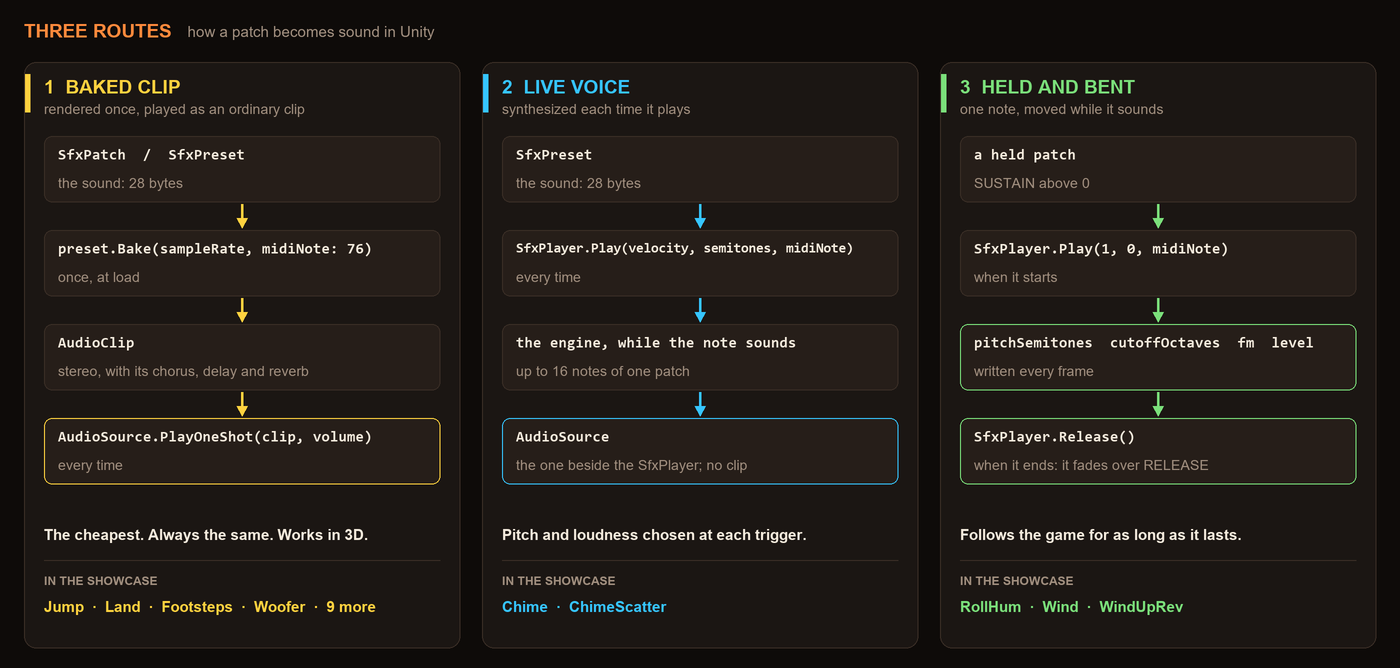
Read each column from the top: what you start with, what you call, what plays. Yellow is baked, blue is a live voice, green is held. The last line of each column names showcase sounds that use it: the showcase has 19 sounds, 14 baked (the two footsteps counted apart), 2 live and 3 held. Music, the fourth route, is not in the picture.
Three words in the tables below: a held patch is one whose SUSTAIN is above 0, so it sounds until it is released; the live values are four numbers of a player that bend a sound while it plays; an audio block is the run of samples Unity asks for in one go. All are in the Glossary.
| Route | You call | Use it for | Page |
|---|---|---|---|
| Baked clip |
preset.Bake(…) once, then AudioSource.PlayOneShot(clip)
|
short sounds that fire often and are always the same: jump, footstep, UI click | Unity One Shots |
| Live voice | SfxPlayer.Play(velocity, semitones, midiNote) |
a sound decided when it plays: a pickup that climbs a scale | Unity Live Voices |
| Held voice |
Play on a held patch, write the live values every frame, then Release()
|
a sound that follows the game: an engine, wind, a charge | Unity Held Sounds |
| Music |
SfxMusicPlayer with an SfxSong; set intensity, call CuePattern
|
a song whose layers follow the game | Unity Music First Song |
| Baked clip | Live voice | Held voice | Music | |
|---|---|---|---|---|
| CPU while it plays | the least: Unity plays an ordinary clip | the engine runs on the audio thread while the player sounds | the same, for as long as it is held | the engine runs the whole song |
| CPU up front | the bake: it renders on the calling thread, so do it at load | none | none | none |
| Memory | the clip's samples | the player's own engine with its effects, about 0.6 MB a player | the same | the same |
| When a trigger is heard | as any PlayOneShot
|
at the next audio block: Play queues a command that the audio thread takes when Unity next asks for samples |
the same; live values glide over 30 ms | a cue takes effect at the next bar line |
| Flexibility | fixed when baked. Volume per play; the AudioSource's pitch changes the length too | pitch and velocity per trigger. Another patch too, but it reshapes notes of that player that still sound | pitch, filter, timbre and level while it sounds | intensity, cues, mix while it plays |
| 3D | yes | no | no | no |
| Needs the native library to play | no, only to bake | yes | yes | yes |
| Question | Baked | Live voice | Held voice |
|---|---|---|---|
| Can each trigger have its own pitch? | only by the AudioSource's pitch | yes, by semitones or MIDI note | yes, and while it sounds |
| Can it change while it sounds? | no | the four live values, for all notes of that player | yes |
| Can it sustain as long as the game wants? | no: a held patch is held for holdSeconds, then let go |
yes | yes |
| Can many overlap? | yes (PlayOneShot) |
up to 16 notes of one patch per player | one sound per player |
- Start baked. Most game sounds are short and always the same. Move a sound to a live voice only when you need what baking cannot give.
-
Count your players. Every
SfxPlayerruns an engine of its own. A few are fine; one per bullet is not what it is for. The showcase bakes 14 of its 19 sounds, and has a small pool of players for its two live ones. - 3D means baked. A player adds its sound to a 2D mix.
-
A pitched sound that must be in tune with the music is played as a MIDI note (
midiNote), on any route.
- Unity One Shots: the baked route, step by step
- Unity Live Voices: a voice per trigger
- Unity Held Sounds: hold it and bend it
- Unity Music First Song: the fourth route