Repository navigation
Device Controls And Pages
What each control is, how the six K keys lead to fourteen pages, and which keys do the same thing everywhere.
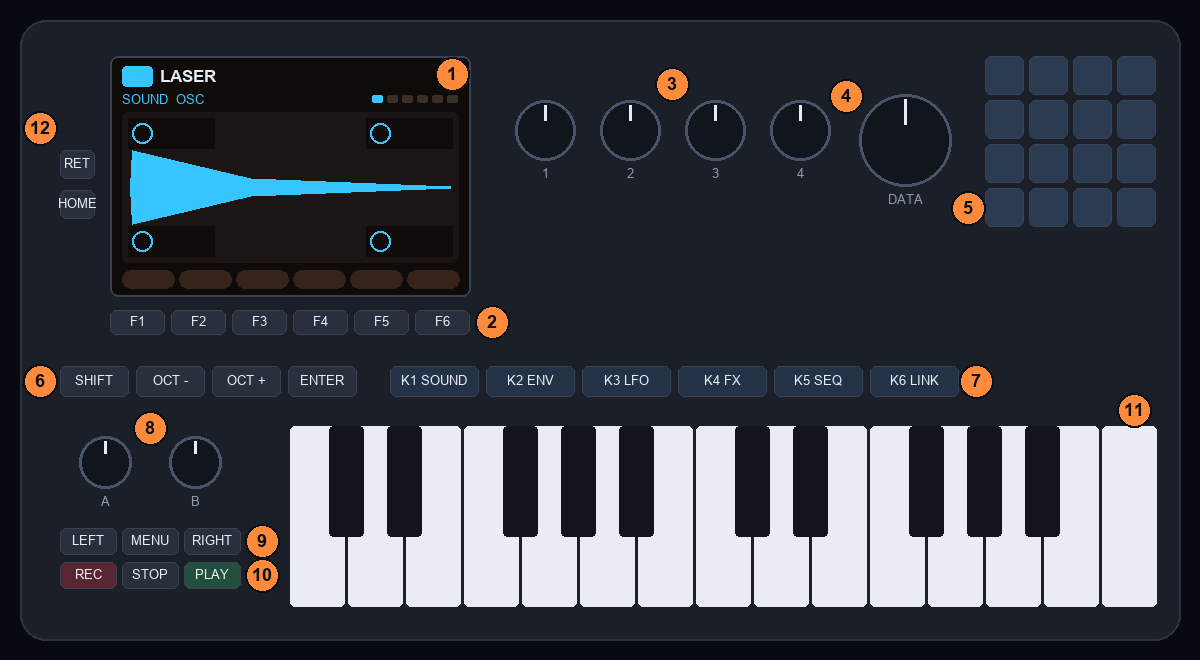
| Control | What it does | |
|---|---|---|
| 1 | the display | the selected sound, the page, the four values, six soft keys |
| 2 | F1 - F6 | the six soft keys along the bottom of the display. They change with the page |
| 3 | encoders 1 - 4 | the four values the display shows. Hold SHIFT to turn fast |
| 4 | DATA | selects a sound, on every page |
| 5 | the 16 pads | play the kit's sounds. On SEQ, SONG, AUTO, PERFORM and MIX they are steps, patterns, points or mutes |
| 6 | SHIFT | the second meaning of a key, and fast encoders |
| 7 | K1 - K6 | the pages. Press a K key again for its next page |
| 8 | A · B | two more encoders. What they turn depends on the page: the table below |
| 9 | LEFT · MENU · RIGHT | LEFT and RIGHT: the sound page before and after (on SEQ, SONG, AUTO and PERFORM: the pattern before and after). MENU: the tour |
| 10 | REC · STOP · PLAY | the transport: Device Recording |
| 11 | the keys | play the selected sound as an instrument, in tune |
| 12 | RETURN · HOME | back to the first page · the controls of this page |
Encoders A and B, page by page:
| On | A | SHIFT + A | B | SHIFT + B |
|---|---|---|---|---|
| the sound pages, MIX, MASTER | the output volume | the same, faster | nothing | nothing |
| SEQ | the tempo, 40 - 240 | the swing | the scale | the beat |
| SONG, PERFORM | the tempo | the swing | the bar's length | the beat |
| AUTO | the tempo | the swing | nothing | nothing |
| LINK | sends CC 24 to the game | sends CC 25 to the game |
The bar's length and the beat make a time signature: Device Time Signatures.
Words this page uses: the top line is the first line of the display, with the selected sound's name; for about
two seconds it shows instead what a key just did (MUTATED, SAVED). The second line names the page. The
transport is REC, STOP and PLAY. More words: Glossary.
ENTER is the key right of OCT +. SFX FORGE gives it one job: SHIFT + ENTER, a short press, changes kit (see below). DATA pressed counts as ENTER. ENTER held is FOCUS, which belongs to the VIBE: a frame that DATA moves from control to control. The manual's section 2 describes it.
Six K keys, fourteen pages. The first press of a K key opens its first page. Pressing it again walks to its next page, and after the last one to the first again.
flowchart LR
  K1["K1 SOUND"] --> OSC --> TONE --> FILTER --> WAVE["WAVE<br/>(wavetable sounds only)"]
  K2["K2 ENV"] --> ENV
  K3["K3 LFO"] --> LFO
  K4["K4 FX"] --> FX["FX<br/>a sound's sends"] --> MIX["MIX<br/>faders"] --> MASTER["MASTER<br/>delay, reverb"]
  K5["K5 SEQ"] --> SEQ["SEQ<br/>steps"] --> SONG["SONG<br/>patterns, layers"] --> AUTO["AUTO<br/>automation"] --> PERFORM["PERFORM<br/>the whole pattern"]
  K6["K6 LINK"] --> LINK["LINK<br/>the game"]
| Pages | They are about | Where to read on |
|---|---|---|
| OSC, TONE, FILTER, WAVE, ENV, LFO, FX | one sound: the selected one | Device Make A Sound, Device The Five Engines |
| SEQ, SONG, AUTO, PERFORM | the song: patterns, their order, automation | Device Make A Beat, Device Song And Arrangement, Device Automation, Device Perform |
| MIX, MASTER | the song's mix | Device Mixer And Effects |
| LINK | the game at the other end of the MIDI cable | Unity Device Link Setup |
The display names the page in its second line: SOUND OSC (and SOUND TONE, SOUND FILTER,
SOUND WAVE), ENVELOPE, LFO, EFFECT SENDS, SEQUENCER, SONG, AUTOMATION, PERFORM, MIXER,
MASTER EFFECTS, GAME LINK.
| Kind | Pages | What you see |
|---|---|---|
| A picture | the seven sound pages, MASTER | one picture of what the knobs shape, with the page's values in its corners |
| The pads | SEQ, SONG, AUTO, MIX | the 16 pads drawn as 16 tiles, with the page's values in a column beside them |
| A grid | PERFORM | the whole pattern: a row a sound, a cell a step, with the four values in one line under it |
LINK has a list where the others have a picture or tiles: what the game sends. WAVE has two values and AUTO three; every other page has four.
A picture page, with its parts numbered:

| What it is | |
|---|---|
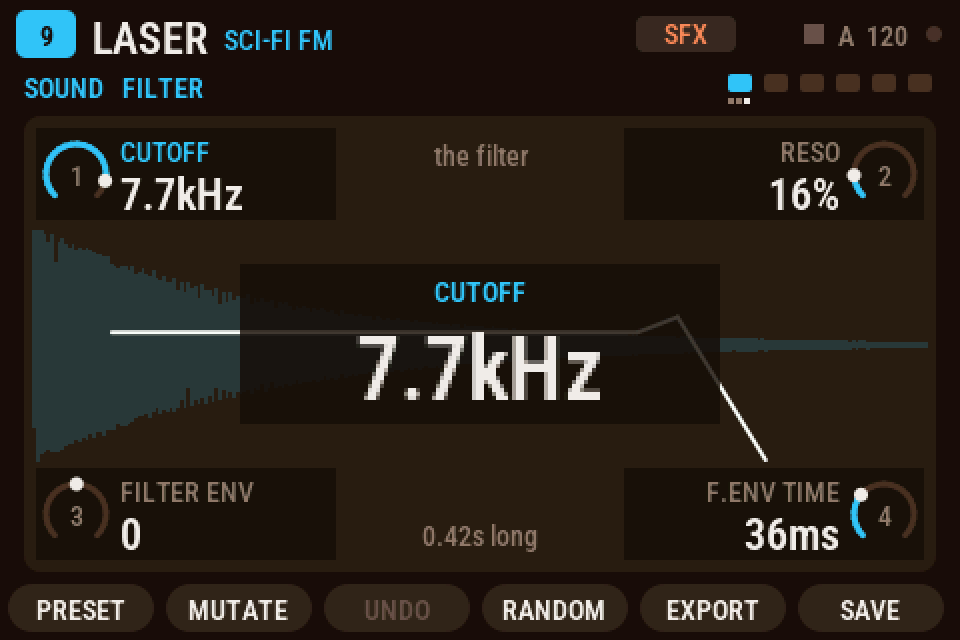
| 1 | the selected sound: its pad number, its name, its engine |
| 2 | the kit: SFX or MUSIC. On SEQ, SONG, AUTO, PERFORM, MIX and MASTER this place says LOOP or SONG: what PLAY plays |
| 3 | the song: stopped (a square) or playing (a green triangle), the pattern, the tempo, and a dot that turns green once something has come in from a game. While REC is lit the square or triangle is a red dot |
| 4 | the page's name |
| 5 | six marks for K1 - K6. The bright one is the key you are on; the dots under it are that key's pages |
| 6 | the picture |
| 7 | a value in each corner. The number in the ring is the encoder: on a sound page 1 top left, 2 top right, 3 bottom left, 4 bottom right |
| 8 | the soft keys: F1 - F6 |
Turn an encoder on a picture page and its value is written large across the middle for about a second:
SFX FORGE holds two sets of 16 sounds. SHIFT + ENTER changes between them: hold SHIFT, press ENTER shortly. The
top line says SFX KIT or MUSIC KIT. From a song page, MIX, MASTER or LINK it also goes to the first sound page.
As the device starts, the kit is SFX.
| SFX kit | MUSIC kit | |
|---|---|---|
| What is in it | the game's sound effects | the band the song plays |
| Where it goes | beside the song: past fader, pan and mute | through the mixer: fader, pan, mute |
| Layers | none: it always sounds | a LAYER mark for each sound (Device Layers And Intensity) |
| F1 PRESET offers | 16 sound effects | 23 instruments |
Going to a song page (SEQ, SONG, AUTO, PERFORM, MIX, MASTER) chooses MUSIC by itself. Do not turn DATA while SHIFT is held: the manual's section 2 says why.
| Key | What it does |
|---|---|
| PLAY · STOP | PLAY starts what the top line of the song's pages says: one pattern round and round (LOOP) or the song (SONG). PLAY again, or STOP, stops it |
| REC | lights REC: while the song plays, what you play is recorded into the pattern. SHIFT + REC: the click on or off (CLICK ON, CLICK OFF) |
| HOME | the controls of the page that is open, up to eleven lines. HOME or RETURN closes it |
| RETURN | back to the first sound page (or, while HOME is open, closes it) |
| MENU | the tour. SHIFT + MENU, twice within three seconds: factory reset |
| SHIFT + ENTER | the other kit |
| DATA | selects a sound |
| the keys | play the selected sound in tune |
What the pads, the four encoders and F1 - F6 do depends on the page: Device Cheat Sheet has one row for each.
- Device Make A Sound - the sound pages in use
- Device Make A Beat - the SEQ page in use
- Device Cheat Sheet - every page on one picture, and as tables
- Glossary - the words used here
- The manual, section 2: The device, section 3: The display, section 4: Two kits
-
fw_state.h - the pages (
PG_...), the K keys (TAB_OF,TAB_NAME), the soft keys' captions (SOFT) -
fw_pages.h -
tab_key,arrow,encoder -
fw_events.h -
on_event: what every key does, in order - Firmware Add A Page Or Key - to add a page of your own