Repository navigation
Device Perform
One page to make a beat on and to play a set from. PERFORM shows the whole pattern at once, and four keys choose what the 16 pads are: steps, the kit, mutes, or patterns.
Press K5 until the second line says PERFORM (K5 walks SEQ, SONG, AUTO, PERFORM, and SEQ again). Opened while
the song is stopped and REC is off, the page sets LOOP: PLAY repeats the pattern. (From firmware 1.7.0.)

| What it is | |
|---|---|
| 1 | what PLAY plays: LOOP or SONG. SHIFT + F1 changes it |
| 2 | the pattern you see and its grid: PATTERN A 1/16
|
| 3 | the 16 sounds of the MUSIC kit, a row each, pad 1 at the top. A name is grey when the sound is not heard: muted, another one solo, or its layer off at the current intensity. It is white while the sound plays |
| 4 | the pattern: a row is a sound, a cell is a step. A step that is on has the colour of its sound, brighter the harder it plays |
| 5 | the selected sound: its row is lit. While the pads are STEPS a white frame stands round the 16 steps they are |
| 6 | the playhead: the column that plays now. A step under it is white |
| 7 | encoders 1 - 4, in one line: VOLUME · PAN · INTENSITY · LAYER |
| 8 | the eight patterns, and a line that says what the pads are now |
| 9 | F1 - F4: what the pads are. The blue one is chosen. F5 FILL · F6 UNDO |
flowchart LR
  F1["F1 STEPS"] --> S["The pads are 16 steps<br/>of the selected sound"]
  F2["F2 SOUNDS"] --> K["The pads are the kit"]
  F3["F3 MUTES"] --> M["The pads mute<br/>SHIFT + pad: solo"]
  F4["F4 PATTERN"] --> P["Pads 1 - 8: a pattern<br/>Pads 9 - 16: the intensity"]
  R["REC"] --> K
Each of F1 - F4 goes straight to its mode. Lighting REC on this page makes the pads SOUNDS, whatever they were; so does opening the page while REC is lit.
| Key | The pads are | A pad | SHIFT + a pad | The line under the grid |
|---|---|---|---|---|
| F1 STEPS | 16 steps of the selected sound, as on SEQ. The page starts so | the step, on or off. Held while a key is played: the step gets the key's note | hear that pad's sound and select it | PADS: STEPS OF KICK |
| F2 SOUNDS | the kit | plays its sound and selects it. With REC lit while it plays, the hit is recorded | the same |
PADS: PLAY THE KIT. With REC lit: PADS: THE KIT - REC READY: PLAY, then PADS: THE KIT - RECORDING
|
| F3 MUTES | the mixer's mutes | mutes its sound and selects it. Again: it is heard again | solo: only soloed sounds play. Again: solo off | PADS: MUTE - SHIFT + PAD: SOLO |
| F4 PATTERN | patterns and intensity, as on SONG | pads 1 - 8: pattern A - H, at once while stopped, on the next bar line while it plays. Pads 9 - 16: the intensity, in eight levels | the same | PADS: 1-8 PATTERN - 9-16 INTENSITY |
The page keeps the mode you chose when you leave it and come back, unless REC is lit then.
F3 MUTES, while pattern A plays. Pads 7 and 16 were hit:

| What it is | |
|---|---|
| 1 | a red M: FM BASS is muted. Its name and its steps are grey, as are those of STRINGS in the last row. A soloed sound has a yellow S |
| 2 | what the pads are |
| 3 | F3 is blue |
A mute stays when the pads become something else and when you leave the page: it is the mixer's own (Device Mixer And Effects). SHIFT + F3 ALL ON lifts every mute and every solo.
F4 PATTERN, while pattern A plays. Pad 2 was hit:
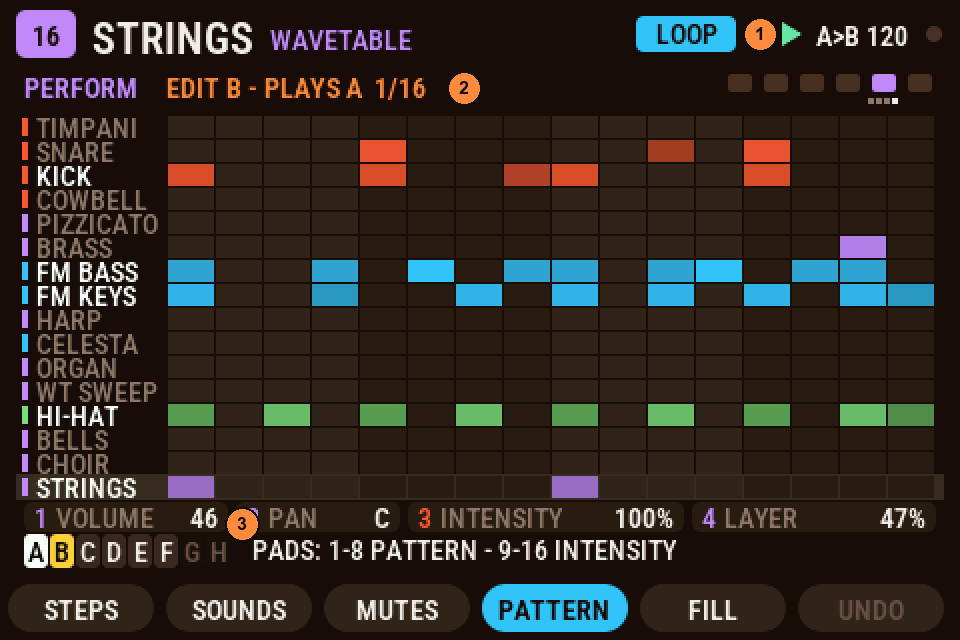
| What it is | |
|---|---|
| 1 |
A>B: A plays, B comes on the bar line |
| 2 |
EDIT B - PLAYS A: the grid shows B already |
| 3 | B blinks yellow until it starts. White is the pattern that plays |
F2 SOUNDS with REC, while pattern B plays. The cowbell was played in on pad 4, a round before:

| What it is | |
|---|---|
| 1 | the red dot: REC is lit |
| 2 | the hits, where they landed |
| 3 | in red, PADS: THE KIT - RECORDING: what the pads play now is recorded |
| 4 | F2 is blue. REC chose it |
While SHIFT is held, the six keys on the display show their second names.
| Key | What it does | The top line says |
|---|---|---|
| F5 FILL | the selected sound on every beat, every eighth, every sixteenth, then cleared. Each press goes one further |
EVERY 1/4, EVERY 1/8, EVERY 1/16, SOUND CLEARED
|
| F6 UNDO | takes back the last thing done to the song. Again: redo |
UNDO: ..., REDO: ..., NOTHING TO UNDO
|
| SHIFT + F1 | TO SONG or TO LOOP: what PLAY plays |
SONG: PLAYS IN ORDER, LOOP: PATTERN REPEATS
|
| SHIFT + F2 CLEAR | takes the selected sound out of this pattern |
CLEARED - F6: UNDO, or NOTHING TO CLEAR
|
| SHIFT + F3 ALL ON | no mute, no solo | ALL ON |
| SHIFT + F4 COPY | copies the pattern into the next empty one, and you are on the copy |
COPIED A > G, or NO EMPTY PATTERN
|
| SHIFT + F5 · F6 | the pattern's grid one level coarser · finer | Device Finer Grids |
| LEFT · RIGHT | the pattern before / after, on the bar line while it plays | |
| SHIFT + LEFT · RIGHT | at 1/32 and 1/64: the 16 steps before / after | STEPS 17-32 |
| DATA | selects a sound: its row is lit |
| Encoder | Value | What it is |
|---|---|---|
| 1 | VOLUME | the selected sound's fader, the one on MIX: 0 - 127, 100 is as designed |
| 2 | PAN | its place between left and right |
| 3 | INTENSITY | which layers play: Device Layers And Intensity |
| 4 | LAYER | the selected sound's mark: the intensity from which it plays |
| A | the tempo. SHIFT + A: the swing | |
| B | the bar's length. SHIFT + B: the beat (Device Time Signatures) |
At 1/32 and 1/64 the grid still shows the whole bar, in narrower cells. The pads are 16 of its steps, and the frame says which. SHIFT + RIGHT and SHIFT + LEFT move the frame.
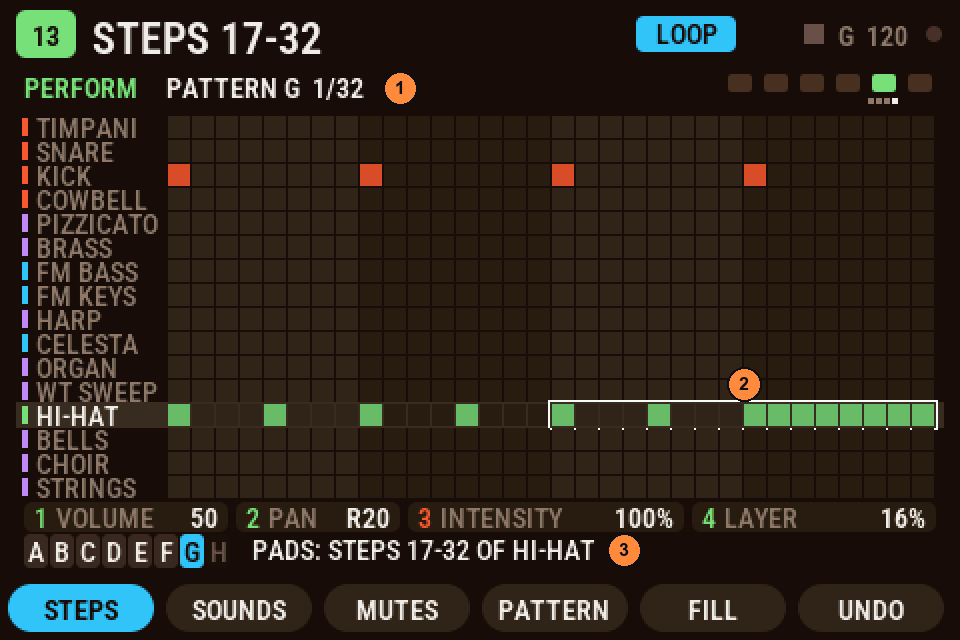
Here the pattern is at 1/32 (1), the frame is round steps 17 - 32 with a hi-hat roll in the last beat (2),
and the line names them: PADS: STEPS 17-32 OF HI-HAT (3).
- No ERASE and no SAVE on this page. F4 is PATTERN here. To take a take back use F6 UNDO, or go to SEQ, where F4 held is ERASE while REC plays. SAVE is F6 on SEQ: K5 once more.
- A step's note shows only on SEQ. PERFORM shows that a step is on and how hard it plays. You can give a step a note here (F1 STEPS, hold its pad, play a key); velocity and length are encoders 3 and 4 of SEQ.
- REC makes the pads the kit. F1 makes them steps again, with REC still lit. Switching REC off leaves the pads as they are.
Nobody has played this page by hand or listened to it yet. A script presses its keys and checks what the song then holds and plays; it does not look at the display: What Is Tested.
- Device Make A Beat - the same beat on SEQ, with notes
- Device Recording - REC, the click and ERASE
- Device Mixer And Effects - mute and solo on their own page
- Device Cheat Sheet - PERFORM in one row
- The manual, section 13: Perform: the pads, four ways, F5, F6 and the keys with SHIFT, a beat from nothing, and playing it
-
fw_softkeys.h -
soft_perform,perform_mode -
fw_events.h -
perform_pad: what a pad does in each of the four modes;HELP_PERFORM - fw_draw_pages.h - how the grid is drawn
- check-perform.mjs - the script that checks the page