Repository navigation
Device Make A Beat
Write a pattern from nothing on the SEQ page: kick, snare, hi-hat and a bass line, step by step.
A pattern is one bar for each of the MUSIC kit's 16 sounds. As it comes, a bar has 16 steps: sixteenth notes, four to a beat. The song has eight patterns, A - H. The SEQ page shows the steps of one sound of one pattern, as the 16 pads.
flowchart LR
  P["A pattern<br/>one bar, A - H"] --> R["16 rows<br/>one for each sound<br/>of the MUSIC kit"]
  R --> S["16 steps a row<br/>(32 or 64 at a finer grid)"]
  S --> V["A step: on or off,<br/>a note, a velocity, a length"]
  D["DATA"] -. "chooses the row you see" .-> R
  X["The 16 pads"] -. "are its steps" .-> S
Before you start, three things:
- Press STOP, and see that REC is not lit.
- Press K5. The second line says
SEQUENCER, and the top line LOOP: PLAY will repeat this pattern. K5 also chooses the MUSIC kit, so the pads' sounds are now the band's: TIMPANI, SNARE, KICK and so on. - Press RIGHT until you are on an empty pattern: in the row of eight letters under the values, an empty one is dim. In the demo song that is G (RIGHT six times, or LEFT twice).
1. The kick. Turn DATA until the top line says KICK, with a 3 in the square before it: pad 3. Press
F3 FILL once: a kick on every beat. The top line says EVERY 1/4.

The kick stands on steps 1, 5, 9 and 13: the first tile of each row. A row of tiles is a beat.
2. The snare. Turn DATA to SNARE (pad 2). Hit pads 5 and 13: the pads are the 16 steps. A step you switch on sounds once, while the song is stopped.

3. The hi-hat. Turn DATA to HI-HAT (pad 13). Press F3 FILL twice: EVERY 1/8, a hat on every eighth note.
4. A bass line. Turn DATA to FM BASS (pad 7). Hold a step's pad and play a key: that step is on and plays that note. The tile shows the note's name. In the picture: E2 on steps 1 and 4, G2 on 7, A2 on 11, B2 on 14.

5. Press PLAY. The pattern repeats. The lit tile is the step that plays now: white where the sound has a step. Go on changing it while it plays.

6. Wrong? F2 UNDO takes back what you just did; pressed again it brings it back.
7. Keep it. F6 SAVE.
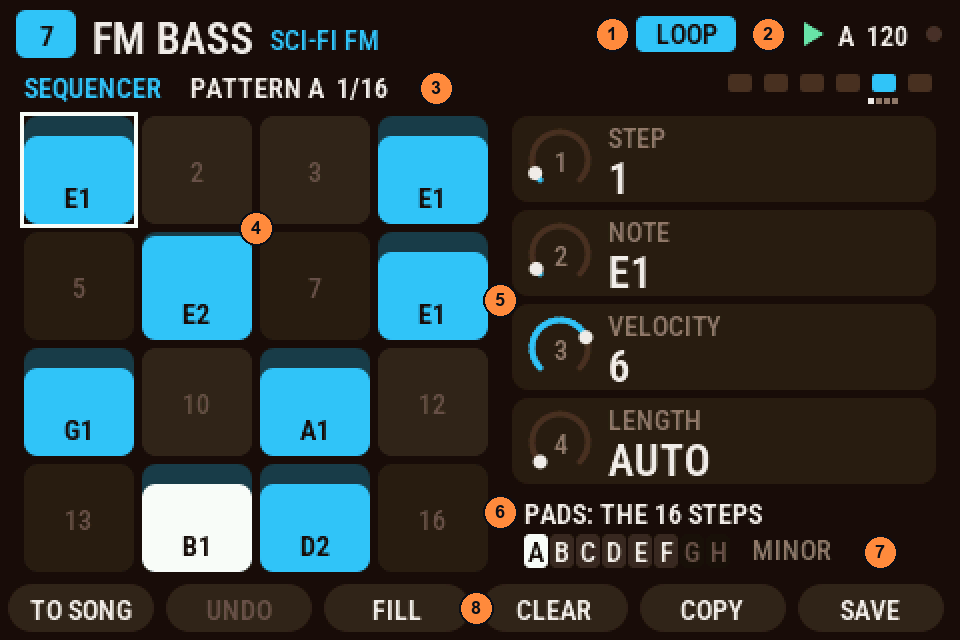
| What it is | |
|---|---|
| 1 | what PLAY plays: LOOP (this pattern, round and round) or SONG (the song in its order) |
| 2 | playing (a green triangle) or stopped (a square), the pattern that plays, the tempo |
| 3 | the pattern you see and its grid: PATTERN A 1/16
|
| 4 | the 16 steps of the selected sound. A step that is on shows its note (a dot: no note); its height is how hard it plays; >3 in its corner is a length of 3 steps. The frame is the step the encoders edit; the white tile is the step playing now |
| 5 | STEP · NOTE · VELOCITY · LENGTH of the framed step |
| 6 | what the pads do: PADS: THE 16 STEPS
|
| 7 | the eight patterns, and the scale NOTE moves in |
| 8 | TO SONG (or TO LOOP) · UNDO · FILL · CLEAR · COPY · SAVE |
The eight letters: blue is the pattern you see, white the one that plays, blinking yellow one that waits for the bar line, dim an empty one.
| To do this | Do this |
|---|---|
| switch a step on or off | hit its pad (REC not lit) |
| choose another sound | turn DATA, or SHIFT + its pad (you hear it) |
| give a step a note | hold its pad and play a key, or turn encoder 2 NOTE. The knob stays in the scale, and it switches the step on |
| choose the scale | encoder B: CHROMATIC, MAJOR, MINOR, PENTATONIC. A new song has MINOR |
| make it louder or softer | encoder 3 VELOCITY, 1 - 8: how hard the step plays |
| make a held note shorter | encoder 4 LENGTH: AUTO, or 1 - 15 steps |
| fill the row | F3 FILL, again and again: EVERY 1/4, EVERY 1/8, EVERY 1/16, SOUND CLEARED
|
| take the sound out of the pattern | F4 CLEAR: CLEARED - F2: UNDO
|
| try a variation | F5 COPY: the pattern is copied into the next empty one, and you are on the copy (COPIED A > G) |
| change the tempo | encoder A, 40 - 240. SHIFT + A is the swing, 0 - 100 % (SWING 20%) |
| another pattern | LEFT or RIGHT, round and round: at once while stopped, on the next bar line while it plays |
A step without a note plays the sound as designed, which is right for drums. LENGTH AUTO holds a note until the sound ends, plays again, or the bar ends. LENGTH matters for held sounds only: a one-shot always plays to its own end (Device Make A Sound).
HOME on this page lists the same in eleven lines:

-
You hear nothing from the row you edit. Its layer may be off at the current intensity. The page says
ITS LAYER IS OFF NOWunder the values, andlayer offin the second line where there is room: Device Layers And Intensity. -
The pads play sounds and set no step. REC is lit: the line under the values says
REC READY: PRESS PLAY. Press REC again: Device Recording. - The SEQ page shows one sound. For every sound's steps at once, press K5 three times more: Device Perform.
- Device Recording - play the pattern in, live
- Device Time Signatures - the same beat in 3/4, 6/8 or 7/8
- Device Song And Arrangement - put this pattern and others in an order
- Device Finer Grids - notes faster than a sixteenth
- The manual, section 9: Tutorial: a beat, Step by step, Reading the SEQ page, Everything a step can do, UNDO
-
fw_softkeys.h -
soft_seq,fill,sound_clear,pattern_copy - fw_sequencer.h - the steps, the notes, the patterns
-
fw_events.h -
HELP_SEQ, and what a pad does on SEQ