Repository navigation
Device Recording
Keep one pattern playing and play into it: the pads as a drum kit, the keys as notes, a click to keep time, and one key to take a bad take back.
Two things decide what happens when you press PLAY and hit a pad: what PLAY plays (LOOP or SONG), and whether REC is lit.
stateDiagram-v2
  [*] --> Stopped
  Stopped --> Looping: PLAY (top line says LOOP)
  Looping --> Stopped: STOP
  Looping --> Recording: REC
  Stopped --> Ready: REC
  Ready --> Recording: PLAY
  Recording --> Looping: REC again
  Recording --> Ready: STOP
  Ready --> Stopped: REC again
  note right of Recording
    pads and keys are written
    onto the nearest step
  end note
  note right of Ready
    REC is lit, nothing plays
    pads only sound
  end note
1. Press K5 while nothing plays. The page is SEQUENCER and the top line says LOOP. (If the song is playing, press STOP first, or press F1.) Turn DATA to the sound you want to see: here KICK.
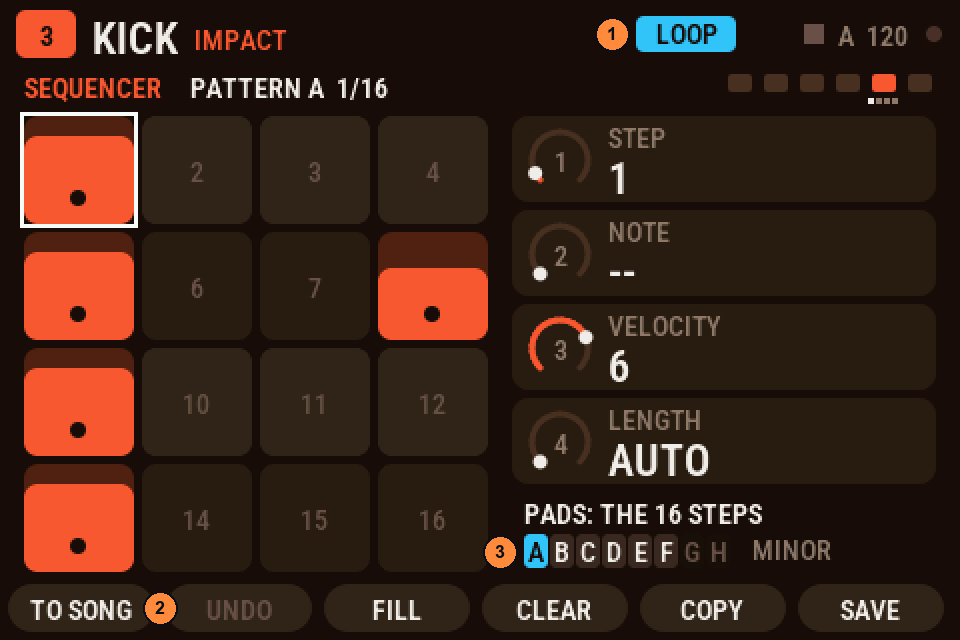
| What it is | |
|---|---|
| 1 | LOOP: PLAY will repeat the pattern. The other word here is SONG |
| 2 | F1 changes between the two. It says what it will do: TO SONG |
| 3 | the eight patterns. The blue one is the one you see |
2. Press PLAY. Pattern A repeats until you press STOP.
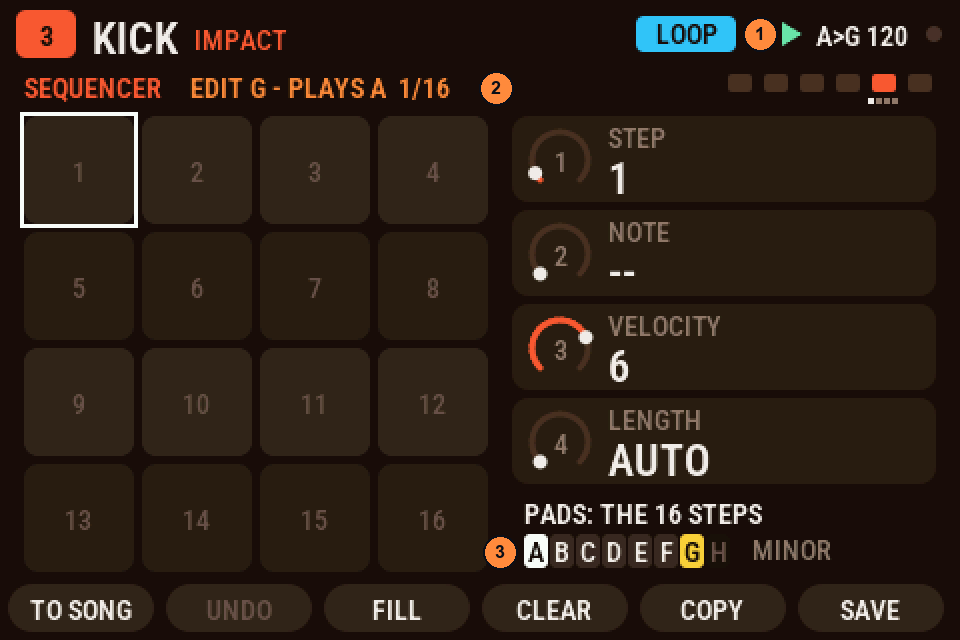
3. Choose an empty pattern: LEFT twice, for G (or RIGHT six times). If G holds a beat of yours, take H: LEFT once. The pattern does not cut in. It starts on the next bar line, and then it is the one that repeats. Until then:
| What it is | |
|---|---|
| 1 |
A>G: A plays, G comes next |
| 2 |
EDIT G - PLAYS A, in orange: what you see is not yet what you hear |
| 3 | G blinks yellow until it starts. White is the pattern that plays |
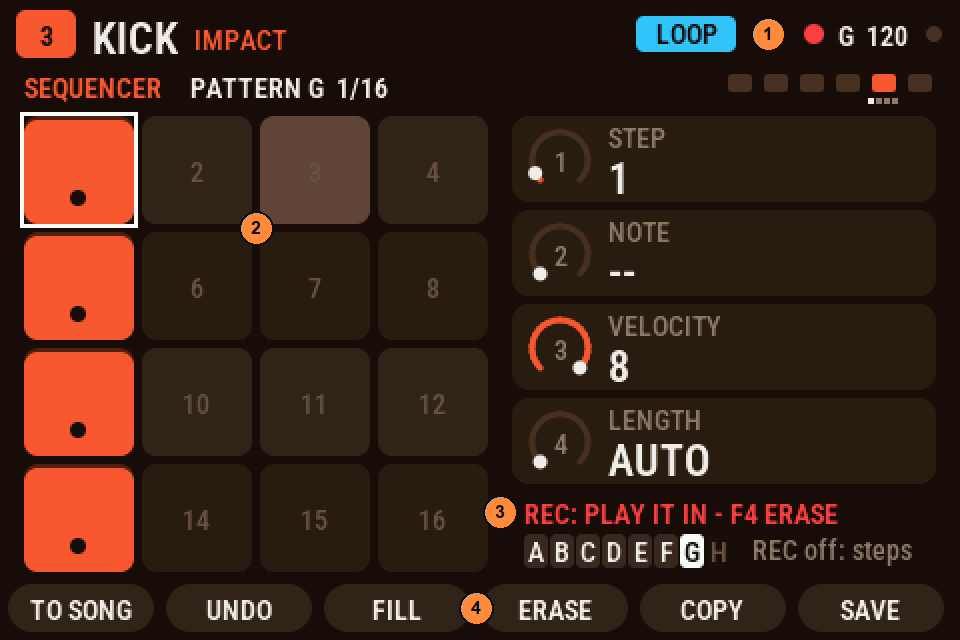
4. Press REC once G plays. Now the pads are the drum kit and the keys are the notes. Play in time: every hit is written onto the step nearest to it, as hard as you hit it, and you hear it again on the next round. A click keeps time.
| What it is | |
|---|---|
| 1 | the red dot: REC is lit. It beats with the click |
| 2 | the hits, as they land. The tiles show the sound you played last |
| 3 |
REC: PLAY IT IN - F4 ERASE, in red: what the pads do now |
| 4 | F4 is ERASE while REC plays |
5. A wrong note? Two ways:
- Hold F4 ERASE (
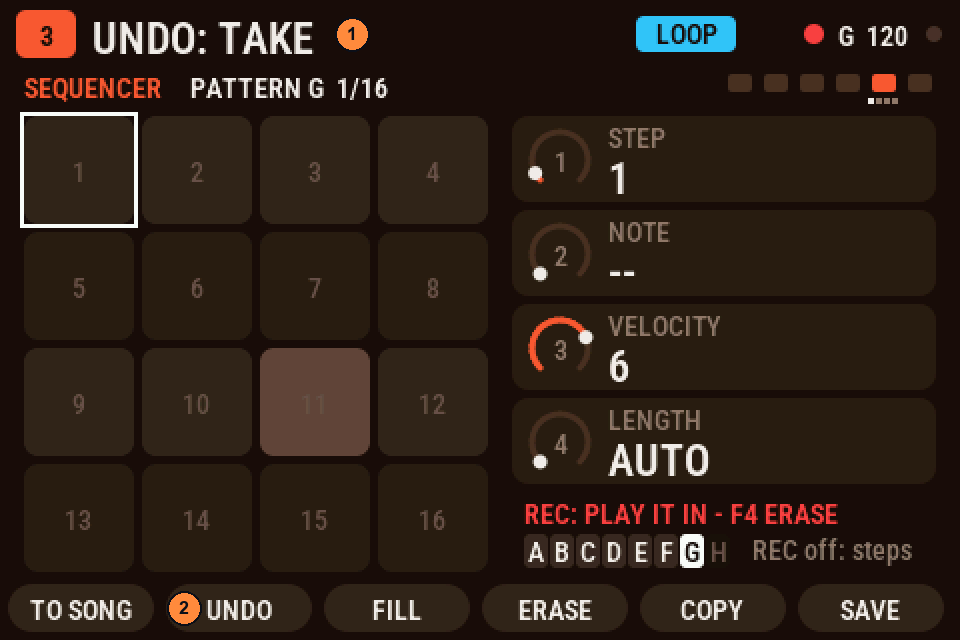
ERASE: HOLD F4; the key is red while you hold it): the selected sound's steps are erased as the bar passes them. A tap erases only the step under the playhead. - Press F2 UNDO: everything you played since the first hit is gone in one press (
UNDO: TAKE). F2 again brings it back.
6. Press REC again. The pads are the 16 steps once more, and the pattern goes on playing. STOP stops it. STOP alone does not switch REC off: it stays lit until you press it again.
| the pads are the kit | a hit lands on the nearest step of the pattern's grid. Kick, snare and hat can be played in together |
| the keys are the notes | SHIFT + a pad (on SEQ) or DATA selects an instrument without recording it; then every key is recorded on its step, at its pitch |
| the pattern repeats | switching REC on sets LOOP. If it was SONG the top line says REC ON: PATTERN LOOPS
|
| a click keeps time | on every beat, higher and louder on the bar line, while REC is lit and it plays. It is the device's own: it is not part of the song, and a game never hears it |
| stopped, nothing is recorded | the pads only sound. The line under the values says REC READY: PRESS PLAY
|
| Key | What it does |
|---|---|
| REC | lights REC, and sets LOOP. Again: off. STOP does not switch it off |
| SHIFT + REC | the click off and on: CLICK OFF, CLICK ON
|
| F1 | TO SONG / TO LOOP: what PLAY plays (SONG: PLAYS IN ORDER, LOOP: PATTERN REPEATS) |
| F2 UNDO | the whole take, from the first hit to STOP, PLAY or REC. Again: redo |
| F4 ERASE | on SEQ, while REC plays: held, erases the selected sound as the bar passes. Otherwise F4 is CLEAR |
| LEFT · RIGHT | another pattern, on the bar line. Until then the display stays on the pattern that plays |
-
Only the MUSIC kit is recorded. On a sound page with the SFX kit chosen, a hit while REC plays says
MUSIC KIT ONLY: K5 SEQand nothing is written. - There is no count-in. The first round of the loop is one.
- F1 TO SONG while REC plays sends the take along the song: each hit lands in the pattern that plays in that bar.
- A hit is moved to a step, and past the middle of a step to the next one. For timing finer than a sixteenth, give the pattern a finer grid first: Device Finer Grids.
- On PERFORM REC makes the pads the kit too, but F4 is not ERASE there: Device Perform.
- Device Finer Grids - a take at 1/32 or 1/64
- Device Perform - record with the whole pattern in view
- Device Song And Arrangement - LOOP and SONG in full
- Device Saving And Reset - keep what you played
- The manual, "Loop a pattern and play into it", "Playing it in", UNDO, "What PLAY plays: LOOP or SONG"
-
fw_sequencer.h -
seq_play,seq_rec,record, the click -
fw_events.h - REC, SHIFT + REC and F4 held in
on_event - fw_edit.h - the song's undo