Repository navigation
Unity Showcase Walkthrough
A map of the example game: which objects make its sound, how the game tells them what happened, which sound takes which route, and where the music gets its intensity. Read it before you open the code, or before you copy the pattern into your own game.
Brio: First Harmonic is a one-level 2D platformer. Every sound in it is SFX FORGE at runtime: 19 sound effects written as patches in code, and the demo song. There is no audio file in its folder.
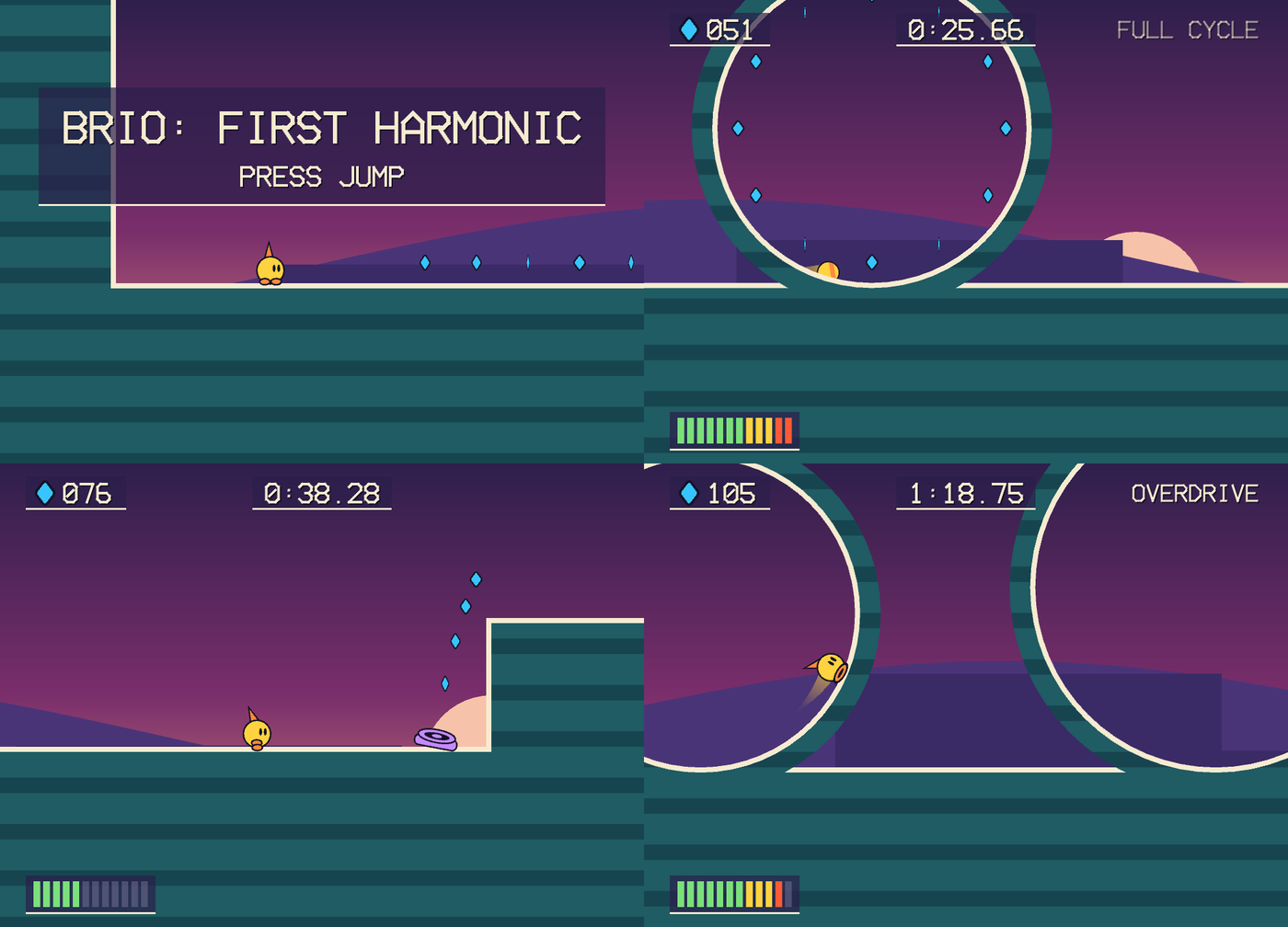
- Open the Unity project
unity/Demoof the repository with Unity 6000.3.8f1. (From the package instead: in the Package Manager, select SFX Forge, open Samples and import Showcase. It needs the built-in render pipeline and the legacy Input Manager.) - Open the scene
Assets/Showcase/Showcase.unity. (Imported as a sample, the folder isAssets/Samples/SFX Forge/<version>/Showcase.) - Press Play. You see the title card
BRIO: FIRST HARMONIC,PRESS JUMP, and hear the song's rhythm section. - Press Space. The run starts.
| Keyboard | |
|---|---|
| Run | Left / Right or A / D |
| Jump (hold for a full jump, tap for a hop) | Space or Z |
| Tuck into a roll, while moving | Down or S |
| Wind-Up, standing still: hold Down, tap Jump up to six times, let go of Down to Burst | Down + Space |
Sound needs Windows x64. Elsewhere the game runs silent and says so in the Console. No device is needed. The video of a whole run is on Videos.
Everything that sounds is under one object, Audio. AudioInstaller.Install builds it in code.
flowchart TD
    A["Audio"]
    M["Music<br/>AudioSource + SfxMusicPlayer + MusicDirector"]
    E["Effects<br/>AudioSource + SoundEffects + LiveVoicePool"]
    F["Footsteps<br/>AudioSource"]
    V["Live Voice 1, 2, 3<br/>AudioSource + SfxPlayer"]
    C["Continuous<br/>ContinuousSounds"]
    H["Roll Hum, Wind, Wind-Up Rev<br/>AudioSource + SfxPlayer each"]
    A --> M
    A --> E
    A --> C
    E --> F
    E --> V
    C --> H
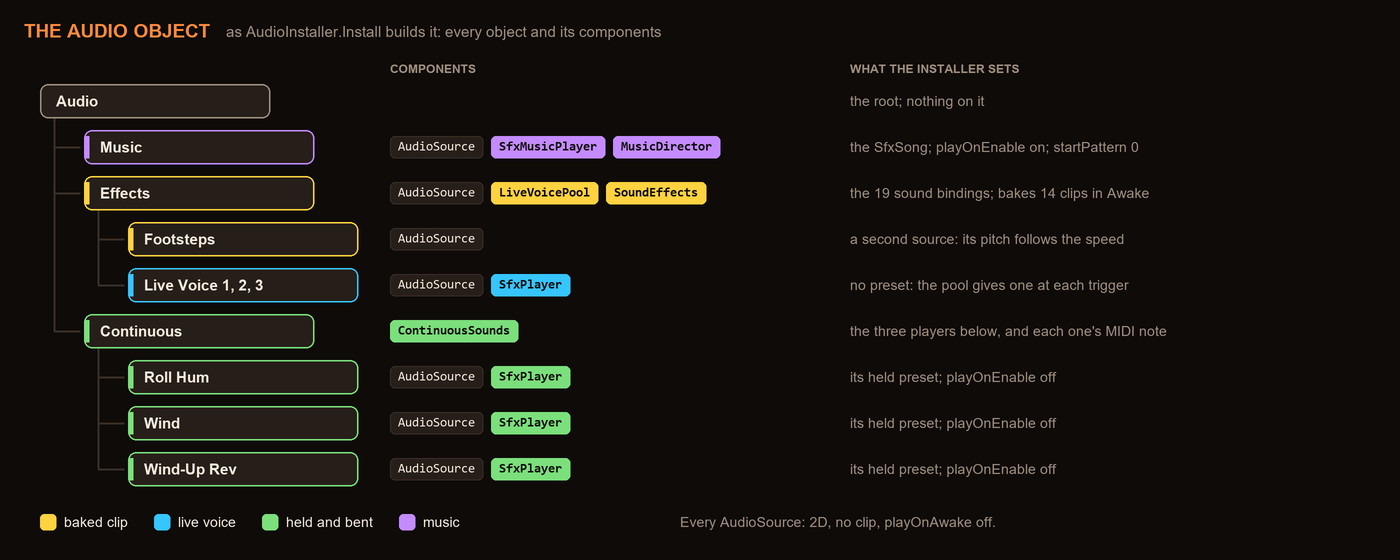
The same tree with what the installer sets. Yellow is a baked clip, blue a live voice, green held and bent, purple music.
Every AudioSource is 2D, has no clip and has playOnAwake off. An SfxPlayer or SfxMusicPlayer adds its sound
to the AudioSource beside it and keeps that source running.
Audio only listens to events and reads the player's state. Gameplay never calls SFX FORGE.
flowchart LR
    G["Gameplay and level code<br/>PlayerController, Chime, Woofer ..."]
    EV["GameEvents<br/>19 static C# events"]
    ST["IPlayerState<br/>Speed01, IsRolling, IsGrounded,<br/>IsCharging, Charge01"]
    SE["SoundEffects<br/>one-shots"]
    CS["ContinuousSounds<br/>held sounds"]
    MD["MusicDirector<br/>the music"]
    G -- "RaiseJumped() ..." --> EV
    G -- "shows its state" --> ST
    EV -- "listen" --> SE
    EV -- "listen" --> CS
    EV -- "listen" --> MD
    ST -. "read every frame" .-> CS
    ST -. "read every frame" .-> MD
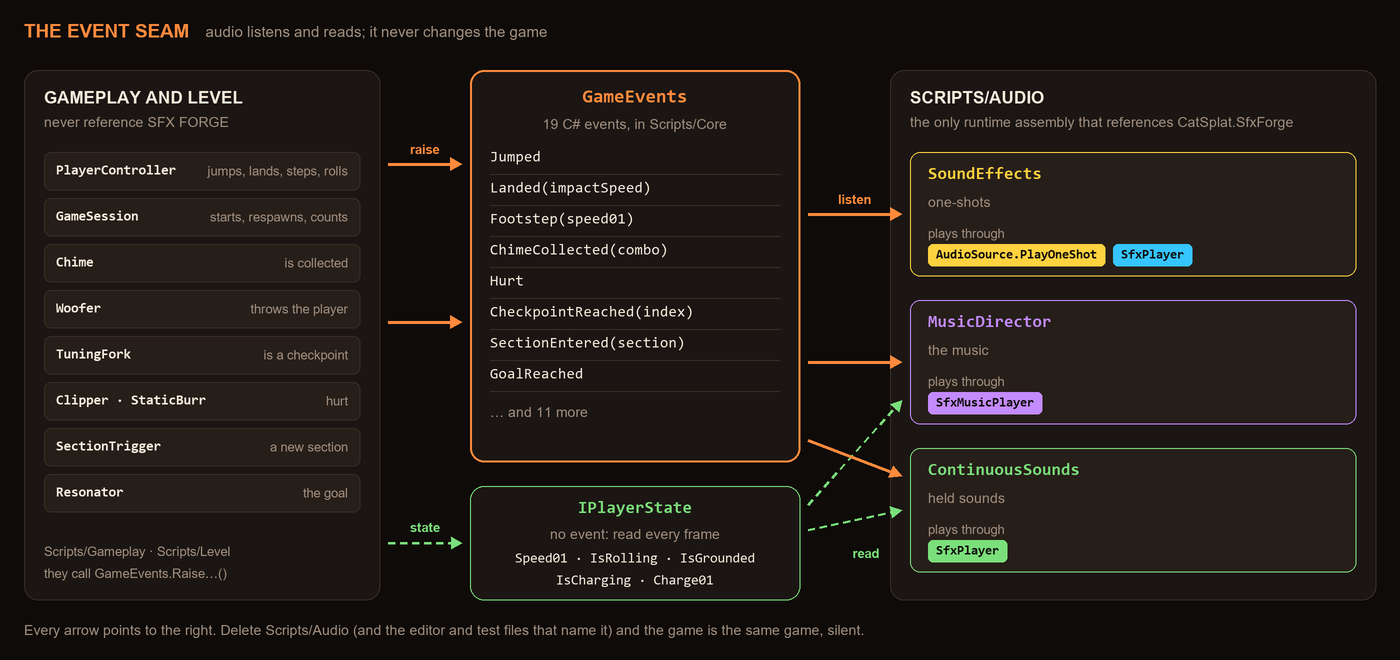
Every arrow points to the right: nothing in the audio changes the game.
-
Events are for things that happen at a moment: a jump, a landing, a Chime.
GameEvents.cshas oneRaise…method for each. The audio scripts subscribe inOnEnableand unsubscribe inOnDisable. - State is for things that last: speed, rolling, charging. They have no event. The audio reads them every frame.
-
Scripts/Audiois the only assembly of the game itself that referencesCatSplat.SfxForge. (The scene builder inEditorand the tests inTestsdo too.)
A route is how a sound reaches the speakers: baked once into a clip, synthesized live for one play, or held and bent while it plays (Unity Choosing A Route).

Two frames of a recorded run. 1, 2, 10: the roll hum and the wind (held). 3, 4: Chimes (live). 7, 9: the Tuning Fork and the Woofer (baked). 5, 6, 8: the speed meter, the section's name and the bells that answer the fork (music). The line under each frame gives the game's values at that moment.
| The game says | You hear | Route | Varies with |
|---|---|---|---|
Jumped |
Jump | baked | |
Landed(impactSpeed) |
Land | baked | silent below 4 m/s, louder up to 25 m/s |
Footstep(speed01) |
FootstepLeft, FootstepRight in turn | baked, on a source of its own | the source's pitch 1.0 … 1.3 with speed |
TuckStarted, Skidded, WooferBounced, ClipperDefeated, Respawned, UiConfirmed
|
TuckStart, Skid, Woofer, ClipperPop, Respawn, UiConfirm | baked | |
BurstReleased(charge01) |
Burst | baked | volume 50 … 100 % with the charge |
Hurt |
Hurt, and the music flinches | baked, music | |
CheckpointReached(index) |
TuningFork, and three bell notes of the song | baked, music | |
GoalReached |
Goal, and a fanfare on the song's instruments | baked, music | |
ChimeCollected(combo) |
Chime | live voice | one step up E minor pentatonic per Chime of a combo, up to 10 |
ChimesScattered(count) |
ChimeScatter | live voice | a run of 5 … 8 pings, 55 ms apart, falling and fading |
WindUpCharged(charge01) |
WindUpRev, started again on each tap | held and bent | pitch, fm and cutoff with the charge |
| state: rolling on the ground | RollHum | held and bent | pitch, cutoff and level with Speed01
|
| state: above 60 % of top speed | Wind | held and bent | level and cutoff with Speed01, faded over 0.4 s |
That is 14 baked sounds, 2 live and 3 held. The whole list, with each sound's patch, note and volume, is the table
at the end of SoundLibrary.cs. Every pitched
effect is tuned to a note of E minor pentatonic, the song's key, so the effects fit the music.
Intensity is a number from 0 to 1 on the SfxMusicPlayer. Every sound of the song has a layer mark and plays
only at or above it (Unity Adaptive Music). MusicDirector computes it every frame:
flowchart TD
    Q{"On the title card?"}
    TI["target = 0.42"]
    S["The section the player is in<br/>its floor: 0.42 ... 0.60"]
    V["player.Speed01<br/>0 ... 1"]
    T["target = Lerp(floor, 1, Speed01)"]
    CP["For one bar after a Tuning Fork:<br/>at least 0.8"]
    HU["After a hit: times 0,<br/>growing back to times 1 over 2 s"]
    SM["Smooth towards the target:<br/>the whole range up in 0.6 s, down in 2.5 s"]
    OUT["music.intensity"]
    Q -- yes --> TI
    Q -- no --> T
    S --> T
    V --> T
    T --> CP
    CP --> HU
    HU --> SM
    TI --> SM
    SM --> OUT
A hit also sets the smoothed value itself to 0 at once, and dips the music's volume to half for the same two seconds.
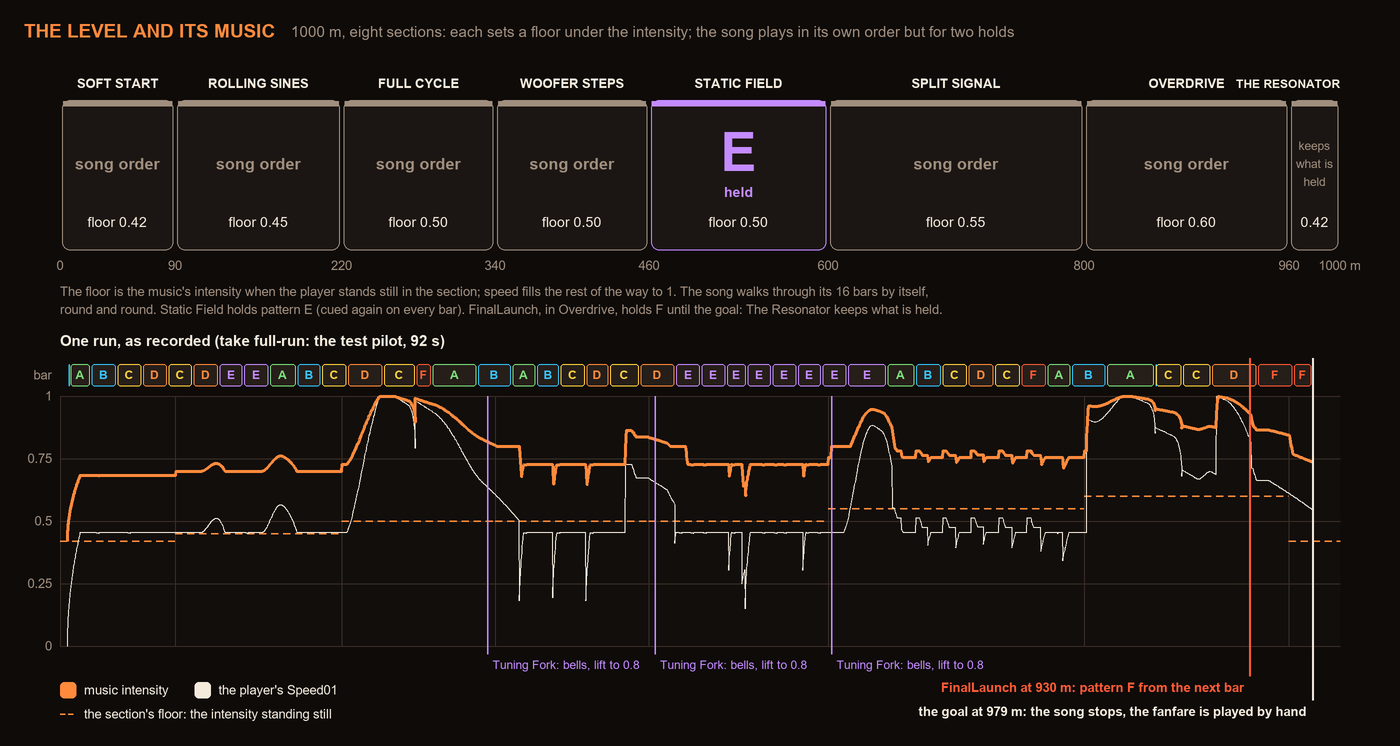
Above: the eight sections and the floor each puts under the intensity. Below: one recorded run. The dashed line is the floor, the white line the speed, the orange line the intensity.
The song itself plays in its own order, 16 bars round and round. Two places hold one pattern instead, and the goal ends the song:
| When | The music | How |
|---|---|---|
| the player is in Static Field | pattern E, the breakdown |
CuePattern(4), cued again whenever music.Bar changes |
FinalLaunch, at the end of Overdrive |
pattern F, the turnaround, until the goal |
CuePattern(5), the same way |
GoalReached |
the song stops; a fanfare by hand, in a bigger room |
Stop, SetTrackVolume, SetMaster(SfxMaster.ReverbSize, 110), PlaySound
|
GameStarted after a goal |
the song's own mix, from pattern A |
Reload, Play
|
File in Scripts/Audio
|
Read it for |
|---|---|
SoundLibrary.cs |
every patch, and the table of route, note and volume |
SoundEffects.cs |
BakeClips, PlayBaked, OnChimeCollected
|
LiveVoicePool.cs |
three SfxPlayers shared by the live one-shots |
ContinuousSounds.cs, HeldSound.cs
|
UpdateRollHum, UpdateWind; hold, let go, retrigger |
MusicDirector.cs |
TargetIntensity, HoldPattern, OnGoalReached
|
AudioInstaller.cs |
how the Audio object is put together |
- Unity Copy The Showcase Pattern: the same structure in your own game
- Unity Testing Your Audio: how the showcase's tests check all of this without ears
- Unity Recipes: the same ideas as single scripts
- Videos: the showcase played from start to goal
- The Unity manual, section 7: The showcase, a worked example, with What uses which route, The event seam, The sound table and The MusicDirector
- The showcase's README: keys, checks, the folder map
- The showcase's source