Character Sheets
Shadowdark Extras extends player and NPC sheets while leaving the underlying Shadowdark actor types alone. Most enhancements are world-controlled. Dark Mode is per client.
Header, waves, or sheet controls missing? These are toggled in Feature Manager → Advanced & Hidden Features → Character Sheets — 12 toggles from Enhanced Header through Character Generator.
With Enable Enhanced Header on, a Player sheet gets an interactive summary across the top: current and max HP with a health bar, AC, ability modifiers, Luck, XP progress and level, plus the actor portrait and header background.
Actors can supply their own image or video background. The GM can also set one world default that covers every actor without a custom header.
Clicking a supported value opens the normal SDX or Shadowdark adjustment workflow, so the header is a working control surface.
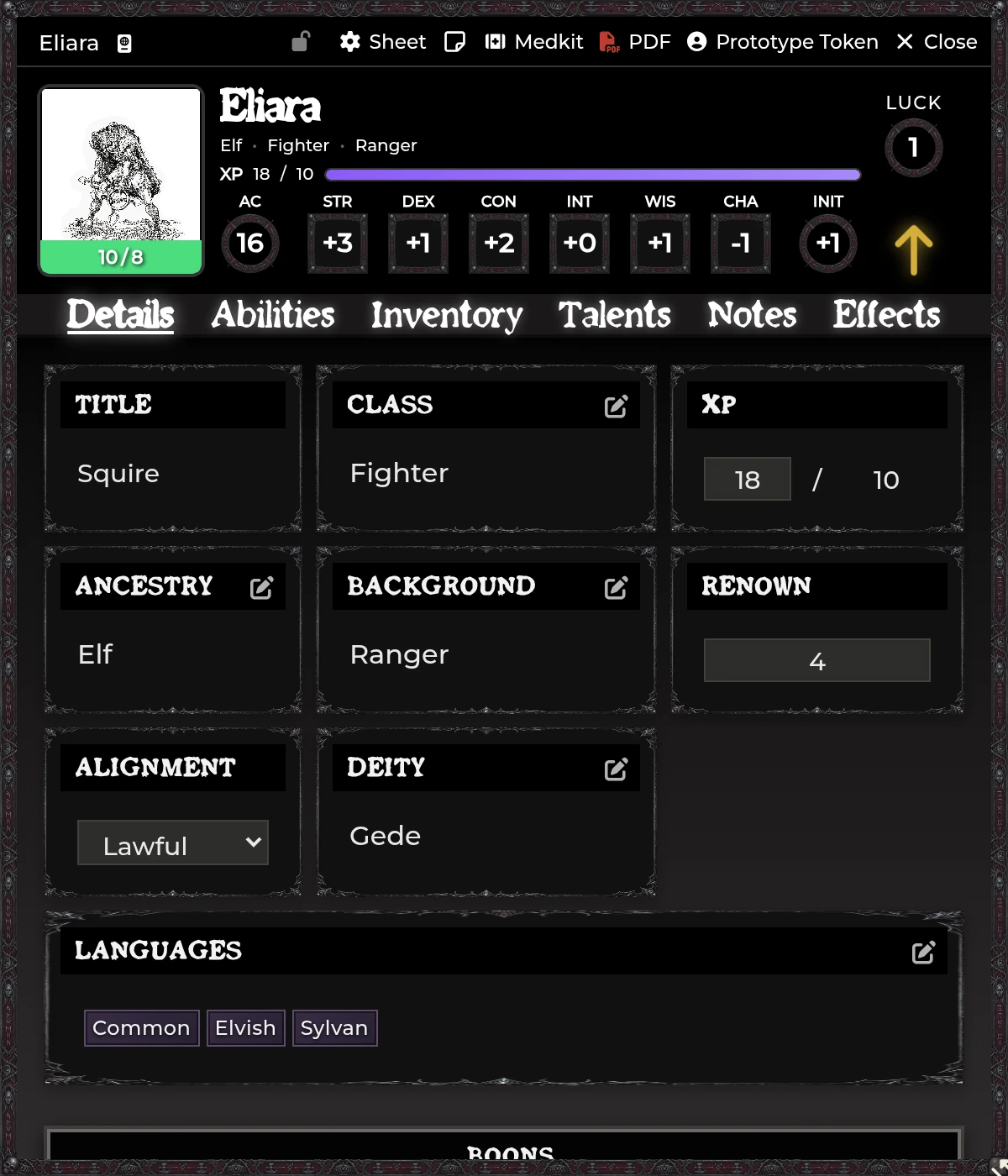
Current HP controls take direct edits and quick relative changes. NPC sheets get the same compatible quick-control behavior. Actor permission still governs every change, and combat automation may be writing to that same value through damage cards.
The HP wave is a portrait overlay whose height tracks remaining health. Open Configure HP Waves to switch the effect on or off, choose the default color, and add ancestry-specific colors.
Ships enabled, with a red wave. Pick a solid, high-contrast color when the portrait art underneath is busy.
This GM-only editor owns the shared visual system: the outer sheet frame, panels and stat boxes, border slices, width and repeat, header, title bar, tabs, navigation, labels and value colors, actor-name shadow and weight, tab gradients, and a live preview.
Those values are stored as hidden settings because the editor treats them as one coherent theme. Dark Mode loads a client theme over the top without erasing the GM's saved custom settings.
Match NPC Sheet Theme to Player Sheets applies the same frame, header, and panel language to NPC sheets while the system's NPC layout stays intact.
Player and NPC sheets both get condition toggles. The Conditions theme setting offers Shadowdark, 5e, Parchment, Stone Tablet, Leather Bound, Iron & Rust, Moss & Decay, and Blood & Shadow.
Changing the theme re-renders open Player sheets. The condition documents underneath stay identical, and only the control presentation changes.
Player sheets carry a Renown value for faction reputation, fame, or whatever campaign-scale standing you're tracking. Carousing outcomes can apply a configured Renown delta to it. Decide at the table what the number means. SDX stores and displays it without imposing a faction model.
With Enable Journal Notes on, the simple Notes tab becomes a multi-page journal with a page sidebar, controls to create, select, rename, and remove pages, rich-text editing, and quick inserts for information, warnings, quests, loot, and NPC notes.
See Journal Tools & Pins.
The sheet padlock protects configured fields from player edits, and Configure Sheet Locks decides what the locked state actually covers. On the numeric side, XP, coins, gems, HP, abilities, and Luck. Past those it reaches equipped state, inventory add and remove, spells, and talents, then the identity fields (class, ancestry, background, deity, alignment, languages) plus Active Effects.
The configuration is global while the lock state is per sheet and per actor. GMs keep authority throughout. A locked field warns the player rather than silently swallowing their edit.
The Medkit icon appears for actor owners when Show Medkit Icon is on. It checks owned Spells, Scrolls, and Wands against registered source packs.
| Item | Update behavior |
|---|---|
| Spell | Compared to and replaced from the matching source document |
| Scroll | Keeps the physical item; refreshes SDX enhancement flags from its referenced spell |
| Wand | Keeps the physical item/use data; refreshes enhancement flags from referenced spells |
Read the preview before you apply. The GM can run the same logic across the entire world with Medkit: Scan All Actors.
With Enable Add Coins Button on, the Coins area picks up a quick adjustment control. Positive values add, negative values subtract. Transfers are a separate workflow, covered in Inventory & Trading.
The Shadowdark Spell Book dialog gains a compendium selector. It scans installed Item packs containing Spells and lets the user narrow to one source or view all of them. This filters the browser list. The actor's existing spellbook is untouched.
SDX registers default sheets for several Shadowdark item types:
| Item type | Tabs/features |
|---|---|
| Potion | Details, Activity, Description, Macro; damage/healing/effects |
| Background | Description and Advancement; grant configured items immediately or at a level |
| Class Ability | Details, Description, Macro |
| NPC Attack | Attack details, typed damage, ranges, Description, Source |
| NPC Feature / NPC Spell | Activity, Description, Macro |
| NPC Special Attack | Activity, Description, Macro |
They're data editors as much as presentation sheets. See Spell Automation for Activity configuration.
When a ranged weapon could draw on more than one owned ammunition item, SDX prompts for which to consume and remembers the preferred choice.
Staff weapons can open Staff Spells Configuration to manage attached spells and restore their uses. Those stored spell UUIDs have to stay valid.
SDX's Party actor runs its own Members, Inventory, Travel, and Description tabs. It's documented with the tray, since both coordinate the same roster: The SDX Tray & Party Tools.
Header or layout did not change. Reload after changing the enhanced-header setting. Hard-refresh if art or CSS still looks stale.
Player cannot edit a field. Check the sheet's padlock state and the global Sheet Lock configuration.
Medkit cannot match a Scroll/Wand. Repair its referenced Spell UUID.
An ancestry color is ignored. Confirm the stored ancestry name matches the override, and that HP Waves are enabled at all.
Potion/NPC item opens the system sheet instead. Check the sheet selection in the item window, and reload after enabling or updating SDX.
Related: Inventory & Trading · Spell Automation · The SDX Tray & Party Tools