Party View
Party View is the live roster in the SDX Tray — every eligible token on the current scene, with health, armor, and luck at a glance. Click a card to jump to that character.
The Tray lives on the left edge of the canvas. The chevron expands it.
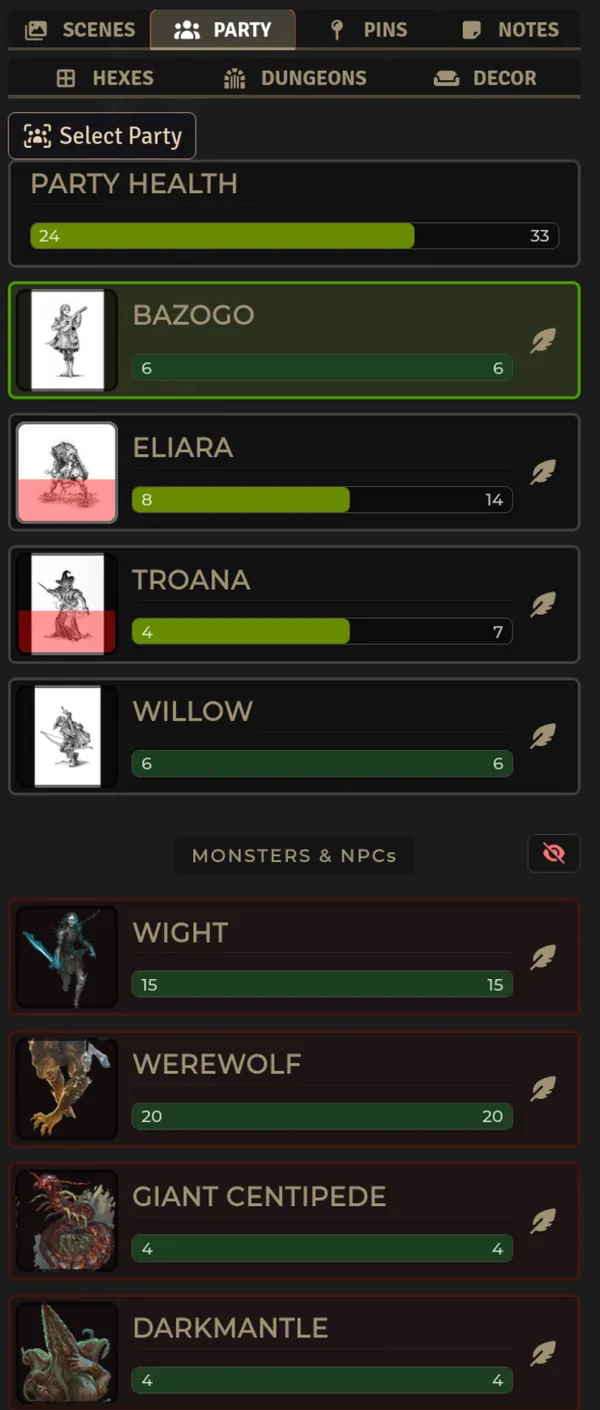

Walkthrough: click → select, double-click → center, feather → open sheet, eye → hide the monster section.
Party tab missing? Check Feature Manager → SDX Tray Tabs → Party (and the Master Control → SDX Tray card above it). GM only, reload after you re-enable.
- Put your party (and any monsters/NPCs) on the current scene.
- Open the Tray → Party tab. The heading comes from the world Party Name.
- Click a card to select that token.
- Double-click a card to center the canvas on it — works even for tokens you don't own.
- Click the feather on a card to open its sheet.
- Read player cards by their HP bar, AC, and luck chips — all three sync to every client.
- Read monster/NPC cards: players see only the HP bar (percent), never exact HP or AC — even when the GM has revealed them. The GM sees full numbers.
- GM: use the eye in the NPC header to hide the whole monster section from players. Hidden tokens never appear for players at all. Each player's own Show NPCs and Show Health Bars remain client-side.
- Portrait with a wounded overlay that grows as HP drops and a skull when the actor is down.
- Name + level, plus the feather shortcut to the sheet.
-
Player cards: HP as
current / maxwith bar, AC chip, and luck chips. -
Monster/NPC cards: HP bar only for players; GM sees
current / max, percent, and AC.
| Setting | Scope | What it does |
|---|---|---|
| Party Name | World | Heading text in the Party tab |
| Show Party Tab | Client | Show or hide the Party tab for you |
| Show Health Bars | Client | Show or hide the HP bars for you |
| Show NPCs | Client | Show monsters/NPCs in your own Party view |
| Hide NPCs from Players | World (hidden) | GM eye-toggle — hides the entire monster section from every player and survives reloads |
How it stays in sync
The GM broadcasts sdxTrayPartyStats on every tray render (deduped) and answers a joiner's sdxTrayRequestPartyStats so late joins don't miss the first snapshot. Player cards keep full hp {value,max,percent} + ac + luck; monster cards are trimmed to hp {percent} only on the wire. That's why the bar and wounded overlay still work without leaking numbers. Hidden tokens (token.document.hidden) are excluded from the player roster even though canvas.tokens.placeables still contains them.
Files
scripts/tray/TraySD.mjs (snapshot + merge, centerOnToken, visibility setting) · scripts/tray/party-bindings.mjs (card click/dblclick/open-sheet) · scripts/tray/TrayApp.mjs (mixin) · templates/sdx-tray/tray.hbs · styles/sdx-tray.css
Related: The SDX Tray & Party Tools · Character Sheets · Canvas & Table Tools