Spell Automation
The Activity tab turns a Spell, Scroll, Wand, Potion, NPC Feature, or NPC Spell into a declarative workflow. Choose targets, roll saves and damage, apply effects, track duration, summon creatures, hand out items, run macros.
Activity tab, templates, or auras missing? Check Feature Manager → Advanced & Hidden Features → Effects & Spells — the Spell Activity System and its dependents Template Effects and Auras are also blocked when Spell Activity System is disabled. Spell Configuration Panels lives under Advanced & Hidden Features → Item Automation with the same dependency.
- Enable Enhance Spells and reload.
- Open the item from a world actor or an editable world item.
- Go to the Activity tab.
- Save after each major section you change.
- Test with one caster and one target before you pile on templates, auras, or multiple effects.
Scrolls and Wands can point at a Spell by UUID. Move or delete that source and the inherited behavior has nothing to resolve against. Medkit can refresh stale owned copies.
The normal mode uses Foundry's current target set. Decide whether the item hits all valid targets, one random target, or a prompted selection, where the section offers that choice.
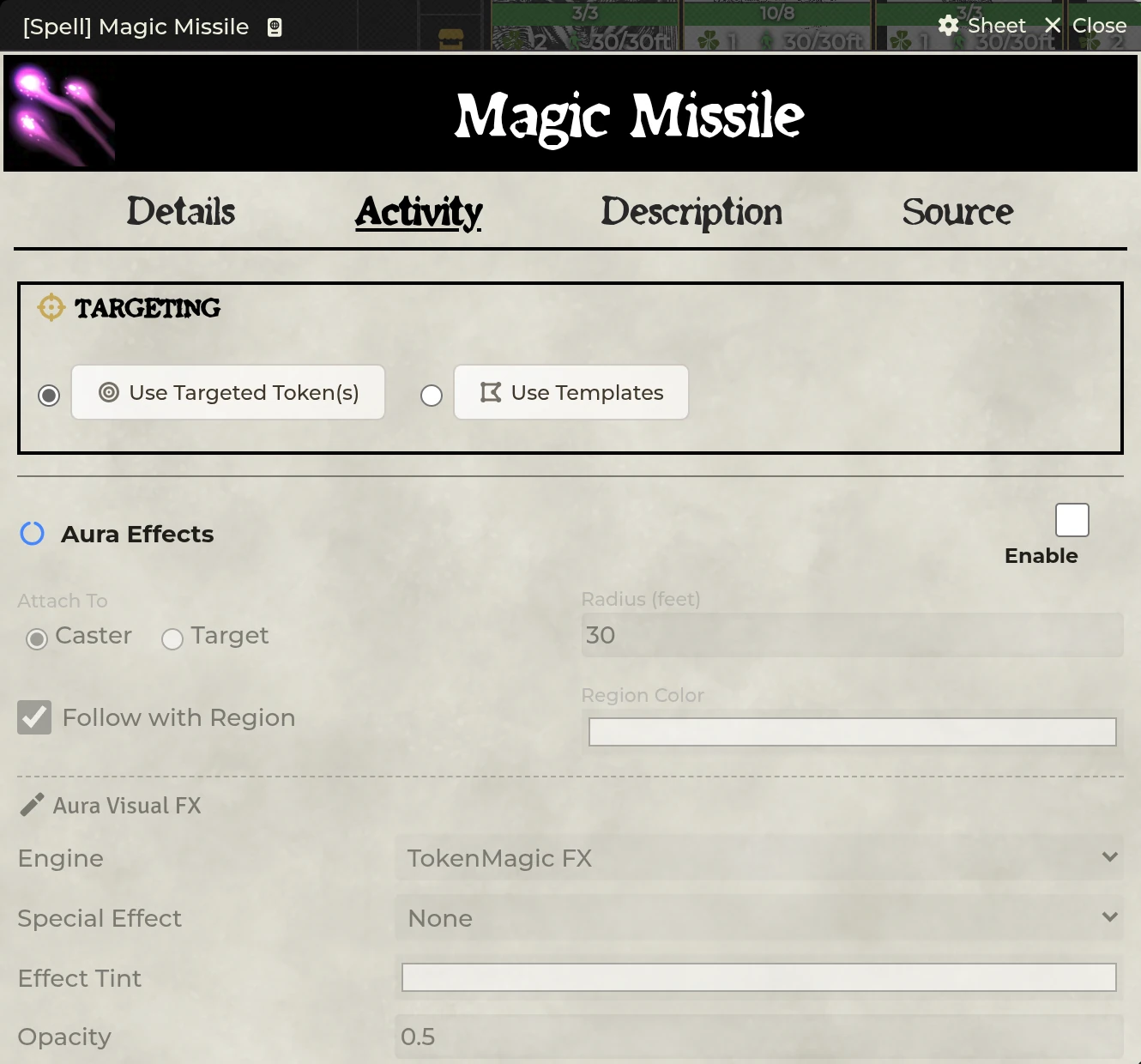
Template targeting drops a measured template when the item is cast:
| Option | Examples |
|---|---|
| Shape | Circle, cone, ray, rectangle |
| Size | Distance/width appropriate to the shape |
| Placement | Caster-origin or interactive placement, depending on configuration |
| Cleanup | End of turn, after rounds, after seconds, or manual |
| Visuals | Texture, opacity, TokenMagic filter stack |
| Effects | On creation, enter, leave, or turn-boundary behavior |
On Foundry v14, SDX pairs every template with a native Region. That Region is the automation surface handling containment, turn triggers, effects, and elevation-aware behavior.
Edit TMFX Stack opens the TokenMagic filter editor for a whole stack rather than one filter at a time.
A configured template save rolls against whichever tokens got caught when the template was created. You set the ability or target defense, the DC or formula, the success behavior such as half or no damage, and which targets pick up linked effects.
"Target Defense" lets an ability use the target's defense value when the item wants a contested calculation instead of a fixed DC.
An aura stays centered on its source or a chosen target. Configurable pieces: radius, disposition (ally, enemy, or all), whether line of sight is required, and triggers on enter, leave, source turn start/end, and target turn start/end. From there you can attach damage or healing, a saving throw, effects and conditions, a Sequencer animation, and TokenMagic filters for the affected tokens.
Aura processing is GM-authoritative, which stops every client from applying the same effect at once. A headless no-canvas GM won't process canvas geometry, so another canvas-capable GM needs to be present.
Three authoring styles:
| Mode | Use it for |
|---|---|
| Basic | Dice plus bonus, with simple level scaling |
| Formula | A custom Roll formula using supported actor/target variables |
| Tiered | Different formulas for level bands |
Common variables cover caster level and abilities, and target variables become available wherever a target exists. Add a damage type so resistance and immunity logic can process the result correctly.
Beyond that there's a requirement formula, a critical multiplier, every-level or every-other-level scaling, a healing type, and per-target roll and application choices.
Keep JavaScript out of Roll formulas. Use Foundry Roll syntax and supported data paths. SDX evaluates formulas as rolls, never as arbitrary code.
Drag effect documents into the normal and critical slots. Each group picks a destination (target or self), a selection mode (all, random, or prompted), an optional requirement, and whether it fires on a normal or critical outcome.
Effects can also be marked to break the next time their bearer loses HP. The public API exposes that same break-on-damage primitive for integrations.
With Enable Focus Spell Tracker on:
- A successful focus spell starts a tracked focus entry.
- Linked effects are associated with that focus instance.
- The caster makes Shadowdark's native focus check when required.
- On success, configured per-turn damage or healing applies.
- On failure or a manual end, the focus entry and its linked effects are cleaned up.
Auto-Roll Focus on Turn fast-forwards each active check at the caster's turn. Off by default.
The Token Toolbar and selected sheet surfaces can display active focus icons. Modeling the same ongoing spell as both a focus entry and an unrelated duration entry gives you two lifecycles to manage, so do it only when you mean to.
Non-focus ongoing spells can be tracked by rounds or by time. You configure the duration, whether it triggers at turn start or turn end, any per-turn damage or healing, effect reapplication when that's needed, and manual versus automatic expiry.
Which clock an entry answers to is decided when it is cast: rounds if an encounter is running, world time if not. Trackers report what is left in whichever unit applies rather than always in rounds. Per-turn damage is a combat loop either way, so its bookkeeping stays on rounds even when the duration itself is held in world time.
Duration icons show up in the Token Toolbar when it's enabled, and their controls end the tracked instance.
Each summon profile defines an Actor UUID, a quantity, placement behavior, token lifecycle, and whether tokens delete themselves when the spell expires.
Use a world or compendium actor with a stable UUID. Interactive placement leans on portal-lib and the current scene. Summoned-token cleanup reads the tracked spell and expiry state, so deleting that state by hand will orphan a token.
Players can cast these themselves. The caster is granted ownership of the summoned actor for the length of the spawn and it is revoked again when the placement is cancelled or the spawn fails, so nobody keeps standing ownership of a shared world creature they never conjured.
When several are listed decides what a spell with more than one profile does.
| Mode | Behavior |
|---|---|
| Summon all | Every profile is summoned together. The default. |
| Ask which one | The caster picks a single creature |
Ask which one is for a spell written as a choice rather than a pack. Shadowdark's Undeath reads "it rises as a zombie or skeleton" and caps you at one undead at a time, so configuring both profiles should offer the choice, not summon the pair. Cancelling the prompt summons nothing. With one profile listed the setting does nothing either way.
Join combat on caster's initiative adds summoned tokens to the running encounter sharing the caster's initiative value, so they act on the summoner's turn. It is on by default.
They share the value rather than rolling, which would scatter them across the round. It applies only while a combat is running and the caster is already in it, so a summon cast out of combat adds nothing, and re-casting will not produce a duplicate that acts twice. Uncheck it for summons that should roll their own initiative.
A duration written in rounds only means something while rounds are being counted. Summons cast with no encounter running fall back to world time at your world's seconds-per-round, and ending a combat re-bases whatever rounds were still owed onto world time, so a spell with two rounds left keeps two rounds' worth of time instead of becoming permanent.
An entry answers to one clock only. A round-based entry ignores world time ticking past, and a world-time entry ignores rounds.
An item-giving entry grants a configured Item to the caster after the required cast result. Conjured weapons, temporary tools, spell-created resources. Decide separately how and when that granted item should go away again.
Spell configuration can carry alignment rules where the item's behavior depends on caster or target alignment. A blank value gates nothing. Test homebrew labels against the values your Shadowdark actors actually store.
Spell-like items run macros on cast, success, critical success, failure, and critical failure.
Run-as-GM is meant for authoritative document changes. The macro context carries
the caster, item, result, targets, and token/scene data wherever those resolve.
Current behavior keeps token as a Token placeable on both the local and GM
paths.
Skip the declarative damage and effects when your macro already applies the same payload. Otherwise the target takes it twice.
- Scrolls resolve their referenced spell and consume or use the physical item according to the system workflow.
- Wands track uses when Enable Wand Uses is on, and can hold one or more spell references.
- Potions use the SDX Potion sheet with Details, Activity, Description, and Macro tabs.
The Animation FX panel on Scroll and Wand Activity tabs gives you the same preview, sound, and override controls a Spell gets. A Spell sheet also carries a Spell FX button in its tab row, opening the same editor bound to that one item. See Animation FX.
Medkit compares owned automation against registered source packs. Spells are replaced outright from their matching source. Scrolls and Wands keep their physical item data while their SDX enhancement flags get refreshed from the referenced spell. The UI previews every change before you commit, and the GM can scan all world actors from settings.
Activity tab is missing. Enable Enhance Spells and reload. Confirm the item type is one SDX extends.
Template appears but nothing happens. Check that it has a paired Region, valid effect triggers, and caught tokens sitting at the correct elevation.
Aura does not process. A canvas-capable active GM has to be connected. Then check radius, disposition, line of sight, scene, and elevation.
A blank Scroll or Wand panel means its spell UUID is missing or stale. Re-link the spell, or push the item through Medkit.
Run-as-GM affects the wrong token or none. Keep the caster on a scene the GM client can resolve. Cross-scene placeables are deliberately never guessed at.
Casting a summon does nothing at all: no creature, no card, no error. Update SDX. Current versions read the stored creature list in every shape it has been saved in, rather than treating the text form as an empty list. The NPC Feature summoning paths were affected the same way.
A player cannot summon, or cannot roll their own initiative. Update SDX. Both need a document write players lack permission for, and current versions grant the caster temporary ownership for the spawn and route the initiative roll through the GM.
A summon outlives the fight it was cast in. Update SDX. Durations now fall back to world time when no encounter is running, instead of waiting on a round counter that will never advance again.
Per-turn focus damage happens before the check. Update SDX and refresh the owned spell. Current behavior applies it only after a successful native focus check.
Related: Combat & Damage · Animation FX · Compendium Packs