Combat and Damage
Shadowdark Extras adds a post-roll damage workflow, configurable target and range rules, typed damage processing, scrolling combat text, and item-level attack automation.
No damage card, range check, or marching tool? Check Feature Manager — Advanced & Hidden Features → Combat (damage cards, scrolling text, weapon bonuses, medkit, omen, death timer) and SDX Tray Tools → Marching Mode / Formation Spawner.
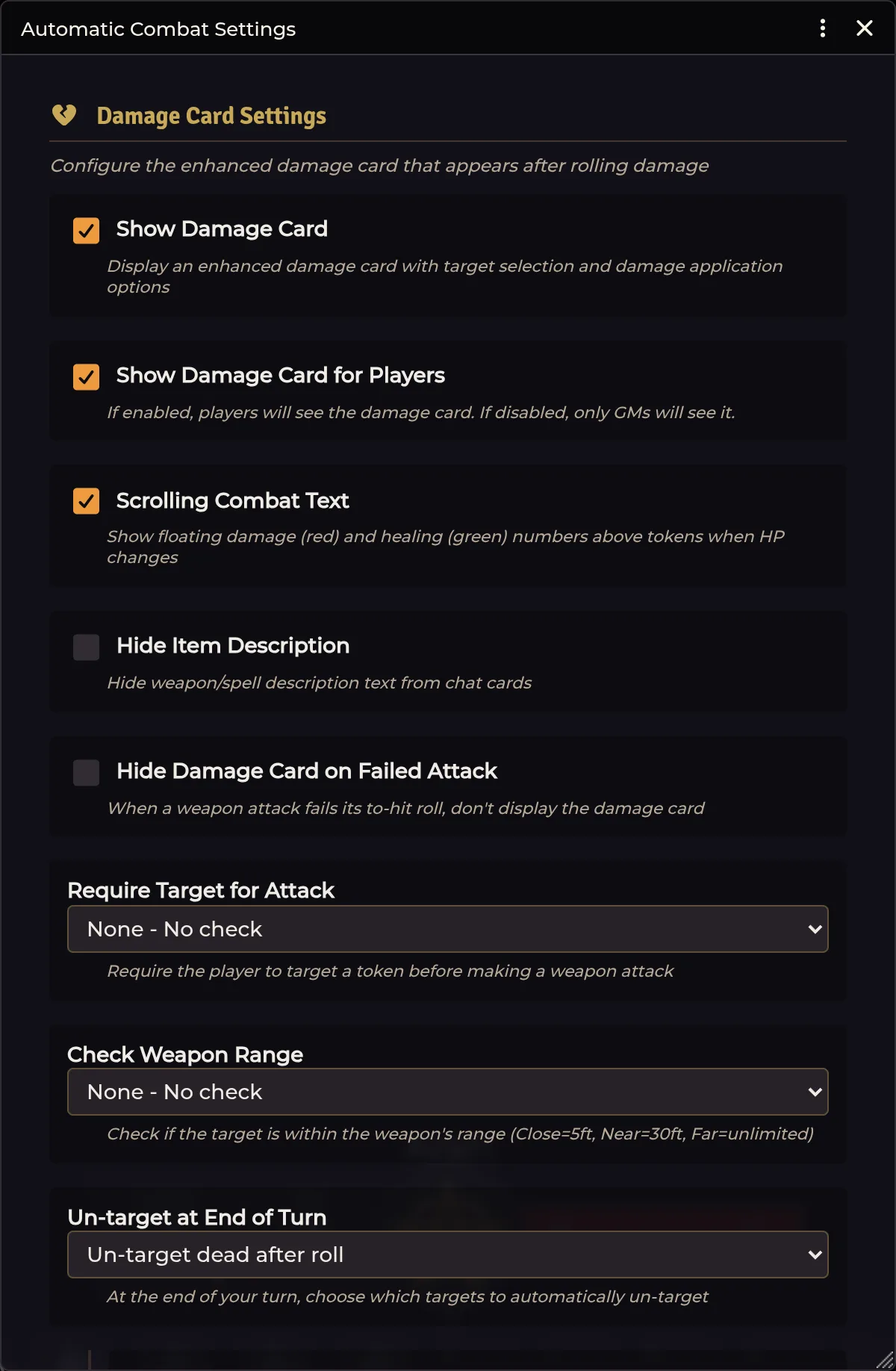
Open Configure Settings → Shadowdark Extras → Configure Combat Settings.
Out of the box the module leans automatic. Everyone sees the enhanced card, successful damage and configured conditions apply themselves, and SDX asks nothing about targets or weapon range.
For a table that wants confirmation first:
- Turn Auto-Apply Damage off.
- Turn Auto-Apply Conditions off if effects should also wait for approval.
- Optionally enable GM Only Apply Damage.
- Leave target and range checks on Warn until you've verified your item ranges and scene scale. Block can wait.
After a recognized damage roll, the card can display the targeted tokens, the damage total broken into typed components, multiplier buttons, an Apply button, and any configured effects or conditions. Your settings decide who sees what.
The default multiplier row runs 0, ¼, ½, 1, and 2, plus the card's clear control. That covers immunity, resistance, normal damage, and vulnerability without anybody editing HP by hand.
Scrolling combat text floats the final damage or healing result over the affected token.
SDX reads the user's current targets and, where the card supports it, selected tokens. Target ownership and actor permission still apply. When a player's change crosses an ownership boundary, it gets relayed to the GM.
The Require Target for Attack choices:
| Mode | Behavior |
|---|---|
| None | Roll normally with no SDX target check |
| Warn | Notify the user but allow the attack |
| Block | Prevent the attack until a target exists |
Check Weapon Range offers the same three modes. SDX's quick reading of Shadowdark distances:
| Shadowdark range | Distance |
|---|---|
| Close | 5 ft |
| Near | 30 ft |
| Far | Not capped by this check |
Your scene grid scale and token positions both have to be right for the result to mean anything.
At the end of the workflow SDX can keep every target, release the dead ones, or release all of them. The default is dead.
Configured item damage carries a physical or elemental tag. The extended item sheets offer bludgeoning, slashing, piercing, and generic physical, plus fire, cold, lightning, acid, poison, necrotic, radiant, psychic, and force. Healing is there too, on item types that support it.
Typed components are processed separately, so an actor's resistance, immunity, or vulnerability lands on the correct portion of a mixed roll.
Open a Weapon item and use the SDX Bonuses interface for behavior that belongs to that specific weapon.
Each entry holds a flat number or a formula such as 2 or
@abilities.dex.mod, along with any requirements. Two flags shape how it
behaves: Exclusive suppresses other applicable entries, and Prompt puts
the decision in the roll dialog for the user to make.
Damage entries use the same formula and requirement model, and each one can carry its own damage type. Promptable entries get chosen during the workflow.
Turn on Exploding damage dice (Momentum) to make this weapon's damage dice explode: a die that rolls its maximum is rolled again and the new result added. It covers the weapon's base damage, the damage bonuses configured on this tab, and the critical extra dice.
This toggle sits beside Enable Weapon Bonuses and works independently of it, so a weapon that only wants exploding damage does not have to switch on the hit, damage, and critical bonus machinery it is not using. Both still live under Weapon Bonuses in the Feature Manager, so switching that feature off stops momentum along with everything else on the tab.
This is a per-weapon override of the Shadowdark system's world-wide Momentum Mode setting. The weapon explodes even when that setting is off, which is what building a single custom exploding weapon needs.
A formula that already explodes is left alone, so writing 1d6x into a bonus
yourself doesn't collect a second explode modifier.
When Momentum Mode is on world-wide, the system explodes the main damage roll itself and SDX leaves that roll alone rather than adding a second explode modifier on top. Note that the stock Shadowdark system explodes only the first die of that formula, so a bonus die folded into it does not explode from the world setting alone. That is a known system-side limitation, and this toggle does not attempt to fix it.
Damage bonuses that SDX rolls separately never pass through the system's roll pipeline at all, so they always follow this weapon's own toggle, whatever the world setting is. With Momentum Mode on and this toggle on, that means the main roll follows the system's rules while the separately rolled bonuses follow yours.
Configure extra dice, a formula, or both, contributing only on a critical hit. Leave normal weapon damage in the Shadowdark system fields and use the SDX critical fields purely for the extra component.
Drag effects or conditions into the weapon's on-hit configuration. On a successful hit SDX applies them to the valid target set, respecting whatever the combat setting says about automatic condition application.
Bonus requirements can inspect combat context: target name, ancestry, creature type, current HP or HP percentage, and conditions or effects. Comparison operators cover equals, contains, starts with, and not-equal.
Target Ancestry applies to player characters only. Monsters have no ancestry, so it always resolves empty against them, and a requirement like "ancestry contains Undead" is not the way to write a bonus against undead. Use Target Creature Type for that. Ancestry itself reads every shape Shadowdark has stored it in: a 4.x document UUID, a bare name, or a pre-4.x object.
Target Creature Type offers a dropdown of your configured types rather than free text that had to match exactly. Its checks read the NPC's manual SDX type when one is set, then fall back to the bundled bestiary name map. See NPCs & Effects.
Test one requirement at a time before you start combining them. A bonus that never shows up is almost always failing one of its requirements. Saving is rarely the culprit.
Weapons can fire a stored item macro at seven points in the workflow: before attack, hit, critical hit, miss, critical miss, equip, and unequip.
Run as GM covers actions that need elevated permissions. The macro receives
the caster and the workflow context. In current versions token is consistently
a Token placeable, so reach for token.document when you need TokenDocument
fields or updates.
Run-as-GM cannot conjure a token placeable for a scene the GM client isn't rendering. Cross-scene targets get dropped with a warning. No silent substitution.
SDX supplies an NPC Attack item sheet covering attack count, to-hit value, damage formula and type, Shadowdark range choices, and description and source tabs.
NPC Feature, NPC Spell, and NPC Special Attack sheets add Activity and Macro configuration for creature abilities that need the same automation concepts as player spells.
| Setting | Default |
|---|---|
| Show card / show to players | on / on |
| Auto-apply damage / conditions | on / on |
| GM-only Apply | off |
| Target requirement / range check | none / none |
| Hide on failed attack | off |
| Scrolling combat text | on |
| Untarget | dead targets |
Damage was applied twice. Look for a second damage automation module and switch off one of the auto-apply paths. Check too whether an item macro is applying damage on top of its configured SDX damage. The system's own apply-damage buttons are no longer a cause: SDX fades them once it has applied the damage, and a stray click raises Shadowdark's reapply confirmation rather than landing the damage again.
Bonus never appears. Strip its requirements, then add them back one at a time. Verify the target carries the SDX creature type you expected.
A bonus "vs Undead" never fires. It is almost certainly written as an ancestry requirement. Ancestry is a player-character field, so it is empty on every monster. Rewrite it as Target Creature Type.
Damage cards throw on old messages. Update SDX. Current versions treat a chat message whose author has been deleted from the world as "not the current user" instead of failing to read the missing author.
Block mode rejects a valid ranged attack. Confirm the item range and the scene grid scale. Switch to Warn if your house distances don't map onto Close/Near.
Apply button is visible but a player cannot change the target. The target is probably unowned, with no active GM around to authorize the change.
NPC attack count is missing. Update SDX. Current builds coerce Shadowdark
4.x's numeric attack.num before enriching the display.
Related: Spell Automation · NPCs & Effects · Animation FX