Inventory and Trading
SDX extends the Shadowdark inventory with containers, identification, visual rules, multi-selection, player transfers, party storage, and quick coin tools.
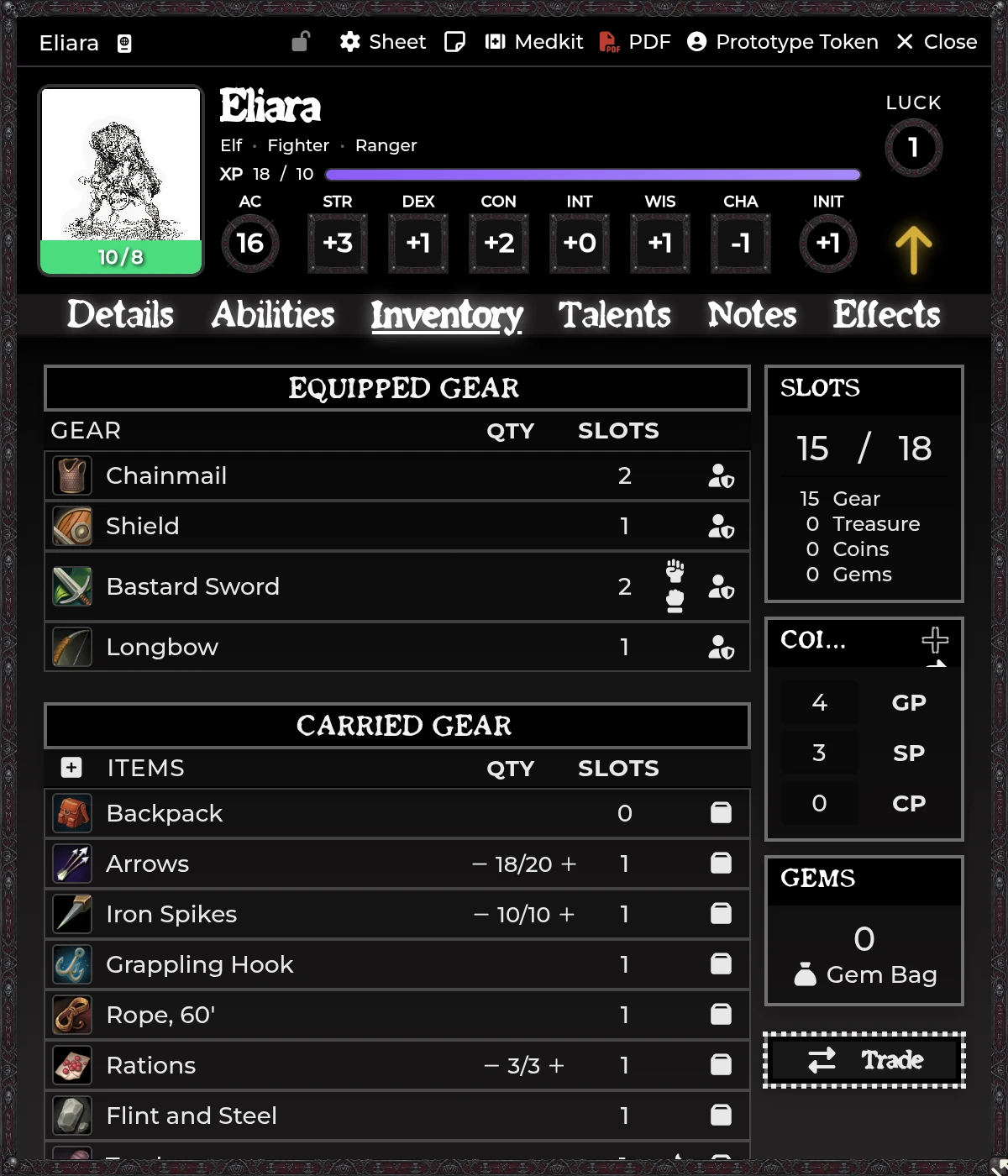
Containers, trading, or styling missing? Toggled in Feature Manager → Advanced & Hidden Features → Inventory — 9 toggles from Ammunition per User through Player Transfers.
Mark an owned item Is Container and it can hold other items belonging to the same actor, plus its own coins.
- Open the container, or expand its inventory row.
- Drag an owned item into the contents area.
- Use the remove control to send it back to the actor's top-level inventory.
The container displays its contents and total, while slot calculation on the actor follows whichever container behavior you configured.
Allow Nested Containers ships on. Turn it off if bags shouldn't go inside other bags. SDX rejects a nested drop outright rather than leaving you with a half-moved item.
Steer clear of circular structures. The UI is built to prevent invalid nesting, but flags edited by hand can still produce data the normal workflow would never create.
An item nobody owns yet can keep a packed contents list, ready for
distribution. Once an actor owns it, the normal same-actor container rules kick
in. Follow the UI's Ctrl hint when you're choosing copy versus move.
Items use Shadowdark 4.x's native identified state. A GM sets the identified/unidentified flag, the name players see while it's unidentified, and an unidentified description.
Players see the safe name and description until the item is identified, while GMs keep the true display throughout. The Identify spell and the related API use that same native state, which avoids a second identification flag fighting the first.
Gem items get a quantity field on their details tab, so five identical gems are one row rather than five.
The Gem Bag picks up a matching quantity column, and its total value counts each stack rather than each row. Sell prices follow the same corrected total.
With the feature on, Shift+Click and Ctrl+Click select inventory rows and
the bulk bar shows a running count. Delete asks for confirmation. Clear
selection backs out without touching a thing.
Check container contents before you bulk-delete a container. Bulk deletion is a real embedded-document delete, with nothing archived.
Open Configure Inventory Styles to set row appearance by category. The shipped categories cover magical, unidentified, container, Weapon, Armor, Scroll, and the remaining item types.
Each category carries a priority, so a row matching several rules has one deterministic winner. Configure backgrounds and gradients, text and description colors, and shadows. The editor pushes a live preview into open Player, NPC, and Party sheets.
SDX adds transfer and trade actions to owned character inventories.
Choose Transfer to Player, pick a recipient actor, confirm. The item leaves the source and lands on the recipient once the authoritative operation succeeds.
Coin transfer lets the sender split GP, SP, and CP. SDX checks the source actually holds the requested denomination before committing.
Trade with Player opens a two-party exchange covering items and coins, with accept and decline confirmation and socket-backed updates across clients.
An active GM may be needed when ownership or document permissions block a direct client update.
Flagged Party actors are valid item and coin destinations. Transfer from a Player into the Party treasury or inventory, hand a Party item to a chosen member, or divide Party coins evenly among eligible players.
Party treasury coins live in Party data of their own, off to the side from the
NPC's normal system.coins. Use the Party sheet or the transfer workflow
instead of poking at the underlying NPC fields.
The Player sheet's + coin button takes positive or negative adjustments. It's built for GM awards and quick corrections. Anything you want audited should go through a trade.
Ranged weapons that could draw on more than one owned ammunition item prompt for which to consume, and remember the preferred choice. See Character Sheets.
With Item Piles installed, three things need reconciling and SDX handles them.
Shadowdark hides an unidentified item's real name in system.identification.name
and shows a generic label instead. SDX adds that field to Item Piles' similarity
comparison, so two different unidentified potions stay two items rather than
merging into one stack.
Weapons and Armor land in a pile unequipped. Equipped state belongs to a character, not to a heap of loot on the floor.
SDX item configuration survives the move. Foundry and Shadowdark both build a new Item by copying a chosen subset of fields, and neither copies module flags, so spell damage, targeting, summoning, item-give, macros, aura and template effects, and unidentified state would otherwise be dropped in transit. The same preservation covers compendium drops and the scroll-to-spell Learn Spell path.
The module cooperates with Shadowdark's normal inventory and light-source behavior. Use the scene and tray map tools for decorative props, and remember that a decorative Tile is no substitute for a transfer when the player needs to own the actual Item.
Transfer target list is empty. The source actor is excluded by design, Player targets need an owner, and only valid Party actors get added as group destinations.
Transfer waits forever. Confirm socketlib is active and a GM is connected.
Player can see the true item. Check the native identified state, then log in as the player to test. A GM's own sheet shows the true item by design, so testing from there proves nothing either way.
Item disappeared inside a bag. Open the container and use its remove control. Check parent containers too if nesting is enabled.
Style is wrong for a magical container. Compare the category priorities in the Inventory Styles editor.
An item lost its SDX configuration after moving. Check that Item Piles Compatibility is enabled in the Feature Manager. It is what carries module flags across item creation, and without it a configured spell or macro item arrives stripped.
Two unidentified items merged into one stack. Same toggle. Item Piles compares the public name, which Shadowdark makes generic for anything unidentified.
Related: Character Sheets · The SDX Tray & Party Tools · Compendium Packs