Repository navigation
Help proclaim
Proclaim (CWM Proclaim) is a Joomla component for managing and displaying Bible studies, sermons, and related media. It provides a complete solution for churches and ministries to organize, publish, and share their teaching content online.
Proclaim supports multi-campus deployments through its location system, GDPR-aware analytics, AI-assisted content creation, and deep integration with popular media platforms.
From the Joomla Administrator: Components → Proclaim
This opens the Control Panel, which provides quick links to all Proclaim sections.
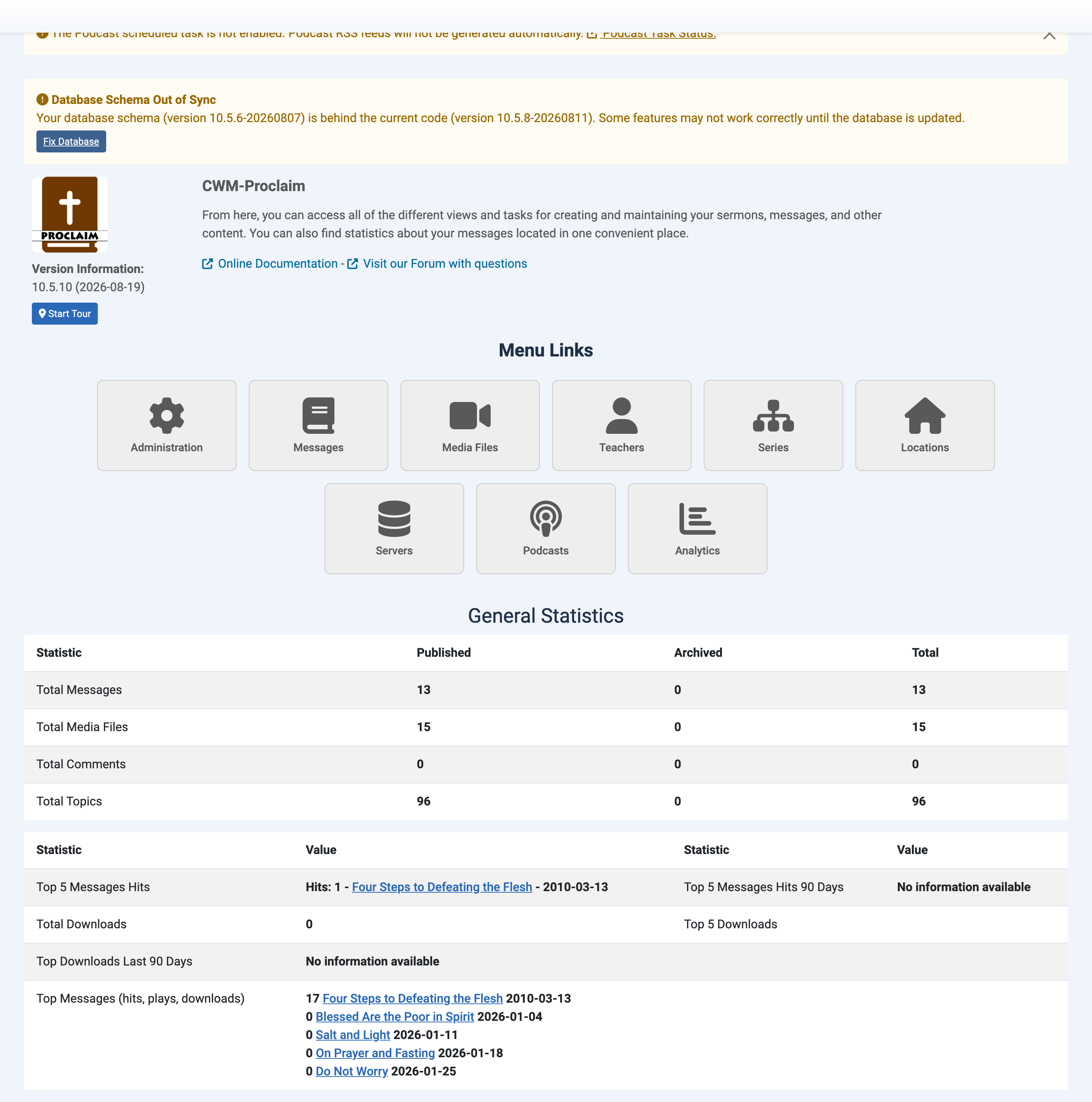
- Messages — The core entity. Each message represents a sermon or Bible study with title, date, scripture references, introduction, full text, and associated media files.
- Teachers — Manage speaker profiles with biographies, contact details, social media links, and images. A message can have multiple teachers.
- Series — Group related messages into sermon series with descriptions and images.
- Topics — Tag-based classification system for organizing messages by subject matter. AI-assisted topic suggestions are available when an AI provider is configured.
- Locations — Multi-campus location system. Assign messages, series, servers, and podcasts to specific locations. Non-admin users only see content for their authorized locations.
- Message Types — Categorize messages by format (e.g., sermon, devotional, panel discussion).
- Comments — Visitor comments on messages (can be enabled/disabled per message).
- Media Files — Attach audio, video, and document files to messages. Each media file is linked to a server that defines how it is hosted and played.
- Servers — Define media hosting platforms. Proclaim includes 15 server addons: Local, YouTube, Vimeo, Facebook, Wistia, SoundCloud, Resi, Rumble, Dailymotion, Embed Code, Direct Link, Legacy, Article (Joomla articles), VirtueMart, and DOCman.
- YouTube Sync — Automatically sync metadata from YouTube videos. Includes API quota tracking and a health dashboard.
- Podcasts — Generate podcast RSS feeds from your messages for distribution to Apple Podcasts, Spotify, and other platforms.
- Templates — Control how messages, teachers, series, and landing pages are displayed on the frontend using a visual Layout Editor.
- Template Codes — Advanced PHP template files using placeholder tokens for pixel-perfect control.
- Layout Editor — A drag-and-drop visual editor for arranging display elements. Supports 7 contexts: message lists, message details, teacher lists, teacher details, series lists, series details, and landing pages.
- Admin Center — Central hub for database maintenance, backups, asset verification, analytics, CSV import, and YouTube status monitoring.
- Analytics Dashboard — Chart.js-powered dashboard showing message views, media plays, downloads, and engagement trends. Supports GDPR opt-out and printable reports.
- CSV Import — Bulk import messages from CSV files with 15 supported fields and automatic entity creation.
- Install the Proclaim component package through Joomla's Extension Manager.
- Navigate to Components → Proclaim to open the Control Panel.
- Visit Administration to run the database check and verify assets.
- Create at least one Teacher and one Server (Local server is fine to start).
- Create a Message, assign a teacher, and optionally add media files.
- Create a Template or use Simple Mode to control frontend display.
- Create a Joomla menu item pointing to a Proclaim view.
| I want to… | Go to |
|---|---|
| Set Proclaim up from scratch | Guide-Publish-Your-First-Message |
| Get it onto my website | Guide-Show-Proclaim-on-Your-Site |
| Add audio and video | Guide-Add-Audio-and-Video |
| Start a podcast | Guide-Set-Up-Podcasting |
| Change how it looks | Guide-Control-How-Proclaim-Looks |
| Import old content | Guide-Import-and-Migrate |
| Keep it healthy | Guide-Maintain-Your-Site |
System Requirements
| Requirement | Minimum Version |
|---|---|
| Joomla | 5.1.0+ (also runs natively on Joomla 6) |
| PHP | 8.3.0+ |
- Enable Simple Mode in component options for a quick setup without customizing templates.
- Use the Location system for multi-campus deployments — assign access levels to each campus and Proclaim automatically filters content per user.
- The Analytics Dashboard is GDPR-aware — visitors can opt out of tracking.
- Run Database Check from the Admin Center after upgrades to ensure all tables are current.
- Help-admin — Admin Center
- Help-messages — Messages list view
- Help-servers — Servers list view
- Help-templates — Templates list view