Repository navigation
Help series
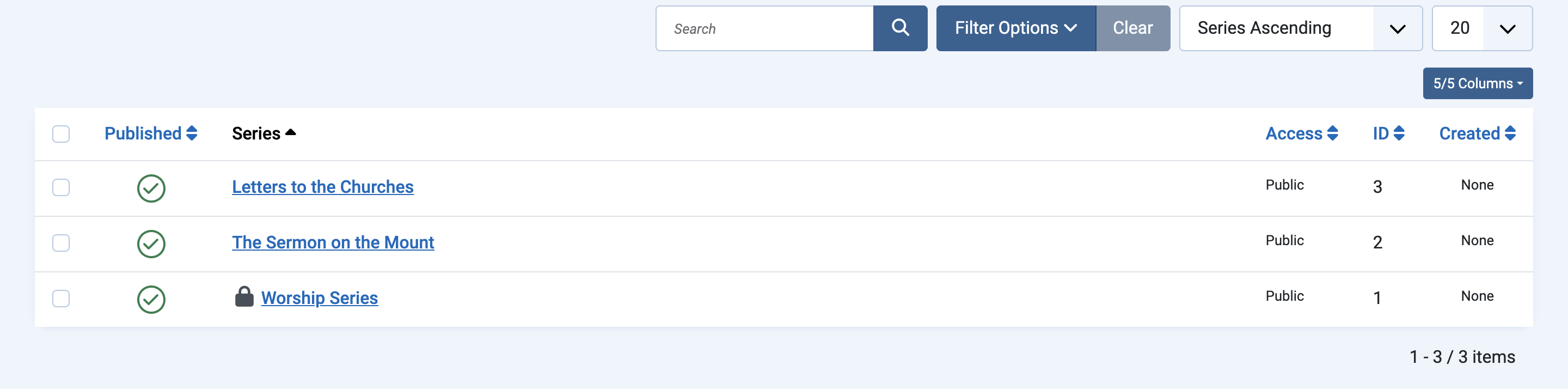
The Series list view displays all sermon series in Proclaim. Series group related messages together for organized browsing.
Components → Proclaim → Series
| I want to… | Go to |
|---|---|
| Group messages into a series | Add a series |
| Fix the order within a series | Get the order right |
| Look up a column or filter | Screen Reference |
- Select New.
- Enter the series title and a description.
- Add an image if you want one on series listings.
- Save & Close.
- Open each message that belongs to it and set its Series.
Full detail: Help-serie
Series order comes from each message's Message Number, not from this list.
- Leave Message Number blank and Proclaim assigns the next one.
- Set it explicitly when a series was preached out of order.
Tip
A series does not need a teacher of its own. Leave it blank when several people preached in the same series.
Toolbar
| Button | Action |
|---|---|
| New | Opens a blank series form |
| Actions | Dropdown: Publish, Unpublish, Archive, Check In, Trash, Batch |
| Help | Opens this help page |
Columns
| Column | Description |
|---|---|
| Checkbox | Select items for batch operations |
| Ordering | Drag-drop handle for manual ordering |
| Status | Publication status icon |
| Series Title | Name of the series (click to edit) |
| Teacher | Default teacher assigned to the series |
| Access | Joomla view access level |
| Language | Language assignment |
| ID | Unique database identifier |
Filters
| Filter | Description |
|---|---|
| Search | Free-text search by series title |
| Status | Published, Unpublished, Archived, Trashed, or All |
| Access | Filter by view access level |
| Location | Filter by location (multi-campus) |
| Language | Filter by language |
Batch Operations
| Option | Description |
|---|---|
| Language | Change language assignment |
| Access Level | Change view access level |
| Location | Assign to a different location |
- Help-serie — Series edit form
- Help-messages — Messages list (series appears as a filter)