Repository navigation
User Tools
The Tools panel contains tools to quickly animate the model. Each tool is available only if the model creator enabled it (see Tools Options).
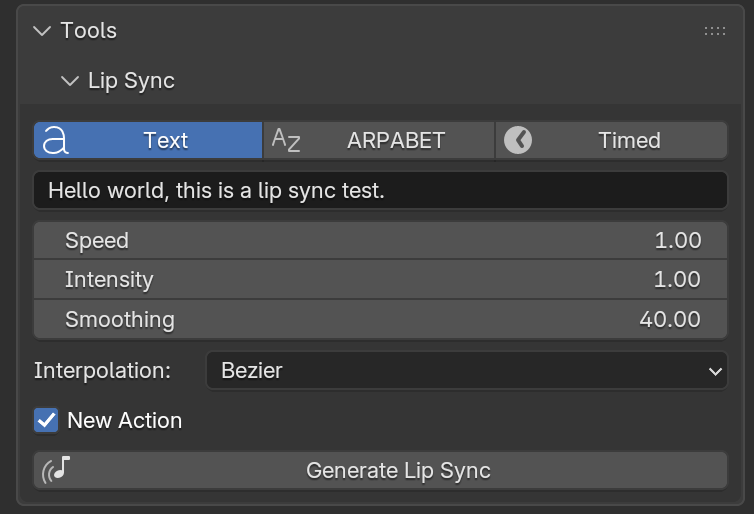
Creates a viseme lip sync animation for the model mouth.
- Choose the Input:
- Text — English text, converted to phonemes with the CMU Pronouncing Dictionary.
-
ARPABET — ARPABET phonemes separated by spaces (e.g.
HH AH L OW); stress digits are ignored. -
Timed — a Text datablock with one
label start endline per segment, in seconds. The label is a viseme or an ARPABET phoneme, e.g. from a forced aligner. Use it to sync the mouth to a recorded voice.
- Adjust the settings:
- Speed — speech speed (not used with Timed input).
- Intensity — multiplier on the viseme peaks.
- Smoothing — smoothing window in ms: higher values give a softer mouth, lower values crisper consonants (0 disables it).
- Interpolation — Bezier or Linear keyframes.
- New Action — replace the current Action with a new one, named after the text. Other keyframes in the current Action (e.g. Auto Blink) will not play anymore. If disabled, the viseme keyframes are replaced in the current Action.
- Click Generate Lip Sync. The animation starts at the current frame.
Note
Timing is in seconds, so the animation does not depend on the frame rate of the scene.
Animates a bone controlling the breath. Select one bone: its unlocked transformations are animated, with a rest value of 1 and a maximum value of 2. Frequency, amplitude and randomness of the breath can be adjusted.
Animates the blink of the eyelids, using a random generator. The blink length and rate (blinks per minute) can be adjusted.
Shrinkwraps the lip bones to a selected Object (e.g. a glass or another character). An additional Object (or the same) can be used to add a friction effect on the lips. Click Apply to add the constraints, and the X button to remove them.