Connectors and FLOW
A hosted machine still has to reach the world: ore has to get in, ingots have to come out. Workbay does that with Connectors instead of pipes, and shows you the result on the FLOW map.
A Connector is a small plate you stick on any chest, tank or machine out in the world. It is the endpoint a bay talks to.
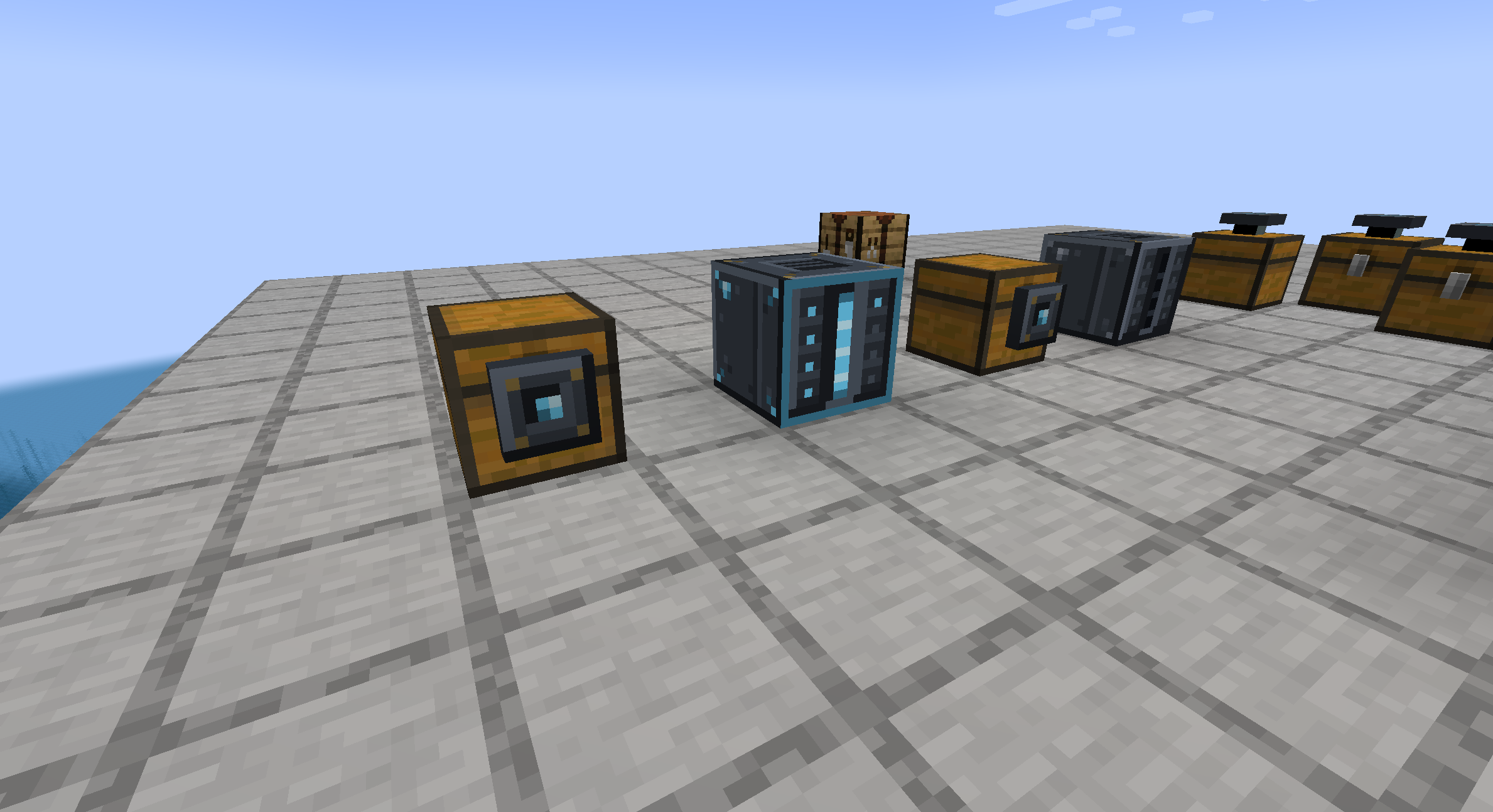
That is the whole network above ground: one block, and the chests it feeds. Everything else is inside.
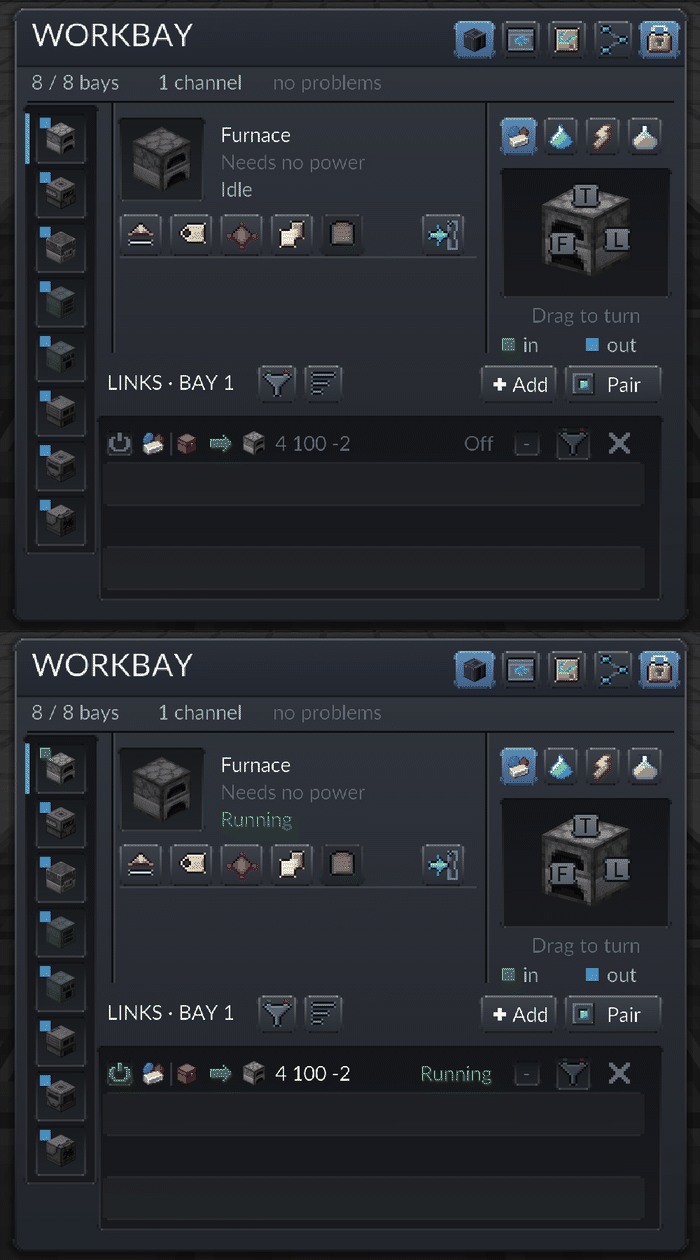
To wire one up:
- Craft Connectors and hold them. Right-click the Workbay with the stack - that is the whole pairing gesture, and it pairs everything in your hand at once. (The Pair button on the screen does the same thing for a Connector in either hand, which is useful when the screen is already open.)
- Then place a paired Connector against the chest, tank or machine you want reached. Its tooltip names the network it belongs to.
- Open the bay that should use it, press Add, tick the Connector, and switch the new row on. A new channel always starts switched off.
Pair before you place, and pairing is not per bay. A Connector belongs to a network, not to a bay - one plate can carry a channel on every bay at once, and which bays use it is decided in step 3. Place an unpaired Connector and it tells you so and sits inactive; right-clicking a Connector that is already down opens its rename panel and nothing else, so you have to break it and pair it in hand.
What a Connector is called. An unnamed Connector takes the name of the block it stands on - Chest, Rotary Condensentrator - and that one name is used on every row and in the Add list. When two unnamed ones stand on the same kind of block, their place leads the name, 47 7 · Chest, so a row cut short still tells them apart; hover a row for where any Connector stands. A link into one of your rooms is named by the room. To name one yourself, rename it in an anvil before placing it, or right-click the placed Connector with an empty hand; an empty name goes back to the block's.
No cable is run at any point. Distance inside one dimension costs nothing. A link whose two ends are in different dimensions needs the Resonator upgrade - without one the row reads Needs a Resonator - though links into your own bays and rooms never do.
The screen calls each row a channel: one bay, one Connector, one resource. A channel and a link are the same thing; the screen says channel, FLOW and this wiki say link.
| Carries | Needs | Notes |
|---|---|---|
| Items | - | Filter by item; drag one in from JEI or EMI. |
| Fluids | - | Tanks and fluid-handling machines. |
| Energy | - | One channel per bay, like items. Nothing to filter. Hosted machines do not share power. |
| Chemicals | Mekanism | Appears only when Mekanism is installed. |
Every channel has four dials:
- Direction - which way the contents move between the bay and the Connector.
- Filter - what is allowed through. Drag an ingredient in from JEI or EMI.
- Rate - how much moves per step.
- Speed - ticks between steps, from a fixed list: 10, 20, 40, 60, 100, 200.
An Impeller doubles what every link moves in a step and halves the wait between steps: four times the throughput, and two may be fitted, for sixteen.
A network holds at most 64 links.
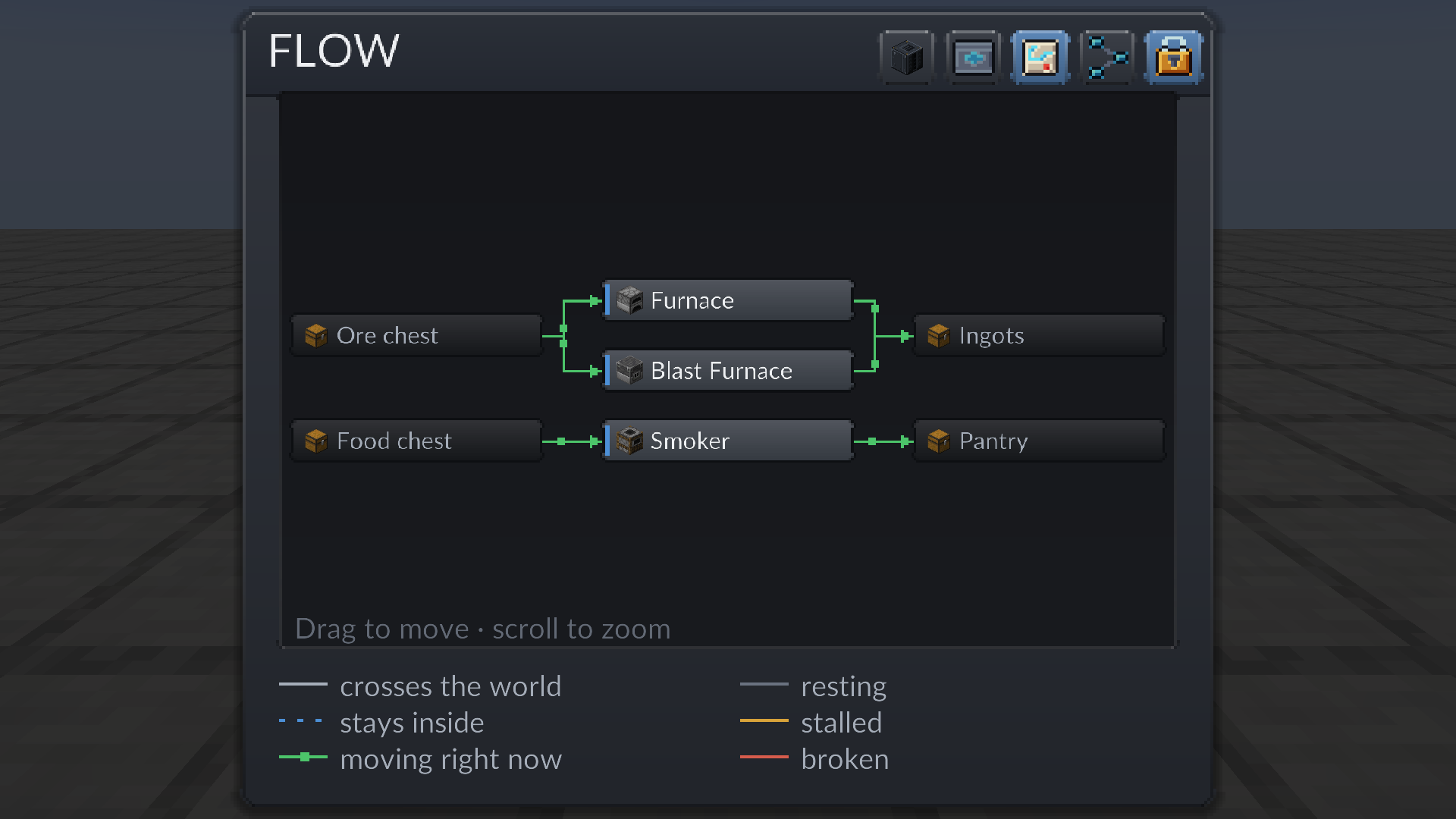
FLOW draws every link that has a machine on both ends: a box per endpoint, one arrow per pair of boxes, resource and direction; three links from one chest into one furnace are one arrow, and arrows of one resource from different boxes join before the box they enter. Drag to move, scroll to zoom. A link parked off its bay, or pointing at an empty bay, is not on the map - the LINKS list is where those live.
The example above reads left to right - an ore chest feeds a Furnace and a Blast Furnace, both feed an ingot chest, and a food chest feeds a Smoker that fills a pantry. The ore chest reaches the Furnace through three links, one per ore, drawn as one arrow; the food chest reaches the Smoker through two.
Shape and colour say different things.
Shape
| Shape | Meaning |
|---|---|
| Solid | An ordinary link, to a Connector anywhere - including one you placed inside a Room. |
| Blue dashed | A bay-to-bay link, with no Connector at all. A dashed link stays blue whatever it is doing. |
Colour, on solid links
| Colour | Meaning |
|---|---|
| Green, with pips walking along it | Moving right now. This is what a healthy link looks like. |
| Pale grey | Resting. Nothing to move, or a target that is simply full. Normal. |
| Dark grey | Switched off, held by the bay's redstone mode, or taken off its bay. |
| Amber | Needs you: the target's chunk is unloaded, the target or the machine offers no port on a usable face, no face is set for that direction, the link needs a Resonator, or there is no power. |
| Red | Broken. The Connector was destroyed, or the dimension it pointed into is gone. |

Note that a full target is grey, not amber. Amber means something needs a decision from you; a chest with no room in it is just resting until there is.
Every packet the mod sends is bounded and validated on the server, and a menu is budgeted to 80 actions per five ticks, so a network cannot be used to hammer a server. The Workbay registry is written on every change and never throws while loading: anything a build cannot read is carried forward rather than dropped. The one hard stop is a save written by a newer build - the file is kept untouched and nothing in it is reachable until you update the mod.
Next: Rooms and Networks and Locking.

 Playing
 Running a server
 Developing
 Help
Help