Home
Welcome to OpenHPSDR Zeus — a web-based client for HPSDR (Protocol 1) radios such as the Hermes Lite 2, ANAN, and other original-protocol boards. This wiki is a user-facing tour of every control you will find in the OpenHPSDR Zeus interface. It does not cover build or protocol internals.
If you are new to OpenHPSDR Zeus, start at Installation, then Getting Started.
- Voyeur Mode · Net Monitor — an unattended net secretary that records, transcribes, and rosters a whole net on your own machine, with a local-AI "what was discussed" summary. Ships as an optional plugin (Settings → Plugins).
- Smoother tuning — the panadapter now glides to the new centre instead of jumping in steps.
- CW Decoder — received Morse decoded to on-screen text in real time, plus a redesigned Telegraph Console.
- Raspberry Pi (arm64) — official 64-bit ARM builds; run the backend on a Pi 4/5.
- WAV Recorder — a reel-to-reel tape deck for RX/TX audio.
- Cleaner transmit — PureSignal and the transmit path reach desktop-grade quality (see PureSignal).
- macOS — signed builds now prompt for and use the microphone correctly; Windows multi-NIC machines discover the radio reliably.
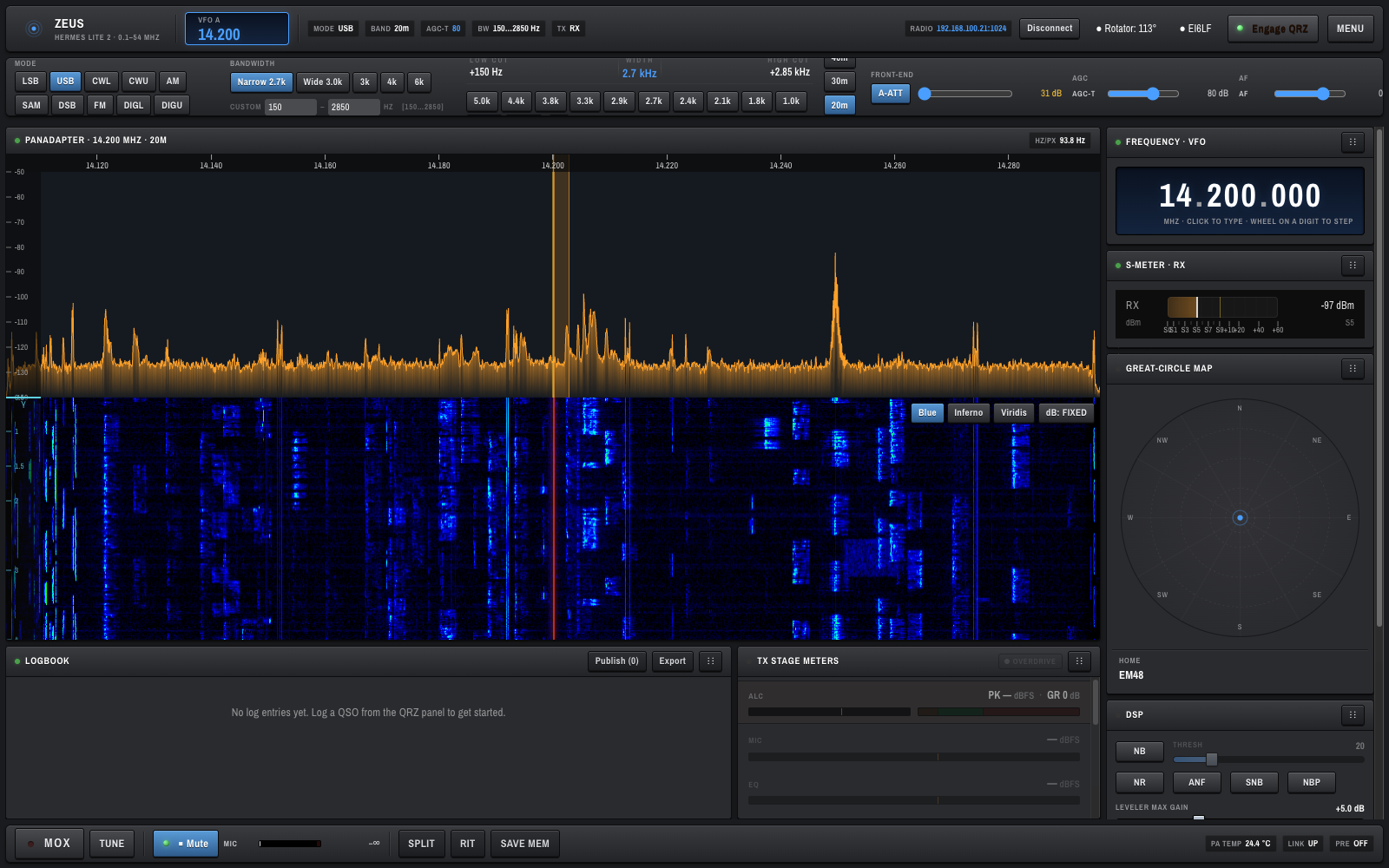
The OpenHPSDR Zeus window is organised top-to-bottom into seven main areas:
- Top bar — radio title, VFO A, live status chips, connect/disconnect, rotator, and QRZ controls.
- Control strip — mode, band, bandwidth presets, front-end, AGC, zoom, drive, and mic.
- Bandwidth visualizer — low/high cut sliders over a spectrum preview, with preset bandwidths.
- Hero panel — panadapter, waterfall, and (when QRZ is engaged) the great-circle world map.
- Right-side stack — frequency (VFO) display, S-meter, QRZ lookup card, DSP controls, CW keyer.
- Bottom row — logbook and TX stage meters.
- Transport bar — MOX, TUNE, audio mute, mic level, and status chips.
- Installation — installers, PWA install, macOS xattr step
- Getting Started
- Mobile — the simple "get on the air" PWA on your phone
- Top Bar and Status
- Keyboard Shortcuts and Mouse Gestures
- Modes and Bands
- Bandwidth and Filters
- Front-End and Gain
- Frequency and VFO
- Panadapter and Waterfall
- DSP Noise Controls
- TX Controls
- Meters
- CW Keyer
- PureSignal — adaptive predistortion on HL2 (internal coupler) and ANAN G2 / G2 MkII / Saturn (external coupler)
- TX Audio Tools — 10-band CFC for voice shaping
- PA Settings — power calibration (Rated PA Output + per-band PA Gain)
- Troubleshooting — known quirks, missing native libraries, WDSP wisdom
- Developer Guide — build from source, dev loop, project layout, tests
OpenHPSDR Zeus is designed to feel familiar to operators coming from Thetis. Sensible defaults are chosen where possible (for example, AGC-T at 80 dB, 2.7 kHz SSB filter, band-memory per band). If a default surprises you, please open an issue — don't assume it is wrong for everyone, but we do want to hear about it.
Issues, bug reports, and ideas are welcome at the OpenHPSDR Zeus issue tracker. The project is maintained by Brian (EI6LF) and Doug (KB2UKA).