Modes and Bands
Mode and band selection sit in the control strip just below the top bar. On mobile they collapse to drop-downs.
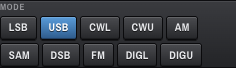
Click any of these to change the RX (and, where applicable, TX) mode. The active button is highlighted in --accent blue.
| Button | Mode |
|---|---|
| LSB | Lower sideband voice |
| USB | Upper sideband voice |
| CWL | CW, lower-sideband offset |
| CWU | CW, upper-sideband offset |
| AM | Amplitude modulation |
| SAM | Synchronous AM |
| DSB | Double sideband |
| FM | Frequency modulation |
| DIGL | Digital modes on lower sideband (e.g. FT8 on 40m) |
| DIGU | Digital modes on upper sideband (e.g. FT8 on 20m) |
Mode is a global state — it is not stored per band by itself. What is stored per band is the (frequency, mode) pair you were last using on that band; jumping to a band restores both. So your "20 m USB" and "40 m LSB" memories survive separately, but switching mode without changing band just changes the live mode.
Switching mode updates:
- the passband shape (symmetric for AM/SAM/DSB/FM, asymmetric for SSB/DIG/CW),
- the list of preset bandwidths offered in the BANDWIDTH block (see Bandwidth and Filters),
- the top-bar MODE chip.

Click a band to jump to it. OpenHPSDR Zeus keeps a band memory per button — the last VFO frequency and mode are saved on the server (with a 500 ms debounce) and restored on return.
| Button | Band |
|---|---|
| 160m | 1.8–2.0 MHz |
| 80m | 3.5–4.0 MHz |
| 60m | channelised 5 MHz (region-dependent) |
| 40m | 7.0–7.3 MHz |
| 30m | 10.1–10.15 MHz |
| 20m | 14.0–14.35 MHz |
| 17m | 18.068–18.168 MHz |
| 15m | 21.0–21.45 MHz |
| 12m | 24.890–24.990 MHz |
| 10m | 28.0–29.7 MHz |
The Hermes Lite 2 covers 0.1–54 MHz, so 6 m hardware is in scope, but the HF strip in the UI currently stops at 10 m. 6 m and other VHF support is on the roadmap.
If you have never used a band before, OpenHPSDR Zeus puts you on the band's default centre. After that it remembers where you tuned to last.
On narrow screens the two rows of buttons become compact drop-down menus.