Meters
OpenHPSDR Zeus shows three separate meter surfaces and an Overdrive LED. Which ones are visible depends on whether you are receiving or transmitting.
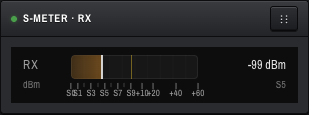
Lives in the S-METER · RX panel on the right column.
- Scale: -127 dBm (S0) → -13 dBm (S9+60), a 114 dB span.
- S-unit ladder labels at
S0 · S1 · S3 · S5 · S7 · S9 · +10 · +20 · +40 · +60. Each S-unit is 6 dB. - Numeric read-out on the right shows the live value in dBm, e.g.
-99 dBmand the matching S-unit (e.g.S5). - Peak-hold tick rises instantly and decays linearly to zero over 1500 ms.
- The data source is post-AGC — the meter reflects what the AGC actually delivered, not the raw RF.
While MOX or TUNE is active the S-Meter panel switches to transmit mode:
- Power — forward watts (linear scale, 0–100 W typical on Hermes Lite 2; configurable).
-
SWR chip — colour-coded:
- Default: under 2.0
- Amber: 2.0 – 3.0
- Red: 3.0 and above (consider retuning)
- MIC chip — current mic level in dBFS, hidden on RX.
When you return to RX the display flips back to the S-meter immediately.
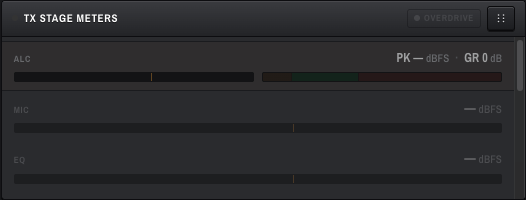
A separate panel along the bottom row, to the right of the logbook. Nine taps along the WDSP TX chain (TXA), in chain order:
| Meter | What it shows |
|---|---|
| ALC (top, prominent pair) | Post-ALC peak (dBFS) and ALC gain reduction (dB). The marquee TX clipping indicator. |
| MIC | Post-panel-gain mic level entering WDSP TXA (TXA_MIC_PK). |
| EQ | Post-equaliser peak. Bypassed by default — renders dimmed until enabled. |
| LVLR | Post-Leveler peak. Same as EQ while the Leveler is disabled. |
| CFC | Continuous-Frequency-Compressor peak + gain reduction. Bypassed by default. |
| COMP | Post-compressor peak. Bypassed by default. |
| ALC (second row) | Post-ALC peak — the key clipping indicator for SSB distortion. |
| ALC GR | ALC gain reduction. Sustained values over 10 dB mean the input is over-driving the limiter. |
| OUT | Final TX peak — what's leaving WDSP for the radio's DUC. |
-
Level bars (dBFS) — scale
-30 dB to +12 dB. Target tick at-6 dBFS(amber). Danger tick at0 dBFS(clipping). -
Gain-reduction bars (CFC, ALC GR) — scale
0 – 25 dB. Background zones tint the bar:- 0 – 3 dB — quiet (amber wash)
- 3 – 10 dB — healthy (green wash)
- 10+ dB — overdrive (red wash) Danger tick at 10 dB.
- Peak-hold — held value rendered as a 2 px amber tick. Decays at half-scale-per-second.
-
Bypass sentinel — WDSP returns
-400 dBFSwhen a stage is bypassed. The client treats anything below-200 dBFSas bypassed and renders an em-dash (—) instead of a bar, plus dims the row to ~55 % opacity.
Each meter row carries a tooltip explaining what it taps and what to watch for.
A compact mic-level meter sits in the bottom transport bar, just right of the Mute button.
- Scale:
-60 to 0 dBFS. - The top few dB are tinted red — peaks living there are clipping.
- Hovering shows a tooltip breaking down the raw input + MIC-gain slider contribution.
A small indicator in the TX Stage Meters header.
- Green / clear — nothing tripped recently.
-
Red — at least one of these triggered in the last ~200 ms:
- Mic clipping (≥ -1 dBFS)
- ALC limiting (> 10 dB GR)
- CFC limiting (> 10 dB GR)
Hover the LED for a tooltip listing which condition tripped.
The logbook and TX stage meters are hidden on narrow screens to keep the panadapter readable. The S-meter and mic meter remain visible.